How SpAIceRocks was made: connecting Claude, Midjourney and Udio in Unity
A source-based look at the actual Unity version, gameplay scripts, two background-removal tools and the limits of reuse. No Unity build or gameplay benchmark is claimed.
Last updated
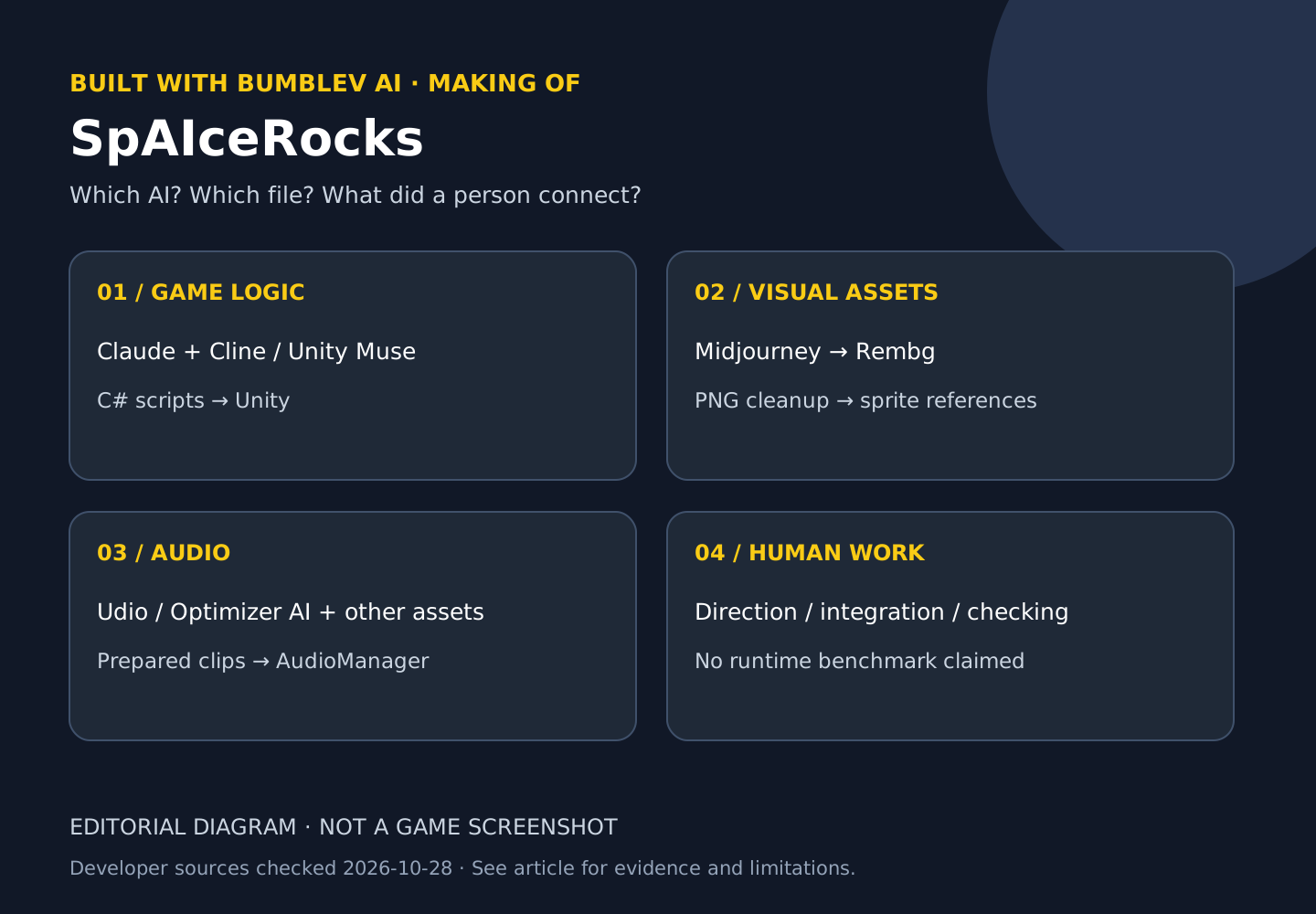
When someone says a game was made with AI, I want to understand the handoffs. How does a generated picture become a usable sprite? Where does the music enter the game? SpAIceRocks, a space-mining match-three puzzle by Chris Harden, exposes enough of its project to investigate those questions. Steam lists it as a free game released on January 20, 2025. This is an established production example selected for its disclosed process, not a claim of a new release or current search popularity. Steam
I read the public project settings and scripts at the commit below. I did not open the project in Unity, play the Steam build or purchase generation from any of its AI services. Reading a file establishes its contents, not which model authored every line or whether the project builds successfully today.
What the game does, and what its AI tools did
The player matches minerals, collects credits and uses tools to progress through mining areas. The store describes six planets and an expanding board. The documented production workflow is different from a game that calls Claude to generate each puzzle during play.
| Production task | Tools named by the creator | Evidence and remaining limits |
|---|---|---|
| Gameplay logic | Claude with the Cline extension for VS Code; Unity Muse | Public C# files and a package manifest; the exact Claude model and full prompt history remain unknown. |
| Artwork | Midjourney | Attributed by the creator; individual image prompts and generation versions are not established here. |
| Background removal | Rembg | Two Python scripts expose concrete input paths and output naming. |
| Music | Udio | A production attribution, not a verified total bill or current subscription offer. |
| Sound and effects | Optimizer AI, Freesound and Unity Particle Pack | The project also uses non-AI material, including Freesound resources and Particle Pack effects. |
The pinned README and Steam AI disclosure support this division. A broad claim such as “almost entirely AI-generated” does not remove the human work of directing, arranging files, integrating systems and testing.
The exact editor version is in the project
The inspected commit is 152c0e554d695da4f79df36847d13546bd770850. Its ProjectSettings/ProjectVersion.txt records 6000.0.24f1. That is the editor version associated with this source tree, not the current Steam executable’s build number and not evidence that it runs on every computer. Version file
The manifest includes com.unity.muse.chat 1.1.0-exp.5 and com.unity.muse.sprite 1.1.1. These are historical project dependencies. Their presence does not demonstrate that the same beta services, account access or interface remain available now. Blindly upgrading old dependencies can also change the environment being studied. Package manifest
Three files provide a useful reading map: Board.cs handles board generation, swaps and matches; GameManager.cs handles collection goals and planet progression; AudioManager.cs connects music and sound effects. Its AudioClip array and fields for swap and match sounds help explain the difference between playing prepared audio and calling a music generator continuously at runtime. Board · Game flow · Audio
The two background-removal scripts are not interchangeable
The root remove_sprite_background.py reads PNG files from Assets/Sprites/ and writes files with a transparent_ prefix in that directory. It skips names that already carry the prefix and outputs that already exist. The script under DesignsAndPipeline/ instead reads images/input relative to the working directory and writes categorized, numbered names into images/output. It accepts category arguments; without arguments, it displays help and exits. Root script · Categorization script
That seemingly small distinction matters. A generated picture still needs transparent edges, consistent dimensions and a dependable name before it can be managed as a game asset. It also needs the correct connection to a sprite or prefab. These scripts demonstrate a preparation step; they do not prove that every image was cleanly cut out or correctly integrated. I inspected their contents without executing background removal or downloading its model.
Try a source-reading exercise without buying an AI plan
The outcome is one local note called spaicerocks-pipeline-notes.md, not a rebuilt game. Reading these public GitHub files needs no AI subscription. Installing the Steam game is a separate task requiring Steam and a suitable machine.
- Open the pinned README and record its tool attributions. Do not mix that snapshot with a later
masterrevision. - Open
ProjectVersion.txt, record 6000.0.24f1, and label it “source project’s editor version.” - Open both background-removal scripts. Write their input directories and naming rules on separate lines.
- Read the three gameplay files named above and map each responsibility. The absence of an AI brand inside a script neither disproves the creator’s account nor measures how much was generated.
- Save a note using the complete example below. Close it, reopen it and check that the commit and source links survive.
Project: SpAIceRocks
Source commit: 152c0e554d695da4f79df36847d13546bd770850
Unity editor: 6000.0.24f1 — ProjectVersion.txt
Art path: Midjourney → Rembg → sprite files → Unity references
Root script: Assets/Sprites → transparent_*.png in the same directory
Categorization script: images/input → categorized numbered PNGs in images/output
Unknown: Claude model, full prompts, total cost, Steam build, runtime quality
Execution performed: none
The wildcard describes naming; it is not a generated output from this review. The exercise is complete when every factual row points to a real file and unknown fields remain visibly unknown. The README also links a creator video series. I have not watched that entire series or independently checked amounts shown in its billing screens.
Before opening or reusing the project
A publicly readable repository is not automatically permission to redistribute its code, pictures or music. I did not find a general project license at the root of the inspected tree, while an included font has a separate license file. Do not treat a download link as permission to publish a commercial derivative. Check the relevant rights for code and assets individually, and ask the creator where necessary. This article does not republish the project or its art.
For a future build attempt, keep an untouched copy and point Unity Hub at the project root rather than only Assets. The latter omits the settings and package context. Availability of the exact editor and resolution of old Muse dependencies have not been tested here. An import failure would need to be separated into editor mismatch, package resolution and missing references before attributing it to AI-generated code.
Assets/Editor/Cheats.cs defines test helpers under Tools/Cheats, including money and remaining-move adjustments. These are editor tools, not promised controls in the Steam release. They show another production concern: reaching a test condition without replaying the entire game. Their appearance in a running editor still needs verification. Editor helpers
What this example teaches, and what remains unmeasured
The useful lesson is the set of handoffs: generation, cleanup, naming, integration and checking. It gives a beginner more concrete questions than a list of AI brands. It does not establish a bug-free game, a faster production method or a lower total cost. The complete bill, prompt count, correction time and play quality remain unverified. A free Steam game does not mean the services used to produce it were free.
A meaningful comparison would use the same small match-three board and owned sprites for manual and AI-assisted implementations. It would check valid and invalid swaps, cascades and exhausted moves, then record implementation, correction, integration and retest time separately. Reopening the saved project should preserve references. Those are proposed completion criteria, not results obtained in this analysis.
For the other making-of articles, Angry Pumpkins follows iteration on a physics game, while Echoes of Somewhere follows an AI image into a navigable scene. Our earlier Project Zomboid article uses the same distinction between a developer’s account and directly observed work.
Unpack the production sequence one asset at a time
Imagine preparing one mineral picture for a puzzle board. Image generation produces a file. If that file contains an unwanted background, a removal step may be needed. Naming and size checks follow before the file is connected to the appropriate material in Unity. This example explains the documented tools and structure; we did not reproduce one of the original minerals from generation through gameplay.
A sprite is visual material used on screen. PNG support for transparency does not establish that a particular picture has clean edges. You would still inspect outlines, distinctions between minerals, and readability at the board’s small display size. An attractive large image may need further work to become a useful puzzle asset.
Find where code and materials meet
Board.cs describes board, swap, and matching responsibilities, but reading it alone does not expose every scene connection. Unity projects can combine values declared in code with materials assigned through the Editor. If a picture exists on disk but does not appear in a board, separate import, object references, and the active scene before generating a replacement.
AudioManager.cs illustrates the same distinction. Replaying a prepared AudioClip is different from requesting new music from an AI service during each play session. Swap effects, match effects, and background music have distinct roles. Hearing one would not verify all three. A real test should pair a specific action with the sound expected from it.
Reduce practice to one inspectable change
Before attempting the complete game, use your own picture and a smaller chain: receive a file, inspect its transparency, name it, find its use in a scene, and reopen the saved work. Do not distribute original game assets without verified permission. Record whether you reached preparation, import, connection, or execution rather than treating them as one completed task.
For the image service, start with the Midjourney introduction and first-background walkthrough. A background exercise is not a reproduction of the game’s sprites. For the engine, read Unity terminology and your first floor-and-cube scene to learn the relationship between files and visible objects.
For a separate Editor-integration course, continue to the MCP for Unity learning path. This does not establish that the game developer used this MCP.
Sources & further reading
- https://store.steampowered.com/app/3412990/SpAIceRocks/
- https://github.com/chrisaharden/SpAIceRocks/blob/152c0e554d695da4f79df36847d13546bd770850/README.md
- https://github.com/chrisaharden/SpAIceRocks/blob/152c0e554d695da4f79df36847d13546bd770850/ProjectSettings/ProjectVersion.txt
- https://github.com/chrisaharden/SpAIceRocks/blob/152c0e554d695da4f79df36847d13546bd770850/Packages/manifest.json
- https://github.com/chrisaharden/SpAIceRocks/blob/152c0e554d695da4f79df36847d13546bd770850/remove_sprite_background.py
- https://github.com/chrisaharden/SpAIceRocks/blob/152c0e554d695da4f79df36847d13546bd770850/DesignsAndPipeline/remove_sprite_background.py
- https://github.com/chrisaharden/SpAIceRocks/blob/152c0e554d695da4f79df36847d13546bd770850/Assets/Scripts/Board.cs
- https://github.com/chrisaharden/SpAIceRocks/blob/152c0e554d695da4f79df36847d13546bd770850/Assets/Scripts/GameManager.cs
- https://github.com/chrisaharden/SpAIceRocks/blob/152c0e554d695da4f79df36847d13546bd770850/Assets/Scripts/AudioManager.cs
- https://github.com/chrisaharden/SpAIceRocks/blob/152c0e554d695da4f79df36847d13546bd770850/Assets/Editor/Cheats.cs
- https://www.youtube.com/watch?v=xodknbWptZo&list=PLFUWlfd8IyFU_aLpT_mx_n4ktZFoeqfrJ