Project Zomboid 3D Mods, AI, and My Installation Experience
My October 3 installation experience, the evidence behind AI-assisted development, recent PZ3D and Viewpoint updates, and a practical ZombieBuddy setup guide.
Last updated
I am optimistic about the new wave of Project Zomboid 3D mods. They offer another way to enjoy a familiar game, and other creators are already building on top of them. Looking into how AI was actually used reveals several different development practices behind the broad label of vibe coding.
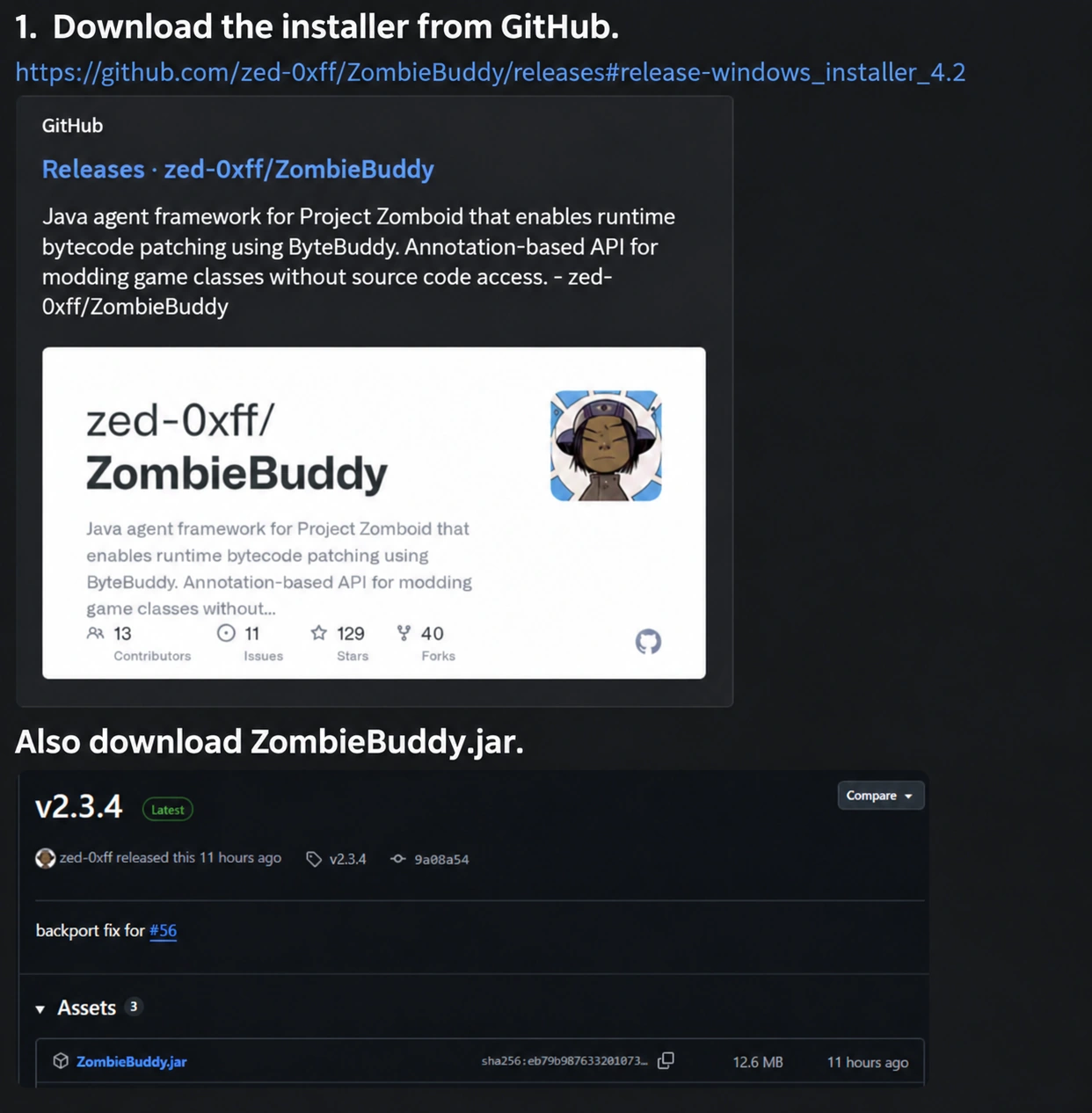
I installed and played with a 3D mod on October 3, 2026. A friend sent me installation instructions, which led me to GitHub to download the necessary ZombieBuddy files. The images below are edited versions of that guide, with clearer public-facing captions. I have also checked what changed over the following days and which instructions a new user should follow now.
Why I went to GitHub on October 3
The guide I followed shows Windows installer v4.2 alongside ZombieBuddy v2.3.4. It involved running the installer, replacing ZombieBuddy.jar in the game folder, and setting -agentlib:zbNative -- in Steam. Those version numbers refer to different things: the installer and the framework loaded by the game. The official Releases page lists them separately. 6
My experience needs a little clarification. I had to download separate files from GitHub; subscribing through the Workshop alone did not finish my setup. However, ZombieBuddy’s Workshop page records an original publication date of December 7, 2025. Saying that it was never listed on Steam would go beyond the evidence. I cannot establish why I could not access or use that route at the time. 7
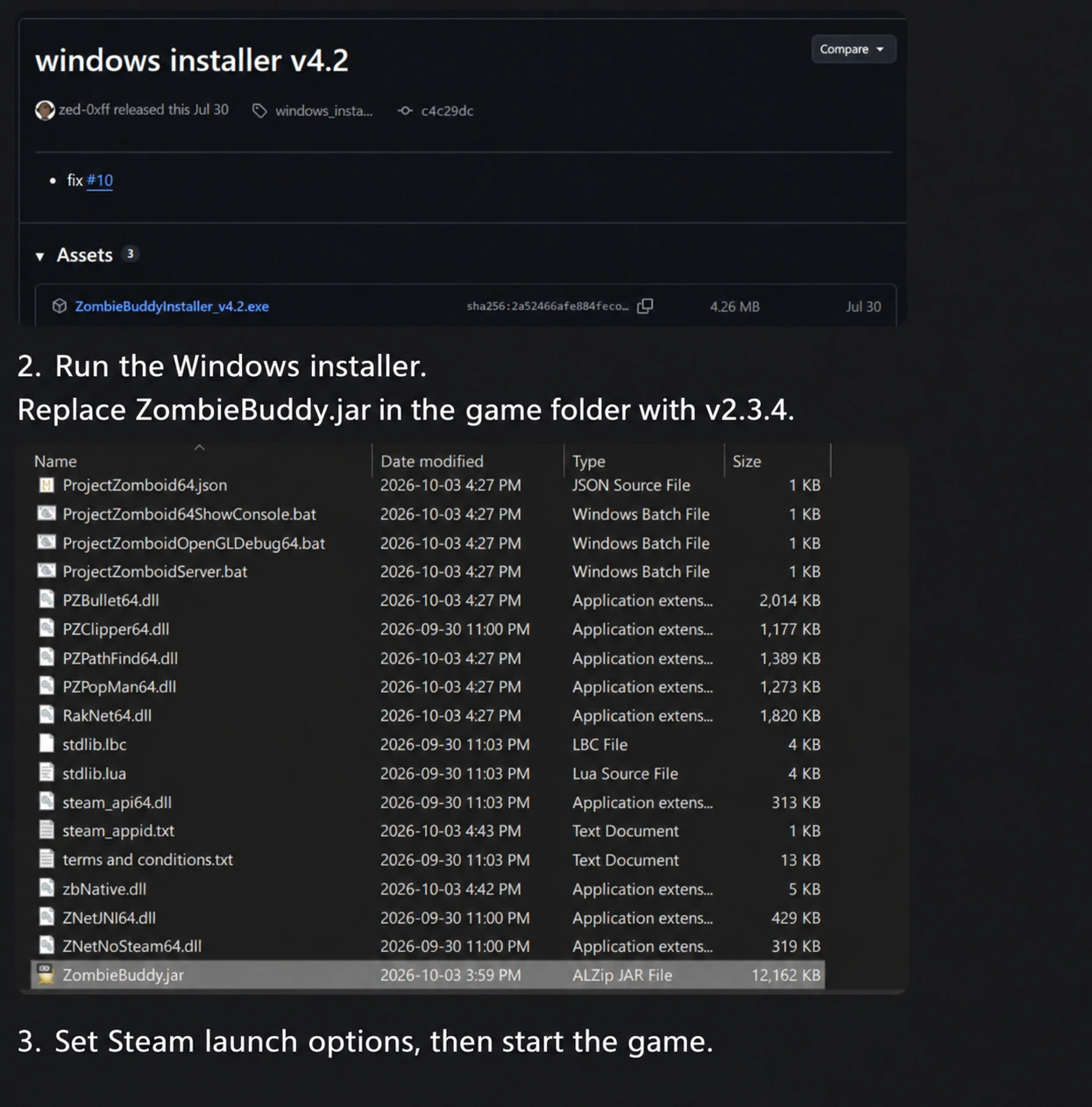
ZombieBuddy provides the underlying support that some mods need to load Java code and patch game behaviour at runtime. Subscribing to a Workshop item and connecting that framework to the game’s launch process are separate parts of setup. 18
Which mod does what
| Name | Role | Download |
|---|---|---|
| ZombieBuddy | Shared framework for advanced Java mods | Workshop · GitHub Releases |
| PZ3D | Brings the camera down toward the character and connects gameplay to that perspective | PZ3D |
| Project Viewpoint | First- and third-person perspectives using a custom rendering system | Project Viewpoint |
| 6244 3D models | Additional models for furniture, props and other objects | Viewpoint edition · PZ3D edition |
PZ3D and Project Viewpoint are separate projects. For an initial test, I suggest choosing one and checking it in its own configuration. Pick the matching model pack, too. The Viewpoint pack’s author specifies the order ZombieBuddy → Viewpoint → model pack. 2 3 4
What is actually confirmed about AI
Project Viewpoint developer ellu explained the team’s LLM use in comment 121 of the official discussion on October 12. The account describes collecting Discord bug reports through an API, classifying them with embeddings, using a React management interface, and having LLMs investigate reports against the code. It also describes unit tests, LLM-assisted end-to-end tests, human validation and volunteer testers. This is the developer’s account, rather than an independent code audit. 1
In the same reply, ellu rejects the claim that the entire engine is being vibe coded. AI assistance and delegating an entire project without understanding or checking the code are different claims. The reply does not establish a percentage of AI-written code or identify every tool used. 1
| Project or component | What its public explanation supports |
|---|---|
| Project Viewpoint | Developer-described LLM assistance in report investigation and testing; the developer disputes wholesale engine vibe coding. 1 |
| sour_kisel model packs | The author explicitly describes an AI-assisted process, manual corrections and community feedback. 4 17 |
| Shovel Graves addon | The author describes using Claude for vibe coding. That is a claim about this particular addon. 5 |
| PZ3D itself | The creator material I checked did not establish the scope or proportion of AI use. Other projects’ statements cannot answer that question for it. 2 |
Writing code with AI assistance and making visual assets with AI assistance also deserve separate descriptions. I appreciate creators explaining which tasks used AI and what a person reviewed or repaired. A rapid release schedule alone cannot prove how a project was made.
What changed during the recent week
I checked the creators’ change notes to put dates behind the impression of constant updates. These are the dates displayed by the Workshop; a reader in another time zone may see a date shifted by one day.
| Date | Version | Main changes |
|---|---|---|
| October 10 | PZ3D 0.7.0 | Multiplayer, interaction and settings changes; the separate PZ3D Loader was retired in favour of official ZombieBuddy 2.3.4 or later. 9 |
| October 11 | PZ3D 0.7.1 | Key-binding fixes, startup improvements and optimization. Reported speed gains are the creator’s claims, not measurements I repeated. 9 |
| October 12 | PZ3D 0.7.2 | Building details, curtains, interaction targeting, camera zoom and aiming-transition fixes. 9 |
| October 13 | PZ3D 0.7.3 | Rugs, wheel textures, lighting artifacts, menu colours and preparation of large model libraries. 9 |
| October 10 | Viewpoint alpha 0.1.6 | Gunplay, third-person and vehicle cameras, controller support, terrain, water and rain changes; experimental upscaling features including FSR 3, XeSS and DLSS. 10 |
Viewpoint’s performance improvements are release-note claims, not a guarantee for every PC. At the time of checking, its page also advised AMD users experiencing crashes to try the Medium preset. The feature list and stability on your own system need separate checks. 3 10
Installation guides are especially date-sensitive. PZ3D 0.6.0 introduced its own loader on October 1, while 0.7.0 returned to official ZombieBuddy on October 10. Follow the instructions for the version you are installing rather than combining old and new loader setups. 9
The growing addon ecosystem
One community Viewpoint collection contained 147 items when checked on October 14. That includes framework items and discontinued entries. It is not a count of mods released during the preceding week. Nevertheless, it shows work spreading across models, weather, cameras and interaction. 13
| Addon | What it adds | What to check |
|---|---|---|
| 6244 3D models | The author lists 6,244 models; the Viewpoint edition was updated October 13. 4 | Choose the matching edition. This does not mean every object is perfectly converted. |
| Viewpoint Rolling Hills | Published October 7 and updated October 13, with expanded hills and mountain scenery. 11 | Visual elevation is distinct from the underlying collision system; physics has separate addon instructions. |
| True Weathers & Lighting | Published October 5 and updated October 13, expanding weather and lighting. 12 | Check the current renderer, shader and weather-mod combination. |
| Shovel Graves | First-person grave and farming-furrow interaction. 5 | Its author describes single-player testing; current-version compatibility needs checking. |
Some patches have already finished their job. Third Person Camera’s author says to disable it with Viewpoint releases from October 10 onward. Fire Fix is no longer needed because Viewpoint 0.1.6 addresses fire rendering. Keeping a useful mod list now includes removing obsolete patches. 14 15
A Windows installation checklist for new users
This guide summarizes creator documentation checked on October 14. My own installation and play experience dates to October 3; I have not rerun the latest combination as a new performance test. I suggest backing up existing saves and configuration files, then starting with a separate test save.
- Match the game build. The featured mods target Build 42, and the model pack specifies 42.21.0. Check each page’s current supported version. 2 3 4
- Subscribe to the required Workshop items. Choose ZombieBuddy and either PZ3D or Project Viewpoint. Begin with the core configuration before adding numerous patches.
- Get the official installer. Open Assets on ZombieBuddy Releases. The pictured
ZombieBuddyInstaller_v4.2.exeis the installer;ZombieBuddy.jaris the framework. A Source code ZIP serves a different purpose. - Install with the game closed. Check the game directory and the launch mode shown by the installer: Normal Launch, Alternate Launch, or Both if you use both. Read the proposed changes. 7
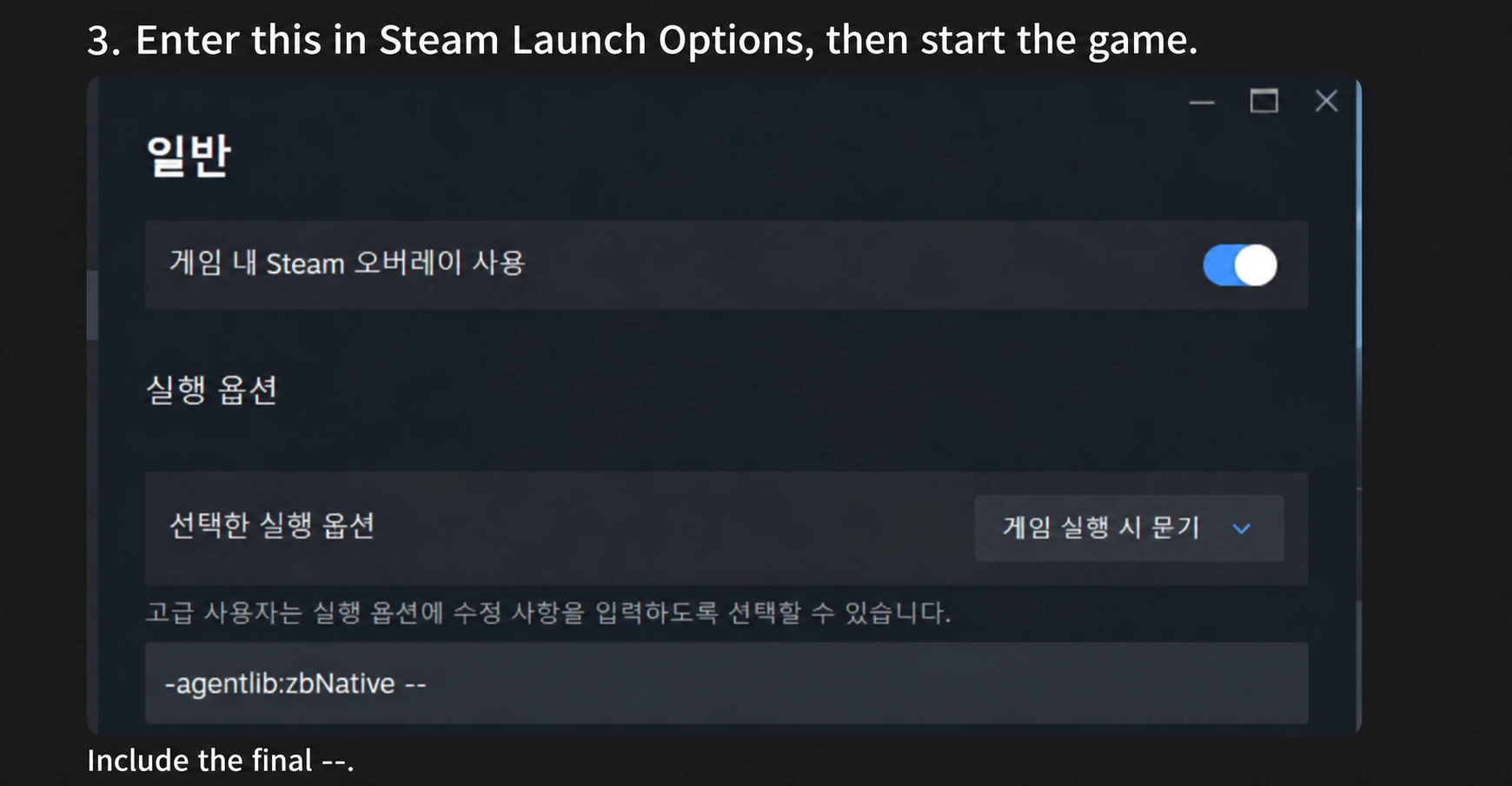
- Check launch options. In Steam, right-click the game, then open Properties → General → Launch Options. The Windows Normal Launch argument is
-agentlib:zbNative --. Include the final--; avoid duplicating an option the installer already set. 8 - Enable the mods in the game. Activate ZombieBuddy and your chosen 3D mod, restarting when needed. Check the mod and filename in Java approval prompts. ZombieBuddy’s loading indicator helps confirm it started. 7 8
- Add the matching model pack after the core works. For the Viewpoint edition, follow ZombieBuddy → Viewpoint → model pack. Check the mod configuration of an existing save as well. 4 17
- Adjust graphics and memory. PZ3D’s author advises allocating at least 6GB to the game. Leave memory for the rest of the system. I would begin with basic graphics settings and add effects gradually. 2
Manual setup and other launch modes
For manual Windows setup, copy ZombieBuddy.jar and zbNative.dll from the mod’s libs directory into the game directory. Typical paths are shown below; your Steam library location may differ. 8
Source folder example
C:\Program Files (x86)\Steam\steamapps\workshop\content\108600\3619862853\mods\ZombieBuddy\libs\

Game folder example
C:\Program Files (x86)\Steam\steamapps\common\ProjectZomboid\
Windows Alternate Launch also needs the BAT configuration; the installer’s corresponding option is the simpler route. On macOS and Linux, ZombieBuddy uses -javaagent:ZombieBuddy.jar --. Framework support does not establish support for every 3D mod: PZ3D was still asking macOS users to wait when I checked. 8 2
The two mods use different controls
| Action | PZ3D | Project Viewpoint |
|---|---|---|
| Toggle 3D perspective | Insert | O |
| Switch first and third person | Check the perspective options for your installed version | Shift + O |
| Settings | Game Options → Mods → pz3d | Delete |
| Cursor handling | Tap Tab for the overlay; hold it to use the cursor | Middle mouse button |
These are the creators’ documented defaults at the check date. Custom bindings and later updates may differ. 2 3
If an update breaks the setup
I would check the core version, disable discontinued patches, and test with ZombieBuddy plus one 3D mod. Then add the model pack and remaining addons in stages. Loading everything immediately makes a conflicting combination harder to identify.
An optimization addon can also become outdated. Viewpoint Turbo’s page names 0.1.5a-hotfix, and on October 13 its author said the new update disabled the addon and an update was needed. An old recommendation list should not automatically become today’s required setup. 16
For a crash report, include game and mod versions, GPU, preset and addon list. Viewpoint’s page requests Zomboid\console.txt with the relevant details. AMD users can begin with the Medium-preset advice on the main page. 3
Why I welcome this direction
What excites me is the possibility of more people contributing without one person having to finish everything. One creator builds the perspective framework; someone else improves a piece of furniture; another fixes an awkward first-person action. If AI helps with investigation, production or repetitive work, more people may be able to test their ideas.
As someone who uses AI to make apps and websites, I value the step from an idea to something people can actually use. A small working result makes the next improvement easier to identify and gives other people something concrete to respond to. I welcome a community trying things, playing them and refining them.
The developer’s explanation of using AI for bug investigation and testing particularly interests me. Development includes finding out where users are getting stuck. Reducing that overhead could leave a small team more time to repair the problems. That is a possibility I infer from the described process, not a measurement of how much AI accelerated these releases.
Some players will prefer the new perspectives; others will keep the original isometric view. I like having more options. An experiment that makes someone want to reopen a familiar game can be a worthwhile contribution to its modding community.
Fast development needs lasting maintenance
I am also concerned about whether compatibility work and maintenance can keep pace with new features. Previously useful patches have become unnecessary, and an optimization addon targeting an older version has stopped working with a new one. Players need to know what to disable as well as what to download.
I would not automatically blame those problems on AI. I care about whether the maintainer understands the code, can repair it, explains supported versions and provides a way to recover from problems. Clear change notes and compatibility guidance make a project easier for me to trust.
ZombieBuddy’s Java mods can access files outside the game. Its documentation describes approval prompts for new or changed JARs. A prompt is not a substitute for a security review, so check the source and the mod being approved. These permissions alone do not demonstrate that a particular mod contains malware. 7 8
As AI-assisted creation grows, I would like more ordinary, specific explanations of where AI was used and what people checked. Credit for the people contributing code and models matters too. That gives both enthusiastic and cautious readers a basis for their decisions.
I want to see how these mods develop visually, and whether they remain straightforward to launch after updates. Having tried the installation on October 3, I welcome the direction and look forward to choosing the next feature to try myself.
Hands-on installation and play: October 3, 2026. Sources checked: October 14, 2026. The guide images were supplied by a friend and their editorial captions were edited and translated; they are not a new test of the latest version combination.
Sources & further reading
- https://steamcommunity.com/workshop/filedetails/discussion/3809306528/586188069723463487/?ctp=9#c586188528590854460
- https://steamcommunity.com/sharedfiles/filedetails/?id=3807334881
- https://steamcommunity.com/sharedfiles/filedetails/?id=3809306528
- https://steamcommunity.com/sharedfiles/filedetails/?id=3810302175
- https://steamcommunity.com/sharedfiles/filedetails/?id=3812198995
- https://github.com/zed-0xff/ZombieBuddy/releases
- https://steamcommunity.com/sharedfiles/filedetails/?id=3619862853
- https://github.com/zed-0xff/ZombieBuddy/blob/master/doc/Installation.md
- https://steamcommunity.com/sharedfiles/filedetails/changelog/3807334881
- https://steamcommunity.com/sharedfiles/filedetails/changelog/3809306528
- https://steamcommunity.com/sharedfiles/filedetails/?id=3815630947
- https://steamcommunity.com/sharedfiles/filedetails/?id=3813908957
- https://steamcommunity.com/workshop/filedetails/?id=3812839109
- https://steamcommunity.com/sharedfiles/filedetails/?id=3811587776
- https://steamcommunity.com/sharedfiles/filedetails/?id=3811495292
- https://steamcommunity.com/sharedfiles/filedetails/?id=3812559973
- https://steamcommunity.com/sharedfiles/filedetails/?id=3810051489
- https://github.com/zed-0xff/ZombieBuddy
- https://pz3d.dev/install/