VectorCraft: what it does and what to check first
An app icon needs to be recognisable on a phone and still look clean when enlarged in a presentation.
Last updated
Menus and supported features can change. Compare the source-check date below with your current app version.
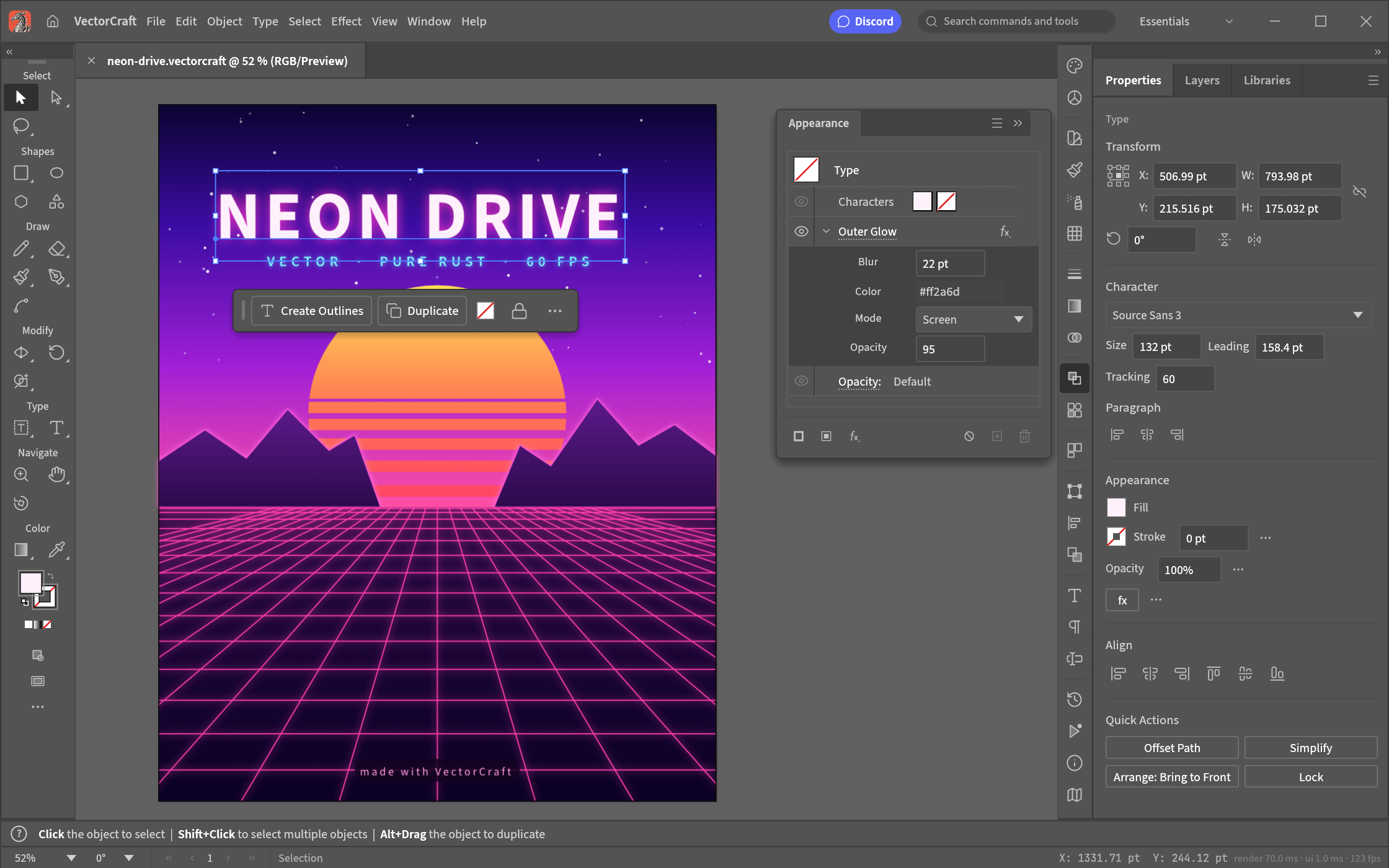
An app icon needs to be recognisable on a phone and still look clean when enlarged in a presentation. VectorCraft is a vector editor for that sort of icon, logo or poster. Vector paths keep an editable outline rather than just a grid of pixels. I would begin with a circle and a rectangle, then look at what survives export before trying to move an existing Illustrator job.
The checked material describes alpha / in development. I have read the public documentation; I have not installed and run this app for a hands-on review.
A look at the screen
| Where to look | What it does |
|---|---|
| Artboard | Define the area you will export. |
| Shapes and Direct Selection | Build the large outline, then refine points and curve handles. |
| Appearance and Properties | Check fills, strokes, lettering and effects. |
What the documentation describes
- Use the Pen tool and Direct Selection to edit the anchor points and handles of Bézier curves.
- Arrange and combine shapes on artboards, with gradients, clipping and text.
- Work with SVG, PDF and the native document format, with CLI and MCP paths for connecting repeatable production tasks.
What interests me beside Illustrator
The native working document is .vectorcraft, while SVG and PDF provide exchange routes. That makes a new SVG a different starting point from inheriting a client’s .ai file. Command-based production is interesting, but I have not measured how much manual work it removes. A working export does not establish that Illustrator’s editable structure has been preserved.
The developer describes free, open-source, local work. Open source means the code is available to inspect. I have not measured a speed or total-cost advantage. For Illustrator, check the official product and plan information for the terms that apply in your region.
The limitation I would check first
The README describes limitations in retaining Illustrator editing data. SVG support should not be read as full .ai compatibility. Fonts, letter spacing, curves, clipping and gradients need checking after a round trip. A file can look correct as a preview while losing the structure you need to make the next change.
A small first task
For the first exercise, let’s build an app icon from simple shapes. Prepare: A simple icon made from a rectangle and a circle. Start without text or elaborate effects so the outline is easy to check.
Check the official app page and release downloads for a build matching your operating system and CPU. If there is no suitable installer or the app does not start, read Get started/Quick start and known issues in the official README. Record the app version and OS when you try the task.
The separate tutorial gives the menu sequence and an expected result. It is a documentation-based exercise, not a claim that I completed it. AI-assisted development, an app’s built-in AI features and an agent operating existing functions need to be distinguished when judging an automation claim.
Keep the working file and the delivery file
A PNG is a pixel preview; it does not preserve editable curve handles. Keep the native vector document for revision and a separate SVG for exchange. For the SVG, check font dependencies, gradients and clipping in the recipient’s actual app. Save a separate working copy before an important combine/subtract operation so there is a clear version to return to.
If the result differs
If the exported outline looks different, separate the path itself from stroke thickness and clipping. If text changes, check font availability and letter spacing. For .ai exchange, use the real delivery file and record which layers and effects remain editable. A successful simple icon does not resolve that separate compatibility question.
What I would verify before a bigger job
- Export the same SVG curves, clipping and gradients from both apps.
- Use the same font and letter spacing, then inspect SVG/PDF layout.
- Use a real .ai file and record lost editing data and the remaining editable range.
Creating a new SVG can start with a small shape exercise. Continuing a client’s Illustrator document needs a real-file test first. Check both the visual result and whether one anchor point can still be edited after reopening; those are two different completion criteria.
When delivering the same icon at several sizes, distinguish document coordinates from exported image dimensions. Outer padding changes how the icon sits in a real interface. Establish a recognisable small outline first, and specify the editable document and the delivery file separately when exploring command-based production.
Introduction · Task tutorial · Comparison: documented differences
Sources & further reading
- https://getartcraft.com/apps/vectorcraft
- https://github.com/storytold/vectorcraft/blob/main/README.md
- https://www.adobe.com/products/illustrator.html
- https://github.com/storytold/vectorcraft/blob/a06717777828867557d759c674283304f63c04ae/README.md
- https://github.com/storytold/vectorcraft/blob/a06717777828867557d759c674283304f63c04ae/crates/ui-egui/src/menus.rs