FigCraft: what it does and what to check first
A mobile card can look tidy with a short heading and break as soon as the real wording gets longer.
Last updated
Menus and supported features can change. Compare the source-check date below with your current app version.
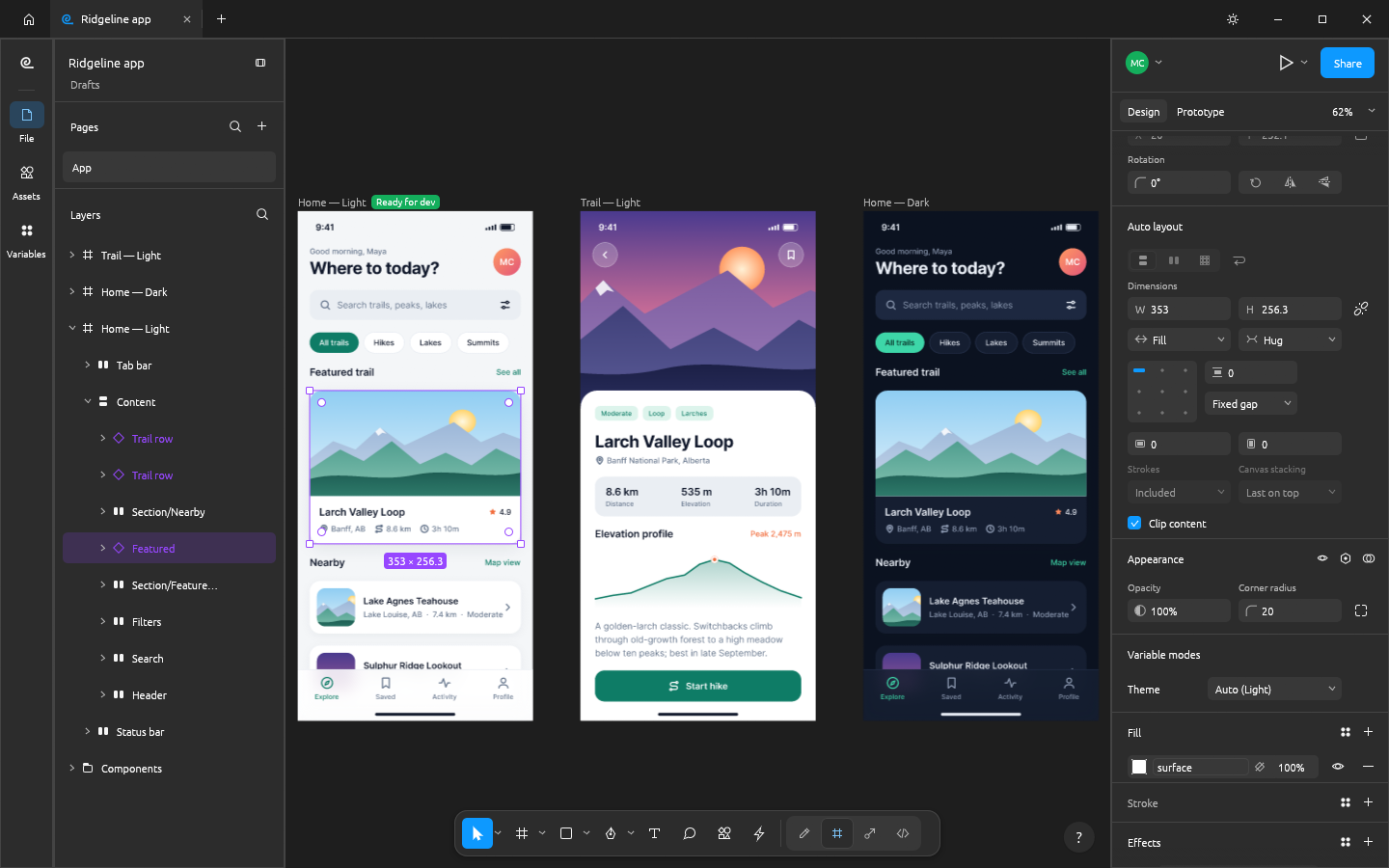
A mobile card can look tidy with a short heading and break as soon as the real wording gets longer. FigCraft is a UI design app with frames, components and layout rules. I would start with a template, change the text and deliberately try a longer title. That is a more useful first question than whether a screenshot resembles Figma.
The checked material describes early alpha. I have read the public documentation; I have not installed and run this app for a hands-on review.
A look at the screen
| Where to look | What it does |
|---|---|
| Layers | See how cards, buttons and text are grouped. |
| Design and Auto layout | Inspect padding, gaps and size rules. |
| Prototype | Connect a click action to its destination frame. |
What the documentation describes
- Work with frames, components, Auto layout, variables and prototypes; Auto layout adjusts arrangement as content or element sizes change.
- Start from templates and use documented image/vector/document output such as PNG, SVG and PDF.
- The project describes a separate collaboration server and its own WebAssembly plug-in architecture.
What interests me beside Figma
Local screen design and agent control are the interesting parts for me. FigCraft’s separate collaboration server and WebAssembly plug-ins are not Figma’s hosted account, team and cloud service. Do not assume existing Figma plug-ins, team permissions or a design system can simply be brought across unchanged.
The developer describes free, open-source, local work. Open source means the code is available to inspect. I have not measured a speed or total-cost advantage. For Figma, check the official product and plan information for the terms that apply in your region.
The limitation I would check first
The README calls .fig import best effort rather than complete preservation. Collaboration is an early preview. Variables, components and prototype connections need a real-file check, and permissions/reconnection are separate from drawing a single screen. A local file that opens does not establish that the entire team workflow transferred.
A small first task
For the first exercise, let’s make a mobile home screen from a template. Prepare: A mobile-app template, a short heading, button wording and two cards. Include a longer Korean string if that is what the eventual interface will use.
Check the official app page and release downloads for a build matching your operating system and CPU. If there is no suitable installer or the app does not start, read Get started/Quick start and known issues in the official README. Record the app version and OS when you try the task.
The separate tutorial gives the menu sequence and an expected result. It is a documentation-based exercise, not a claim that I completed it. AI-assisted development, an app’s built-in AI features and an agent operating existing functions need to be distinguished when judging an automation claim.
Keep the working file and the delivery file
The editable design holds layout rules and reusable objects; the PNG only shows the rendered screen. Reopen the document and change a card heading again. Confirm that padding and grouping still work and that the prototype leads to the intended frame. A screenshot cannot demonstrate that a component or variable remains editable.
If the result differs
For clipped wording, inspect the text-box size and card height first. Adjust padding and spacing one at a time. If a button opens the wrong screen, inspect the On click → Navigate target. Figma plug-ins, team permissions and collaboration reconnection are separate compatibility issues, not something a successful template edit resolves.
What I would verify before a bigger job
- Use identical long Korean wording and compare Auto layout and component sizes.
- Check simultaneous edits, undo and reconnection with two editors.
- Record missing variables, components and prototype links in the same .fig file.
A local home screen is a manageable first test. Transferring a team design system requires checking .fig variables, components and prototype links, plus the collaboration and permission model. Two screenshots cannot establish concurrent editing, undo behaviour or successful recovery after a disconnected editor reconnects.
Judge the screen with real wording, not just short placeholder text. A component that handles a long Korean title may need different size rules from a fixed decorative card. If testing collaboration later, use two editors and record simultaneous changes, undo and reconnection separately from the exported image.
Introduction · Task tutorial · Comparison: documented differences
Sources & further reading
- https://getartcraft.com/apps/figcraft
- https://github.com/storytold/figcraft/blob/main/README.md
- https://www.figma.com/design/
- https://github.com/storytold/figcraft/blob/bcedfeba1079829fd96c3b38077cfcc76e03bb09/README.md
- https://github.com/storytold/figcraft/blob/bcedfeba1079829fd96c3b38077cfcc76e03bb09/crates/engine/src/keymap.rs