DesignCraft: what it does and what to check first
A booklet is not just a large text box.
Last updated
Menus and supported features can change. Compare the source-check date below with your current app version.
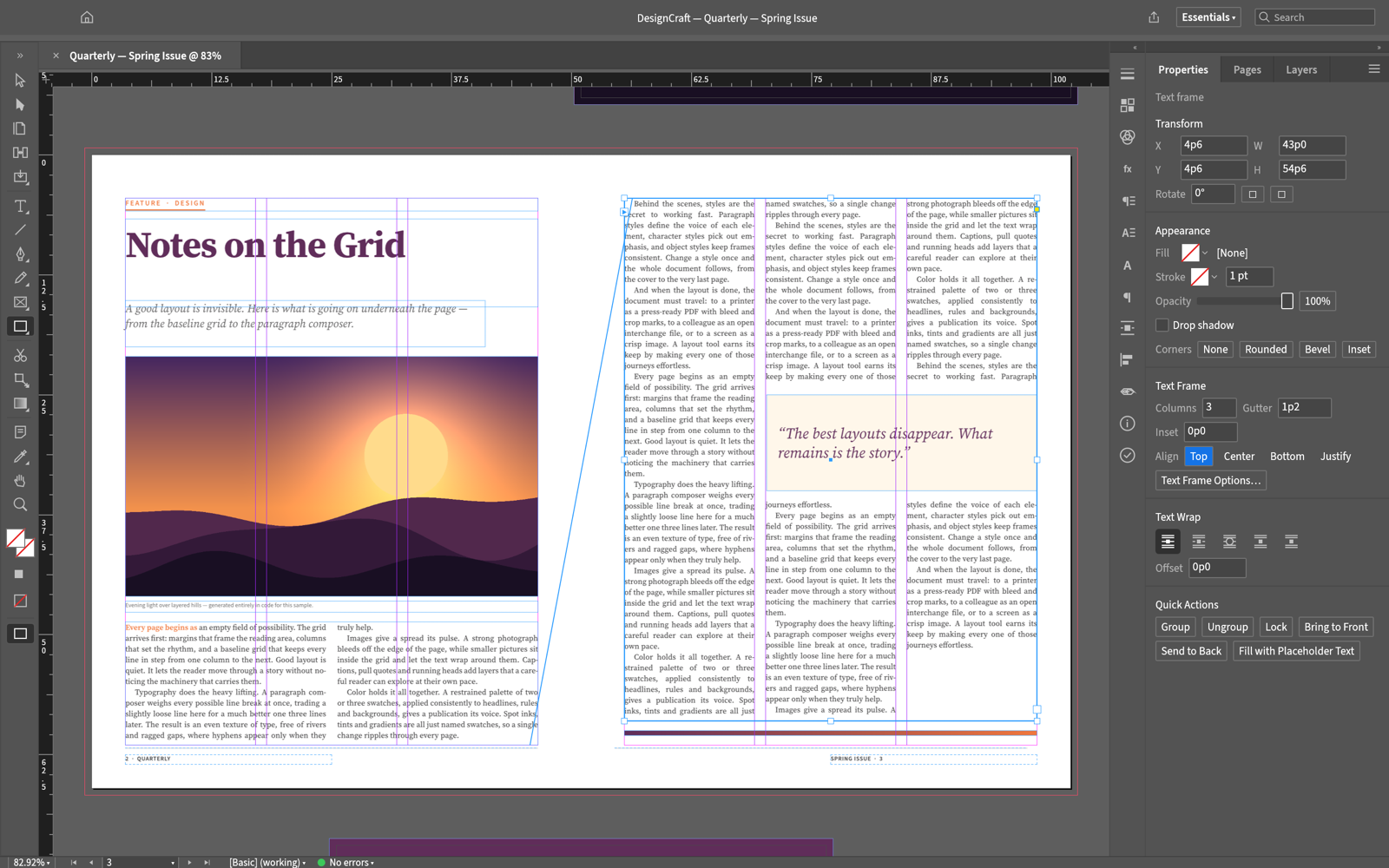
A booklet is not just a large text box. The title, photo and body need to fit the page, and the same layout must remain readable in the exported PDF. DesignCraft is a page-layout app for this kind of work. I would begin with two short pages and independent frames, because some familiar publishing-editor interactions are still missing in the documented UI.
The checked material describes pre-alpha / in development. I have read the public documentation; I have not installed and run this app for a hands-on review.
A look at the screen
| Where to look | What it does |
|---|---|
| Pages and spreads | Check page count and reading order. |
| Text and image frames | Place text and photos in separate boxes. |
| Properties and PDF export | Inspect positions, sizes and exported layout. |
What the documentation describes
- The documented layout model includes spreads, parent pages, text frames and paragraph typesetting.
- Native documents and IDML import/export are described as exchange paths.
- PDF, PNG and EPUB output and CLI/MCP production paths are documented; check the status of each actual UI operation before relying on it.
What interests me beside InDesign
In publishing, line breaks and text flow matter more than a familiar-looking screen. IDML is an InDesign exchange format, not the same file as INDD. A real document must be checked for fonts, paragraph styles and frame connections after exchange. A demo showing connecting lines is not evidence that the current UI lets you create those connections manually.
The developer describes free, open-source, local work. Open source means the code is available to inspect. I have not measured a speed or total-cost advantage. For InDesign, check the official product and plan information for the terms that apply in your region.
The limitation I would check first
The public UI-status document marks manual text threading by clicking a frame’s out port and canvas IME input as unsupported. IME is the input method used to compose characters such as Korean syllables. Windows/Linux clipboard limitations are also listed. These are important before attempting a long Korean manuscript; the first exercise uses short English text and independent frames.
A small first task
For the first exercise, let’s lay out a short two-page booklet. Prepare: Two short English paragraphs, a title and a photo you have permission to use. Keep the first document small enough to inspect each frame individually.
Check the official app page and release downloads for a build matching your operating system and CPU. If there is no suitable installer or the app does not start, read Get started/Quick start and known issues in the official README. Record the app version and OS when you try the task.
The separate tutorial gives the menu sequence and an expected result. It is a documentation-based exercise, not a claim that I completed it. AI-assisted development, an app’s built-in AI features and an agent operating existing functions need to be distinguished when judging an automation claim.
Keep the working file and the delivery file
Keep the two-page editing document, original photo/text and a PDF for reading. In the working document, change one short paragraph and check the corresponding frame. In the PDF, inspect page count, margins and image proportions. The successful export of two independent frames does not prove that long linked stories or imported IDML preserve their structure.
If the result differs
If English enters normally but Korean composition does not, consult the canvas IME limitation first. For frame threading or Windows/Linux clipboard failures, check whether the operation is one of the listed gaps. Repeating an unavailable control will not complete the task. Retain your manuscript in the existing editor rather than transferring the only copy.
What I would verify before a bigger job
- Compare wrapping, overflow and page count for identical text and fonts.
- Open a real IDML document and inspect text styles and frame connections.
- Compare margins, image sizes and fonts in the same booklet export.
This exercise checks basic placement using English and independent frames. It does not claim that Korean IME, manual threading or all clipboard paths now work. Long Korean publication jobs and print-ready handoff need a separate trial with the actual source files and specifications.
On the first page, let a title and photo introduce the topic; use the second for a short explanation. Keep type sizes and margins consistent before adding more content. When checking imported IDML, inspect actual frame connections and paragraph styles instead of assuming visual similarity means editable equivalence.
Introduction · Task tutorial · Comparison: documented differences
Sources & further reading
- https://getartcraft.com/apps/designcraft
- https://github.com/storytold/designcraft/blob/main/README.md
- https://www.adobe.com/products/indesign.html
- https://github.com/storytold/designcraft/blob/43a46c04bf8cd8c8a48a347f6deaa9613223aa54/README.md
- https://github.com/storytold/designcraft/blob/43a46c04bf8cd8c8a48a347f6deaa9613223aa54/crates/ui-egui/src/menus.rs
- https://github.com/storytold/designcraft/blob/43a46c04bf8cd8c8a48a347f6deaa9613223aa54/docs/ui-parity.md