SolidCraft: editable 3D parts built from dimensions
Explore SolidCraft’s sketches, constraints, feature history and MCP automation, with clear separation from CADCraft and current release limits.
Last updated
Menus and supported features can change. Compare the source-check date below with your current app version.
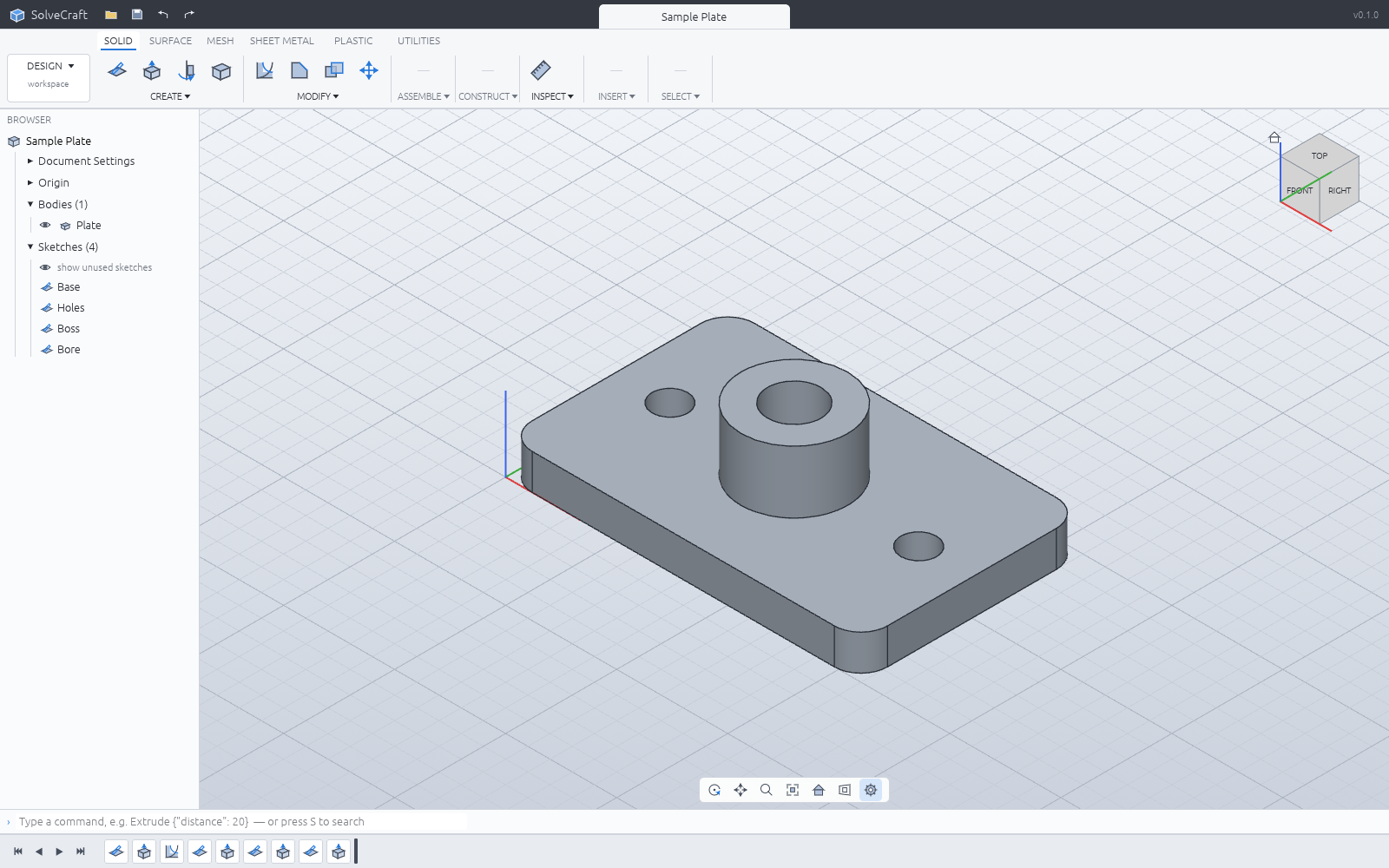
What if changing a small part from 20 to 25 mm high meant editing a dimension rather than drawing it again? SolidCraft builds parts from sketches, geometric constraints and a feature history. A changed parameter causes later operations to rebuild. That is the central reason to look at it.
Start with the interface
What it makes
SolidCraft is a parametric 3D CAD application from Tangency Labs. It is a separate project from Storytold’s CADCraft, which is already covered in Tools. It should not be presented as a newly announced member of ArtCraft’s official thirteen-app list.
The documented workflow starts with a sketch on a plane, then operations such as extrusion, revolution and edge rounding. Dimensions describe size; constraints describe relationships. The feature timeline records how the part was built, giving later edits a structure that a surface mesh alone does not contain.
The project also documents assemblies, sheet metal, materials and measurements. Its developer describes an early application suitable for starting with simple parts and publishes known limitations and reference checks. A feature appearing in a command list does not establish that every production model will work.
Where AI fits
An MCP server lets an AI agent call modeling and measurement commands. MCP is a structured connection between an assistant and another program. The same application can be used manually first, which is helpful when learning what a sketch plane, extrusion distance and closed profile mean.
The open-source application and an external AI provider are separate costs. Connecting a paid model does not make its usage free. A useful request names the units, plane, dimensions and intended output instead of asking only for “a box.” The resulting dimensions and files still need checking.
Access and saved work
Official sources describe Windows, macOS and Linux downloads and a browser build. Match the actual release asset to the operating system and processor. We have not installed those packages or verified a particular computer. The software is available under MIT or Apache-2.0 terms.
Keep the native .solidcraft design for future edits. Use STEP for exchanging solid geometry and a mesh format for workflows that need a triangulated surface. A STEP export should not be treated as a promise to transfer the original feature history into another editor.
The browser keeps work in browser storage. Download an external copy before clearing site data or moving to another browser profile. The documentation also explains compatibility with the earlier SolveCraft name; it is not a second product to count in the catalog.
A useful first task
Start with a 40 by 30 rectangle extruded by 20, then change only the extrusion to 25. Confirm that the other dimensions stay unchanged, save the native design, export STEP and reopen both. This exposes the difference between an editable source and a delivery file without depending on decorative features.
I would investigate SolidCraft for dimensioned cases and brackets before using it for a large assembly. Organic character surfaces have a different goal. Record where a failure occurs—sketch closure, feature rebuild or export—so a future release can be checked against the same small task.
Sources and scope
Checked 19 October 2026. This introduction, tutorial and comparison use the primary sources below. They contain no claim of our own app execution or measured performance. Development builds may differ from the pinned source.
Sources & further reading
- https://github.com/tangency-labs/solidcraft/blob/68c72082030a999c9090c174a571b64e8244f9e8/README.md
- https://github.com/storytold/cadcraft/blob/0b32c2e6a14c761835ea62c01e7b20845971d781/README.md
- https://github.com/tangency-labs/solidcraft/blob/68c72082030a999c9090c174a571b64e8244f9e8/docs/book/src/guide/getting-started.md
- https://github.com/tangency-labs/solidcraft/blob/68c72082030a999c9090c174a571b64e8244f9e8/docs/book/src/guide/sketching.md
- https://github.com/tangency-labs/solidcraft/blob/68c72082030a999c9090c174a571b64e8244f9e8/docs/book/src/guide/features.md
- https://github.com/tangency-labs/solidcraft/blob/68c72082030a999c9090c174a571b64e8244f9e8/docs/book/src/guide/files.md
- https://github.com/tangency-labs/solidcraft/blob/68c72082030a999c9090c174a571b64e8244f9e8/docs/mcp.md
- https://github.com/tangency-labs/solidcraft/blob/68c72082030a999c9090c174a571b64e8244f9e8/LICENSE-MIT
- https://github.com/tangency-labs/solidcraft/blob/68c72082030a999c9090c174a571b64e8244f9e8/NOTICE