OpenCode 2: an AI coding agent whose changes you still need to inspect
A documentation-based look at OpenCode 2.0.30's change inspection, platforms, costs and permission boundaries.
Last updated
Menus and supported features can change. Compare the source-check date below with your current app version.
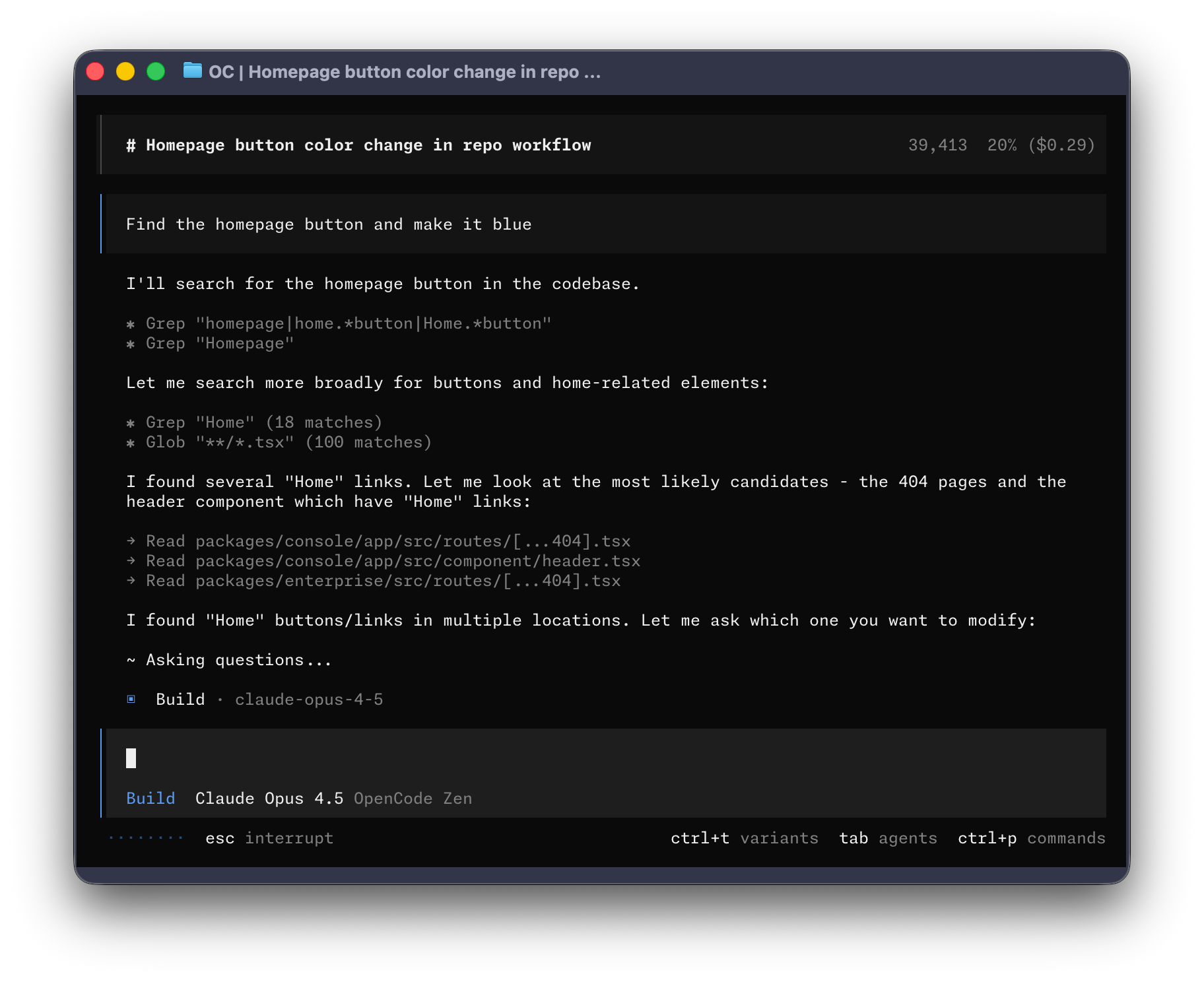
What should you check when you ask an AI to change one button label and several files change instead? Today BumbleV is looking at OpenCode 2, an open-source coding agent that can read project files, edit them and run commands. Unlike a chatbot whose answers you paste into an editor, it operates inside a working project.
The version covered here is 2.0.30, dated October 15, 2026 in the official changelog. This introduction is based on official documentation, source and developer-published images. I did not install the app or run a model-driven edit. The button-label tutorial explains one bounded task; the comparison with direct editing sets out the documented trade-offs.
Why this update?
This is not the first release of an entirely new product. It is a meaningful update to how existing OpenCode 2 users inspect their work. In the desktop app, Settings → Preferences → Timeline → Changed files enables per-turn lists of changed files, line counts and expandable diffs. In the terminal, /diff opens a viewer beside the session, and f switches between its docked and full-screen layouts.
That matters because delegating a change is only half the job. Seeing what changed during a particular turn can help you spot work that escaped your intended scope. It does not prove that the resulting program works. You still need to click the button, check its destination and inspect a narrow screen if those are part of the task.
On October 16, the public GitHub API showed 214,222 stars and 28,747 forks, alongside recent development and changes involving outside contributors. These are observations of public interest and participation, not a count of active users or a quality score. The selection combines a concrete recent update with observable activity rather than assuming popularity from the product name.
Where does AI fit?
OpenCode is an application that uses AI models for coding and a runtime for agent-controlled tools. This research does not establish that OpenCode itself was built with AI. The models are separate from the application: changing the model, instructions or permissions can change the outcome even when the interface stays the same.
V2 offers terminal, desktop and web interfaces. By default, local clients connect to a shared background service for the user’s account. That service owns sessions, configuration, authentication and tool execution. A web interface therefore does not necessarily mean your project runs in the vendor’s hosted workspace. You need to know which server and project directory the client controls.

What is free, and what is not?
| Item | What was verified |
|---|---|
| Availability | Public OpenCode 2 distribution; this article targets 2.0.30 |
| License | MIT for the software and associated documentation |
| Platforms | CLI and desktop downloads for macOS, Windows and Linux; web interface |
| Application cost | The open-source software can be used without an application purchase |
| Model access | Authentication, terms and charges depend on the connected provider and model |
| Optional subscription | V2 documentation lists OpenCode Go at US$10 per month |
| Network and accounts | Provider access is needed; remote model requests go to that provider |
A free application does not make every model request free. An existing subscription is useful only if its provider supports an applicable authentication method and permits that use. I did not connect an account, buy a plan or measure token charges. Before sending code, check the chosen provider’s billing and data-handling terms.
Four things to establish first
Start with the directory. A disposable copy or small Git repository is easier to reason about than a live service. Next, bound the request. “Change this button’s label in this file; preserve its color and destination” is easier to verify than “make everything better.”
Then check permissions. The default Build agent has broad tool access. You can require approval for shell commands and edits rather than assuming the prompt alone restricts what may happen. Finally, understand rollback: OpenCode’s file snapshots require a Git worktree and are not a universal transaction log. Database changes, remote requests, processes and Git history need separate handling. Capture is best effort, so retain commits or backups for important work.
Upgrading from V1 needs care
OpenCode 1 and OpenCode 2 both use the default command name opencode. Do not assume they are installed side by side and easy to distinguish. Check the executable path and version before changing an existing installation. V2 changes the plugin API, server API and terminal-client configuration. A V1 plugin should not be presumed to work unchanged.
My starting point would be one small HTML file: request a narrow edit, inspect the diff, open the result and learn what undo does. OpenCode is a better fit for someone prepared to review a sequence of bounded changes than someone expecting an unverified prompt to deliver a finished application.
Official “latest” download links can move after this article is published. Check the installed version; if it differs from 2.0.30, read its matching release notes before following version-specific controls.
What I actually verified
On October 16 I checked the official changelog, version-tagged V2 documentation, the Git tag, npm metadata for 2.0.30 and the MIT license. The image is a real developer-published example, not evidence of my own execution. I did not obtain a firsthand capture of the new Changed files panel. The sources below provide the version-specific context rather than a benchmark or a replacement claim.
Official sources
Sources & further reading
- https://opencode.ai/changelog#v2-0-30
- https://opencode.ai/v2/docs/
- https://github.com/anomalyco/opencode/blob/f16ef9ad8878279ea2be3cfab7baeed97aef61aa/services/www/src/docs/content/cli/tui.mdx
- https://github.com/anomalyco/opencode/blob/f16ef9ad8878279ea2be3cfab7baeed97aef61aa/services/www/src/docs/content/permissions.mdx
- https://github.com/anomalyco/opencode/blob/f16ef9ad8878279ea2be3cfab7baeed97aef61aa/services/www/src/docs/content/snapshots.mdx
- https://github.com/anomalyco/opencode/blob/f16ef9ad8878279ea2be3cfab7baeed97aef61aa/services/www/src/docs/content/migrate-v1.mdx
- https://github.com/anomalyco/opencode/blob/f16ef9ad8878279ea2be3cfab7baeed97aef61aa/services/www/src/docs/content/cli/providers.mdx
- https://github.com/anomalyco/opencode/blob/f16ef9ad8878279ea2be3cfab7baeed97aef61aa/services/www/src/docs/content/cli/index.mdx
- https://github.com/anomalyco/opencode/blob/f16ef9ad8878279ea2be3cfab7baeed97aef61aa/LICENSE
- https://registry.npmjs.org/@opencode%2fcli/2.0.30
- https://api.github.com/repos/anomalyco/opencode
- https://github.com/anomalyco/opencode/blob/f16ef9ad8878279ea2be3cfab7baeed97aef61aa/README.md