NVIDIA PAIR explained: connecting local AI work across computers
Understand PAIR, engines, models, platform requirements, costs, and the limits of routing local AI requests between computers.
Last updated
Menus and supported features can change. Compare the source-check date below with your current app version.
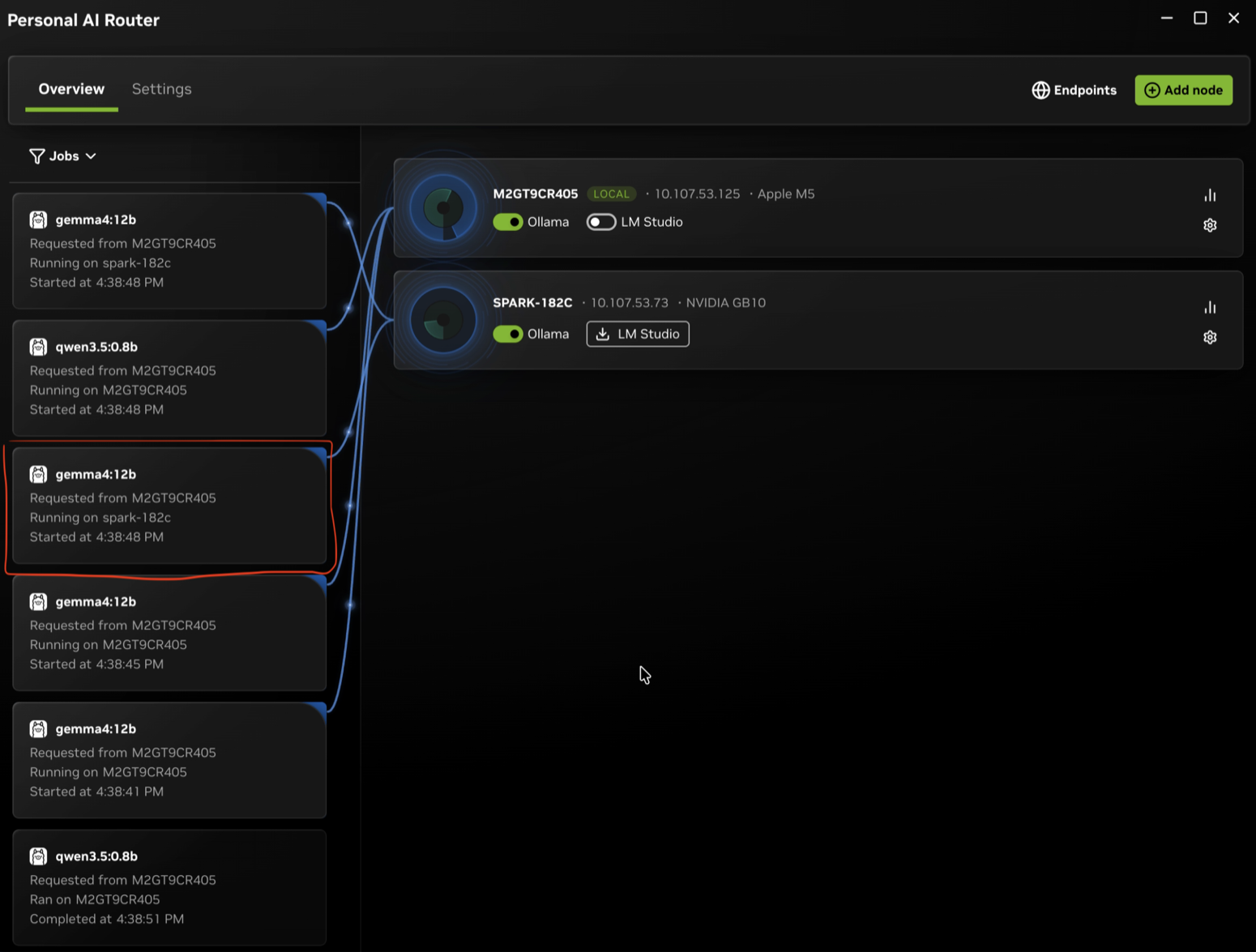
Could a desktop help with local AI work while you send requests from a laptop? NVIDIA Personal AI Router, or PAIR, connects compatible computers on the same network and sends independent inference requests to a machine that can serve them. It manages where requests run when compatible applications or agents use your local models. This introduction explains the pieces and requirements before you start configuring them.
What do PAIR, an engine, and a model each do?
The model supplies the learned weights used to generate an answer. An inference engine, such as Ollama, LM Studio, or llama.cpp, loads those weights and performs the computation. PAIR sits in front of the engine: it accepts a request and selects an eligible computer. Your compatible application or agent sends requests to the local address PAIR provides.
Imagine three independent requests to summarize documents. If two paired computers have the same model ready, PAIR can forward individual requests to eligible nodes. A node means one participating computer. You still need an application to read the documents and construct the requests; connecting computers does not automatically add file discovery or an agent workflow. This is an example of a possible use, not a measured result from our own setup.
| Component | Responsibility | What to check |
|---|---|---|
| Client application or agent | Constructs inputs and receives answers | Configurable base URL and model name |
| PAIR | Manages local endpoints and routing between computers | Service health, paired nodes, and Jobs |
| Inference engine | Runs the model to produce an answer | Operating system, GPU, and driver support |
| Model | Provides the weights used for inference | Memory, download size, and separate license terms |
What changes when you connect two computers?
PAIR distributes independent requests. Each request runs entirely on one selected computer. It does not pool GPU memory or split one model between machines. Connecting two computers therefore does not make a model that fits on neither machine suddenly usable.
A candidate node must be reachable, running a compatible engine, and advertising the requested model in that engine’s inventory. Seeing a computer in the cluster is not enough to establish readiness. Prepare the engine and model on each computer you want to serve that model. A model can also live on only one node, with other members routing requests to its owner.
There is no promise that one answer will become twice as fast. The documented scheduler limitations include not accounting for GPU model, available memory, or measured latency. With a mixture of small and large GPUs, check which node actually ran the work. When testing, record the time for one request separately from the completion time for several independent requests.

The developer example shows Jobs beside the computer cards. Sent to identifies where a job was dispatched; Running on / Ran on identifies its execution location. These are different observations. This is an upstream demonstration, not a cluster BumbleV set up and tested.
What version 1.0.0 provides
The v1.0.0 release, published on October 13, 2026, includes managed llama.cpp installation, compatible GGUF model downloads from Hugging Face, engine launch options, and an improved terminal Jobs view. This article uses that version’s source commit rather than treating development-branch work or roadmap entries as released features.
| Item | Documented availability |
|---|---|
| Operating systems | Windows 11, Linux, macOS |
| CPU architectures | x64 and arm64; Windows on ARM is experimental |
| Installer formats | Windows .exe, Linux .deb, macOS .dmg |
| Inference engines | Ollama, LM Studio, llama.cpp |
| Connection | Paired computers on the same local network |
| License | PAIR is open source under Apache-2.0 |
The ability to run PAIR and the ability to run a particular model are separate requirements. Check the engine’s hardware and driver requirements and the model’s memory needs. PAIR’s platform list does not establish that every model will run on every listed machine. The ordinary Linux installer is a Debian package; users of other distributions should consult the official source-build instructions.
Cost and the meaning of local processing
PAIR itself is freely available, but computers, electricity, download bandwidth, and model storage still matter. Engines and models can have their own terms. For commercial work, read the PAIR license and the selected model’s license separately. An OpenAI-compatible endpoint describes a request format; it does not provide access to a paid cloud model or subscription.
Local processing depends on the whole configuration. Requests and replies are intended to stay on the local network when all configured clients, engines, and nodes are local. Downloading a model requires an external connection, and an application may independently call cloud services. PAIR does not turn those other calls into local operations. Separate the initial downloads from the path your inference request actually takes.
Does it fit your work?
PAIR is worth investigating if you already have several computers and frequently run independent local AI jobs at the same time. A client can use the endpoint on the computer where you work while Jobs reveals where each request ran. If you only send occasional requests from one computer, compare the extra setup with your current direct-engine workflow before committing to it. This is BumbleV’s assessment of the documentation, not a hands-on claim about speed or convenience.
Start with one task you actually need. Check that the model is prepared, that your application supports the required base URL and model name, and that Jobs identifies the serving node after a request. Two visible computer cards alone do not establish that inference is configured correctly; match an answer to its execution record.
The companion first-request tutorial covers setup, saving an input file, checking the response, and verifying remote execution. The documentation comparison examines direct engine calls and the conditions a future test should hold constant. This introduction is based on official release notes, documentation, and developer screenshots. Installation, inference, pairing, and performance have not been tested here.
Sources & further reading
- https://blogs.nvidia.com/blog/local-ai-rtx-spark-laptops-software-updates/
- https://github.com/NVIDIA/Personal-AI-Router/releases/tag/v1.0.0
- https://www.nvidia.com/en-us/ai-on-rtx/personal-ai-router/
- https://github.com/NVIDIA/Personal-AI-Router/blob/85f523d3624cf1596bdda6e36c28eb8ad3969737/README.md
- https://github.com/NVIDIA/Personal-AI-Router/blob/85f523d3624cf1596bdda6e36c28eb8ad3969737/docs/getting-started.mdx
- https://github.com/NVIDIA/Personal-AI-Router/blob/85f523d3624cf1596bdda6e36c28eb8ad3969737/docs/overview.mdx
- https://github.com/NVIDIA/Personal-AI-Router/blob/85f523d3624cf1596bdda6e36c28eb8ad3969737/docs/known-issues.mdx
- https://github.com/NVIDIA/Personal-AI-Router/blob/85f523d3624cf1596bdda6e36c28eb8ad3969737/docs/engine-settings.mdx
- https://api.github.com/repos/NVIDIA/Personal-AI-Router
- https://github.com/NVIDIA/Personal-AI-Router/pull/27