Langflow: Introduction
Langflow is an AI agent and workflow platform offering a visual builder, Python source code access, an interactive playground, and API and MCP server support.
Last updated
Menus and supported features can change. Compare the source-check date below with your current app version.
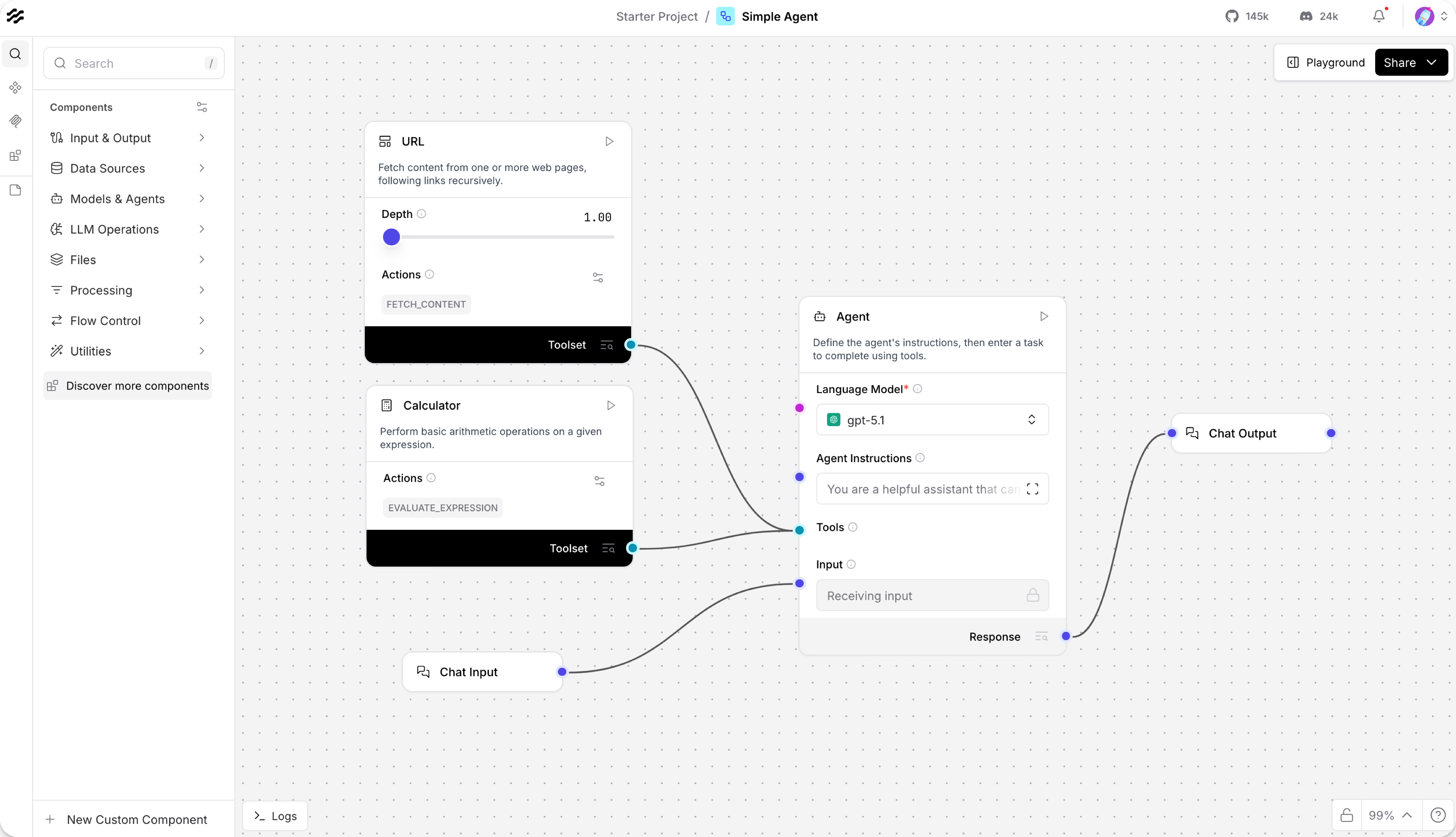
Want to assemble an AI agent visually while keeping access to the Python code behind it? Langflow is an open-source platform for building and deploying agents and workflows. This introduction explains the capabilities described in its official documentation, rather than reporting a hands-on trial F1, F7.
This article covers the Langflow v1.12.5 official release, published on 2026-10-06 (UTC). The source documents were checked on 2026-10-18. Selection used the 30-day fallback to find an uncovered product with accessible official documentation and rights-verified interface images.
What you can build
Langflow provides a visual builder for connecting the components of an AI workflow. Its documentation also describes access to Python source code, so the canvas is not the only way to change a component’s behavior. An interactive Playground lets you inspect and refine a flow, while the documented multi-agent features include conversation management and retrieval F7.
The project describes built-in API and Model Context Protocol (MCP) servers for exposing workflows to other applications F1. These interfaces matter when a flow needs to become part of an existing product: a visual diagram alone is different from an integration that another application can call. The documentation describes the integration options; it does not establish how a particular deployment will perform.
How it compares with Flowise
Flowise is another visual, open-source tool for agent workflows. Its repository identifies the source-code license as Apache License Version 2.0 F8. Langflow’s documentation emphasizes visual editing together with Python component customization and API/MCP access F1, F7.
Those are useful selection criteria if you want to keep working in Python while designing the connections visually. They are not evidence that one product is faster, more accurate, or a replacement for the other. A fair decision still needs a small test in the intended environment. The separate comparison article sets out questions to check rather than assigning unmeasured scores.
Access, costs, and the selected release
Langflow’s source code and installation instructions are published in its official repository D2. Distinguish access to the open-source software from the charges for any external language model used inside a flow. Downloading a package does not include a model provider’s API allowance, and hosted infrastructure can have its own conditions. Check the chosen provider and deployment arrangement before assuming a complete workflow has no running cost.
The selected release, v1.12.5, includes a fix restricting built-in code execution to administrators F2. That is a specific release-note item. It should not be read as a general guarantee about the security of every deployment.
Documented features and limits to check
The Simple Agent template connects an Agent component with Chat Input, Chat Output, Calculator, and URL components F4. The quickstart uses a small arithmetic prompt such as I want to add 4 and 4. to demonstrate selecting a calculator tool. Its Playground presents the agent’s tool-use steps, including a calculator action such as evaluate_expression F5.
These are documented expected behaviors, not results observed for this article. In a trial, inspect which tool was selected and compare the returned result with the known answer before recording success.
The Shareable Playground has a narrower purpose than an application integration: the documentation describes it as a testing feature and says it is not intended for embedding flows in applications F6. Langflow Desktop also has platform requirements, including macOS 13 or later for its Mac version, and the installation guide describes limitations specific to Desktop F3, D3.
Start with a disposable example, read the installation requirements for the chosen environment, and check the deployment documentation before moving a prototype into a live service. This documentation review does not supply measurements for production traffic, reliability, or model accuracy.
Original BumbleV reading guide illustration; not a product screenshot or a result from our testing. Official release behind this illustration · CC BY 4.0 · 2026-10-18

Sources & further reading
- https://github.com/langflow-ai/langflow/releases/tag/v1.12.5
- https://raw.githubusercontent.com/langflow-ai/langflow/52622284d3bbc6d2cddc7a4b0bf18b2161e4b88c/README.md
- https://raw.githubusercontent.com/langflow-ai/langflow/52622284d3bbc6d2cddc7a4b0bf18b2161e4b88c/docs/docs/Get-Started/get-started-installation.mdx
- https://raw.githubusercontent.com/langflow-ai/langflow/52622284d3bbc6d2cddc7a4b0bf18b2161e4b88c/docs/docs/Get-Started/get-started-quickstart.mdx
- https://raw.githubusercontent.com/langflow-ai/langflow/52622284d3bbc6d2cddc7a4b0bf18b2161e4b88c/docs/docs/Flows/concepts-flows-import.mdx
- https://raw.githubusercontent.com/langflow-ai/langflow/52622284d3bbc6d2cddc7a4b0bf18b2161e4b88c/docs/docs/Flows/concepts-playground.mdx
- https://raw.githubusercontent.com/FlowiseAI/Flowise/9291856d1ea4a4ceea9f8fef8ce14f4f6c81e8eb/README.md