Langflow: One-task guide
Langflow is an AI agent and workflow platform offering a visual builder, Python source code access, an interactive playground, and API and MCP server support.
Last updated
Menus and supported features can change. Compare the source-check date below with your current app version.
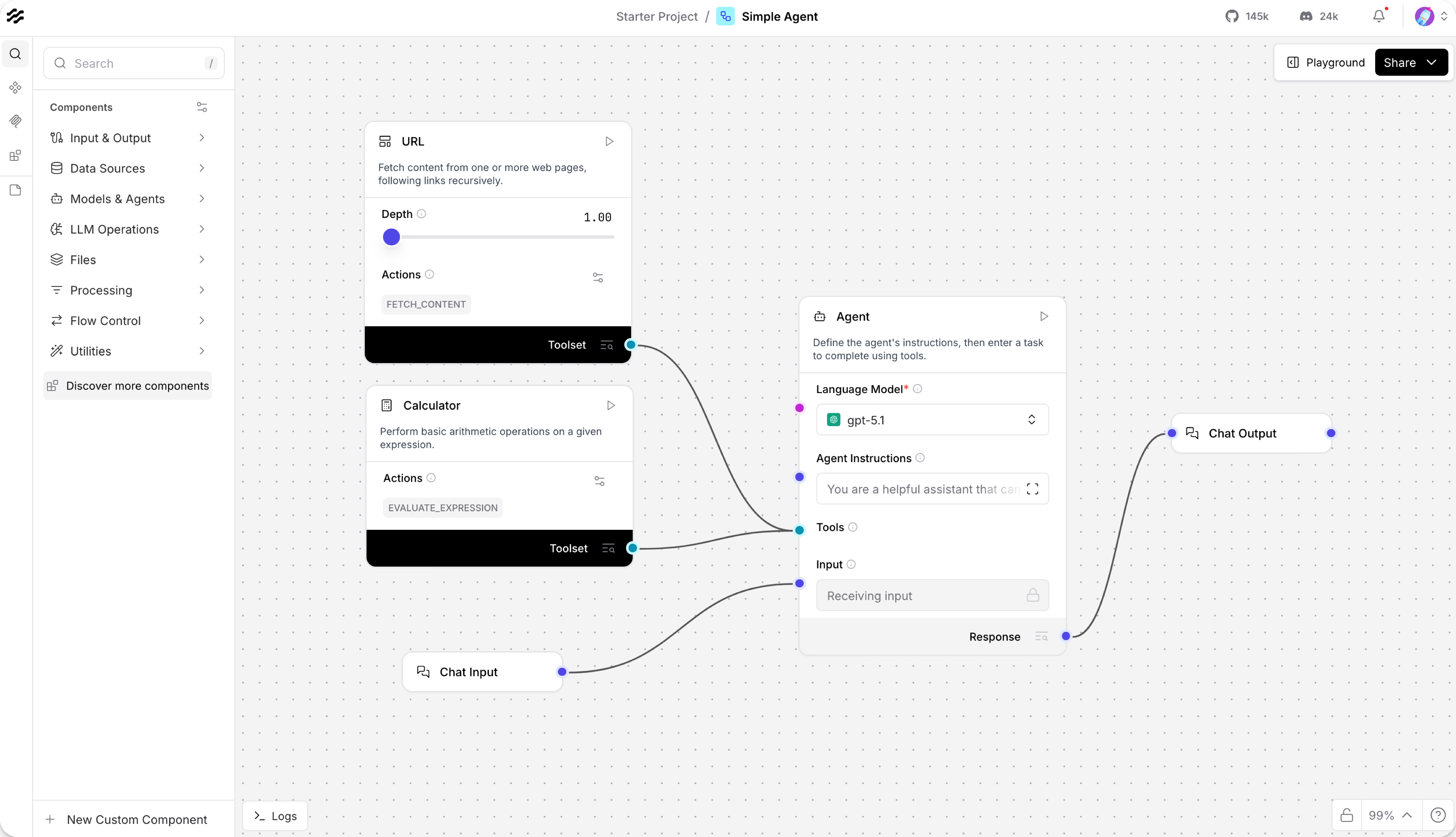
Want to see whether an agent selects a calculator for a simple arithmetic question? This guide follows Langflow’s official Simple Agent quickstart. The outcome to check is one small tool-assisted answer, not a production deployment or a performance comparison F4, F5.
This article covers the Langflow v1.12.5 official release, published on 2026-10-06 (UTC). The source documents were checked on 2026-10-18. Selection used the 30-day fallback to find an uncovered product with accessible official documentation and rights-verified interface images.
This is a documentation-based walkthrough. The steps below describe the documented workflow and expected output; they are not a report of an installation or execution performed for this article.
Set one completion goal
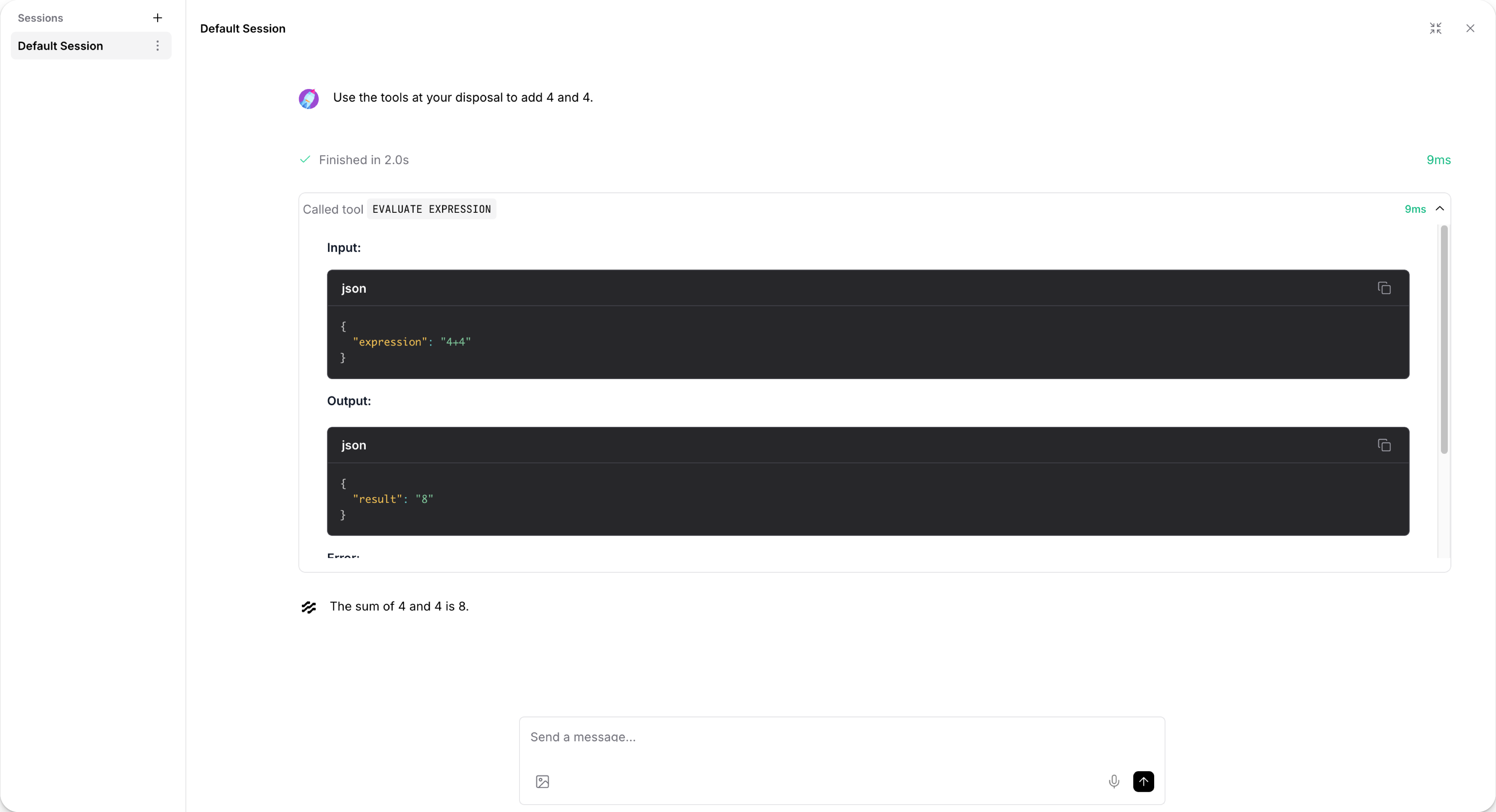
Open the Simple Agent template, connect an appropriate model provider, and ask I want to add 4 and 4. The template includes an Agent connected with Chat Input, Chat Output, Calculator, and URL components F4. For this input, the useful checks are whether the calculator is selected, whether its output is visible, and whether the final answer agrees with 8 F5.
Keeping the input this small makes the result easy to inspect. A plausible-looking answer by itself does not show that a tool call happened. Look at the displayed steps as well as the final message.
Prepare the environment and keys
The repository and installation guide describe a Python installation using Python 3.10–3.14 and uv, together with Langflow Desktop options for Windows and macOS D2, D3. The Mac Desktop version requires macOS 13 or later F3. Choose the instructions for the actual environment rather than treating the Desktop and Python-package paths as interchangeable.
The quickstart also needs access to the language model used by the Agent, for example a provider API key D4. Access to the Langflow software is separate from that provider’s model usage and billing. Check the model account’s conditions before submitting test prompts.
A Langflow API key is relevant when calling the flow externally or testing the API. The quickstart describes creating one from the Langflow API Keys settings D4. Keep that credential separate from the model provider’s key; they authorize different operations.
Follow the documented sequence
- Choose New Flow, then select Simple Agent. Inspect the connections between Agent, Chat Input, Chat Output, Calculator, and URL before changing the template F4.
- In the Agent component, use Setup Provider to configure the model provider, then choose a model from the documented model selector D4.
- Open Playground to reach the interactive test interface D4.
- Enter
I want to add 4 and 4.and inspect the resulting tool-use steps. The quickstart describes a calculator action such asevaluate_expressionF5.
The intended result is an answer consistent with 8, together with a trace showing the relevant calculator operation. That is an expected result to verify, not a promise that every model, account, or configuration will produce the same trace.
Inspect the result and optional API response
Compare the final Chat Output with the calculator step. If the answer appears without the expected tool action, investigate that distinction rather than recording the test as a successful demonstration of calculator selection. Keep the input, displayed tool step, and returned answer together when checking the outcome.
For an external caller, the quickstart describes opening API access from the Share menu and copying the Python, JavaScript, or cURL example D4. A Python example can use requests to send the documented POST request to a /run endpoint and inspect the response. Follow the generated example’s actual URL and payload; the endpoint fragment alone is not a complete request.
Open the returned data and check where the output message appears. If parsing fails or the response is incomplete, retain it for diagnosis and return to the documented request structure before treating the integration as complete.
Resolve documented setup problems
- If a request returns
An API key must be passed as query or header, check the Langflow API-key configuration and the documentedx-api-keyheader or environment-variable setup D4. - If Windows Desktop reports
C++ Build Tools Required!, follow the installation guide’s Microsoft C++ Build Tools or Visual Studio instructions D3. - Do not use the Shareable Playground as a substitute for an application integration. The documentation identifies it as a testing feature rather than a way to embed flows in production applications F6.
After the small example works in the intended environment, change one part of the flow at a time and inspect the output again. This keeps the completion check concrete while leaving broader deployment and security decisions for a separate task.
Original BumbleV reading guide illustration; not a product screenshot or a result from our testing. Official release behind this illustration · CC BY 4.0 · 2026-10-18


Sources & further reading
- https://github.com/langflow-ai/langflow/releases/tag/v1.12.5
- https://raw.githubusercontent.com/langflow-ai/langflow/52622284d3bbc6d2cddc7a4b0bf18b2161e4b88c/README.md
- https://raw.githubusercontent.com/langflow-ai/langflow/52622284d3bbc6d2cddc7a4b0bf18b2161e4b88c/docs/docs/Get-Started/get-started-installation.mdx
- https://raw.githubusercontent.com/langflow-ai/langflow/52622284d3bbc6d2cddc7a4b0bf18b2161e4b88c/docs/docs/Get-Started/get-started-quickstart.mdx
- https://raw.githubusercontent.com/langflow-ai/langflow/52622284d3bbc6d2cddc7a4b0bf18b2161e4b88c/docs/docs/Flows/concepts-flows-import.mdx
- https://raw.githubusercontent.com/langflow-ai/langflow/52622284d3bbc6d2cddc7a4b0bf18b2161e4b88c/docs/docs/Flows/concepts-playground.mdx
- https://raw.githubusercontent.com/FlowiseAI/Flowise/9291856d1ea4a4ceea9f8fef8ce14f4f6c81e8eb/README.md