Langflow: Documentation comparison
Langflow is an AI agent and workflow platform offering a visual builder, Python source code access, an interactive playground, and API and MCP server support.
Last updated
Menus and supported features can change. Compare the source-check date below with your current app version.
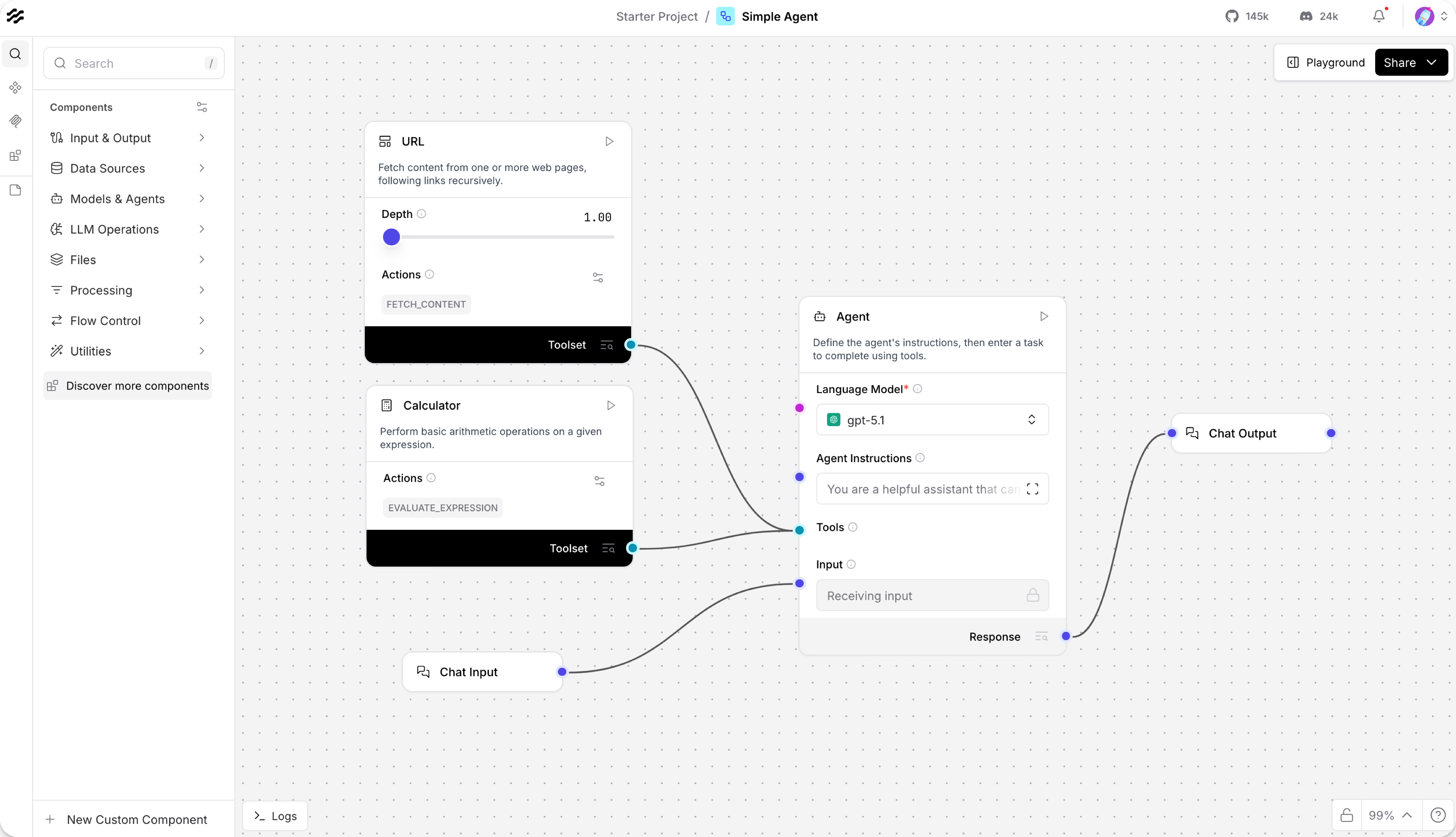
How should you choose a visual builder for an agent workflow without relying on an unsupported claim that one tool is better? Start with the work you want to complete: connect a conversation input and output, give an agent a calculator, and inspect what happens when it receives a small arithmetic question.
This article covers the Langflow v1.12.5 official release, published on 2026-10-06 (UTC). The source documents were checked on 2026-10-18. Selection used the 30-day fallback to find an uncovered product with accessible official documentation and rights-verified interface images.
This comparison reads the official documentation for Langflow and Flowise. It is an editorial assessment of documented capabilities and a proposed test plan, not a hands-on benchmark or a record of either product’s performance.
Establish the reference task
Use the same disposable input for each candidate: ask an agent to add 4 and 4, and inspect both the tool operation and the final answer. Langflow’s Simple Agent quickstart explicitly documents this kind of calculator example F4, F5. For Flowise, first check how its own documentation supports an equivalent flow rather than assuming identical component names or setup steps D7.
The target is not merely a final answer of 8. Record whether the appropriate tool was selected, where its output can be inspected, and what configuration was needed. Apply the same completion criteria to both tools.
Compare the documented capabilities
Langflow’s repository describes a visual builder with access to Python component source code, an interactive Playground, and multi-agent orchestration F1, F7. Its API and MCP servers provide documented ways to make workflows available to another application F1. These are concrete integration options to examine if the surrounding project already uses Python.
Flowise’s repository describes its Node.js-based, visual agent-building project and identifies its source-code license as Apache License Version 2.0 F8, D7. Read its own installation and workflow documentation when preparing the equivalent task. The license identifies source-use terms; it is not a speed, model-quality, or deployment-cost comparison.
An editorial reason to consider Langflow is the combination of visual connections and direct Python customization F7. That does not establish an exclusive capability or show that Flowise cannot meet the same need. Keep the choice tied to the documented requirements of the intended project.
Check platform and sharing restrictions
Langflow Desktop has environment requirements, including macOS 13 or later for its Mac version F3. The installation guide also describes Desktop-specific feature limitations D3. A feature documented for a server installation should not automatically be assumed available through the Desktop interface.
The Shareable Playground is documented for testing, not embedding flows inside a production application F6. Its documentation also describes requirements affecting custom-component paths and shared execution D6. Read those conditions before assuming a publicly shared example has the same behavior or security boundaries as a privately configured development flow.
The selected v1.12.5 release includes a fix limiting built-in code execution to administrators F2. Review the scope of that specific change together with the deployment settings. It is one release-note item, not proof that an application is ready for every production use.
Make a documentation-based choice
If the project needs visual editing while retaining Python customization, Langflow is a documented candidate F1, F7. The repository describes installation with uv, and the installation guide explains available environment paths D2, D3. Read the provider-key requirements as well: installing a tool does not include the usage allowance for any external language model.
Flowise remains a comparison candidate whose workflow setup and source-use terms should be checked directly D7. Neither repository alone establishes a winner for the same real input. Model choice, access conditions, hosting, and configuration can all affect the proposed trial, so record them before drawing a conclusion.
Run an equal-input test before deciding
- Prepare each tool separately using its official instructions. Record the installed version, operating system, model/provider settings, and any account requirements. Use the same model configuration where both tools support it; disclose a difference when they do not.
- Build the documented equivalent of a conversation connected to a calculator. In Langflow, the Simple Agent template supplies the documented starting point F4. Follow Flowise’s own documented route for the comparison D7.
- Submit the same arithmetic prompt. Inspect the selected tool, its output, and the final answer using the same completion criteria F5.
- If external access is needed, test the documented API request and extraction of its returned message. Langflow’s quickstart supplies request examples, including a
/runendpoint D4. Record an unsupported or unavailable operation as a limitation rather than guessing. - Check sharing and custom-component restrictions separately from the local calculator example F6, D6. Record setup work, manual corrections, missing outputs, and access failures without converting a single trial into an accuracy or reliability score.
No results from this proposed comparison are supplied here. The useful next step is a bounded trial in the actual environment, followed by a decision based on the recorded conditions.
Original BumbleV reading guide illustration; not a product screenshot or a result from our testing. Official release behind this illustration · CC BY 4.0 · 2026-10-18

Sources & further reading
- https://github.com/langflow-ai/langflow/releases/tag/v1.12.5
- https://raw.githubusercontent.com/langflow-ai/langflow/52622284d3bbc6d2cddc7a4b0bf18b2161e4b88c/README.md
- https://raw.githubusercontent.com/langflow-ai/langflow/52622284d3bbc6d2cddc7a4b0bf18b2161e4b88c/docs/docs/Get-Started/get-started-installation.mdx
- https://raw.githubusercontent.com/langflow-ai/langflow/52622284d3bbc6d2cddc7a4b0bf18b2161e4b88c/docs/docs/Get-Started/get-started-quickstart.mdx
- https://raw.githubusercontent.com/langflow-ai/langflow/52622284d3bbc6d2cddc7a4b0bf18b2161e4b88c/docs/docs/Flows/concepts-flows-import.mdx
- https://raw.githubusercontent.com/langflow-ai/langflow/52622284d3bbc6d2cddc7a4b0bf18b2161e4b88c/docs/docs/Flows/concepts-playground.mdx
- https://raw.githubusercontent.com/FlowiseAI/Flowise/9291856d1ea4a4ceea9f8fef8ce14f4f6c81e8eb/README.md