InvokeAI Canvas vs Workflows: Choose Direct Layout or Repeatable Steps
Compare direct Canvas composition with node workflows using documented capabilities, concrete tasks, and an original decision exercise.
Last updated
Menus and supported features can change. Compare the source-check date below with your current app version.
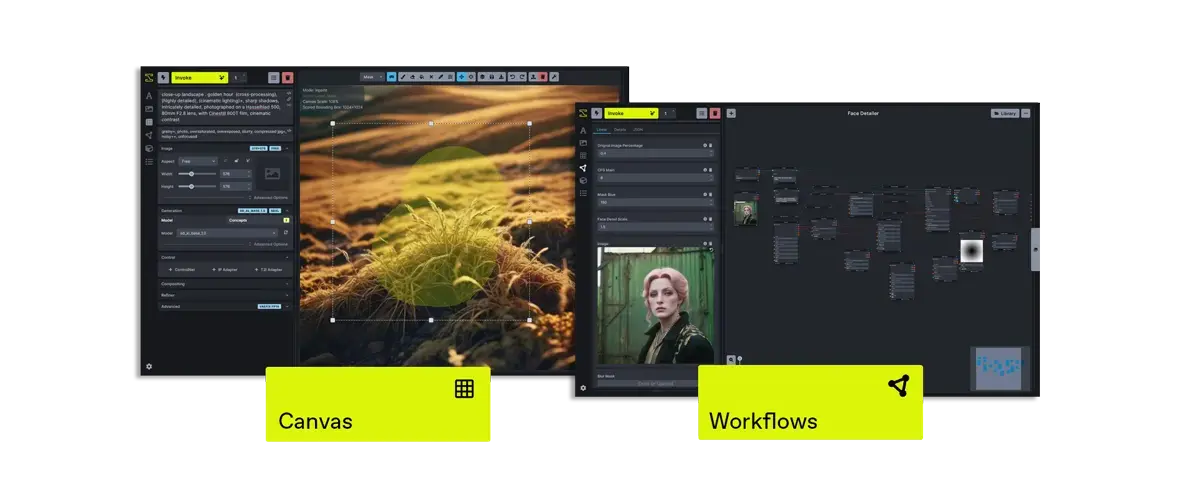
Choose Canvas when your main question is, “Where should this element go in this particular image?” Consider a node workflow when the question becomes, “Which operations should run, in which order, every time?” That is the most useful distinction for a creator moving beyond a first InvokeAI project.
This is a comparison of two approaches within InvokeAI, based on the stable v6.14.2 documentation checked on October 26, 2026. We have not run a timed comparison, assessed output quality, or tested an identical design through both approaches. The recommendations are editorial judgments based on the documented controls.
What you are comparing
Canvas exposes the composition directly. The lettering tutorial in this series uses its Text tool to place a chosen heading on a background. Its implementation provides font, size, spacing, formatting, and alignment controls. Text controls
A workflow represents a sequence of operations as connected nodes. Each node receives inputs and produces outputs; the editor connects compatible ports. Nodes and Workflows · Adding Nodes
Both can participate in an image-making process, but they ask you to organize your attention differently.
| Question | Canvas approach | Node-workflow approach |
|---|---|---|
| What am I arranging? | Visible elements in one composition | Operations and their data connections |
| Where do I inspect a change? | The composition itself | The changed input, its connections, and the resulting image |
| What is a sensible first exercise? | Position one heading on one background | Understand and adjust an existing simple workflow |
| What should I keep with the work? | Original background, copy, font, and project | Workflow, model information, input files, and a record of changed parameters |
| What still needs human review? | Wording, margins, hierarchy, and final export | Input correctness, output consistency, and final export |
The last three rows are suggested working practices rather than claims that one mode automatically solves the task.
Case 1: a single event poster
Suppose you have a café photograph and must add “SATURDAY COFFEE LAB” plus a time. The cup is close to the middle, so the heading may need to sit above it or to one side.
Canvas is a good starting choice because the unresolved decision is visual placement. Make a rough layout, inspect it at the intended viewing size, and adjust the heading. Your most useful feedback is whether the text is easy to read and whether the photograph leaves enough room.
Keep the background fixed during this comparison. If you change both the picture and the typeface, you will not know which change improved the result.
When the layout is acceptable, save a deliverable and keep the working state. InvokeAI documents Canvas project saving and loading separately from Workflow Editor state. Canvas projects
This recommendation does not imply that a node graph is unable to process text or images. We have not established a built-in graph that reproduces this exact custom-font exercise, and we do not assume such a graph exists.
Case 2: repeated image-processing steps
Now imagine that the task is to apply the same sequence of generation and processing decisions to a set of backgrounds. You want to understand which inputs change and which operations stay fixed.
That is a useful reason to study the workflow editor. Start with a documented default workflow from the library, inspect its inputs, and change one parameter at a time. The library and editable workflow fields are described in the editor guide.
The beginner’s challenge is understanding the graph well enough to notice an inappropriate input or an unintended connection. More visible structure is helpful only when you can explain it.
A useful learning note for each operation is:
- What does this step receive?
- What does it produce?
- Which value am I allowed to change?
- What would tell me that the step behaved incorrectly?
You can later expose selected node inputs in Linear View, giving a workflow a simpler control surface. The documented action is to right-click an input label and choose Add to Linear View. Linear View instructions
That can make a known workflow easier to reuse. It does not remove the need to understand its dependencies.
A small comparison exercise
Use one background and make the objective explicit: “Produce a readable event image, and keep enough information to make another version next week.”
For the Canvas attempt, record three layout decisions: heading position, type size, and supporting-line placement. Save the final image and retain the copy separately.
For the workflow-learning attempt, choose a simple existing workflow and identify the image or prompt input, the generation model, and the output. Do not invent a font node to force an exact match. The learning goal is to see whether a repeatable processing sequence would help your future work.
After both activities, answer:
| Evaluation | Evidence to record |
|---|---|
| Can I explain the process? | A short description in my own words |
| Can I change one thing predictably? | The changed input and its visible effect |
| Can I resume later? | Saved working material and dependencies |
| Can I spot a bad result? | A specific acceptance check |
| Is the extra setup useful? | A real repeated task, not a hypothetical one |
Record your own time if it matters to your decision. This article provides no measured speed advantage for either approach.
Costs and handoffs
Changing editing modes does not make a large model fit into less memory. Check requirements for the model and output you actually use. External API models also keep their provider billing regardless of the surrounding workflow. Hardware guide · External-model costs
For a handoff, include a short readme of your own: intended output, model used, source assets, and the first setting a collaborator should change. A saved file alone may not explain what “correct” looks like.
Which should you learn next?
Stay with Canvas while your main difficulties are margins, wording, image placement, and visual hierarchy. Learn workflows when you can name a repeated operation and want to make its inputs explicit.
You do not need to master both before finishing a useful image. Finish one deliverable, preserve its working materials, then choose the next feature because it solves a problem you have actually encountered.
Sources & further reading
- https://github.com/invoke-ai/InvokeAI/blob/11b6ee6e2b7bb2dfb4f9f8714525f2fdc62e591f/invokeai/frontend/web/src/features/controlLayers/components/Text/TextToolOptions.tsx
- https://github.com/invoke-ai/InvokeAI/blob/11b6ee6e2b7bb2dfb4f9f8714525f2fdc62e591f/docs/src/content/docs/concepts/nodes-workflows.mdx
- https://github.com/invoke-ai/InvokeAI/blob/11b6ee6e2b7bb2dfb4f9f8714525f2fdc62e591f/docs/src/content/docs/features/Workflows/adding-nodes.mdx
- https://github.com/invoke-ai/InvokeAI/blob/11b6ee6e2b7bb2dfb4f9f8714525f2fdc62e591f/docs/src/content/docs/features/Workflows/editor-interface.mdx
- https://github.com/invoke-ai/InvokeAI/blob/11b6ee6e2b7bb2dfb4f9f8714525f2fdc62e591f/docs/src/content/docs/features/Canvas/canvas-projects.mdx
- https://github.com/invoke-ai/InvokeAI/blob/11b6ee6e2b7bb2dfb4f9f8714525f2fdc62e591f/docs/src/content/docs/start-here/system-requirements.mdx
- https://github.com/invoke-ai/InvokeAI/blob/11b6ee6e2b7bb2dfb4f9f8714525f2fdc62e591f/docs/src/content/docs/features/External%20Models/index.mdx