Building YouTube Shorts automation: a ChatGPT production board, scheduling and shared analytics
From source research and AI narration to captions, final review, scheduled releases and combined views and likes. A hands-on build journal with recorded costs, timing and the failures that changed the process.
Last updated
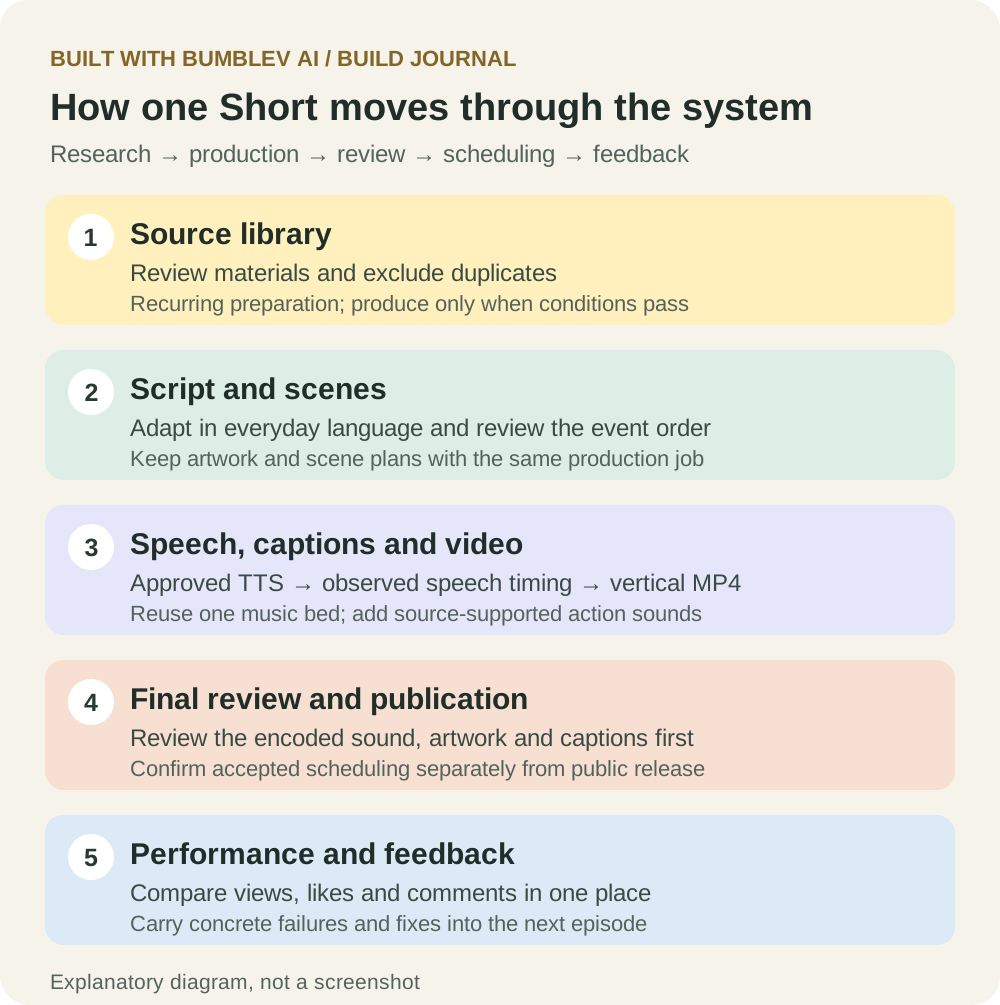
Making a short video means finding a story, reading its source, writing a script, creating pictures and speech, aligning captions, checking the finished video and uploading it. With several channels, finding out which video has reached which stage becomes another job.
On October 16, 2026, I connected those steps through ChatGPT and a private production website built with ChatGPT Sites. The board brings production records, actual YouTube uploads, views, likes and comments together. Recurring tasks are configured to prepare the next videos, with separate checks for production conditions.
This journal covers that day’s work and the subsequently checked state. Channel names, channel addresses and video links are omitted. The illustrations are explanatory reconstructions, not screenshots of the private board. This is my operating workflow, rather than a new automation product for sale.
Why I built a production website
Asking for a script, then speech, then a video in separate messages scatters the results. One video may have narration while another is waiting for source review. I wanted to see the saved work, current stage and next action without relying on memory.
The first board brought together sources, scripts, characters, speech and final review. Later that day, I reorganized the main screen: combined views, likes and comments at the top, channel summaries below, followed by a shared video library. The default order is cumulative views, with alternatives for likes and recency and a channel filter.
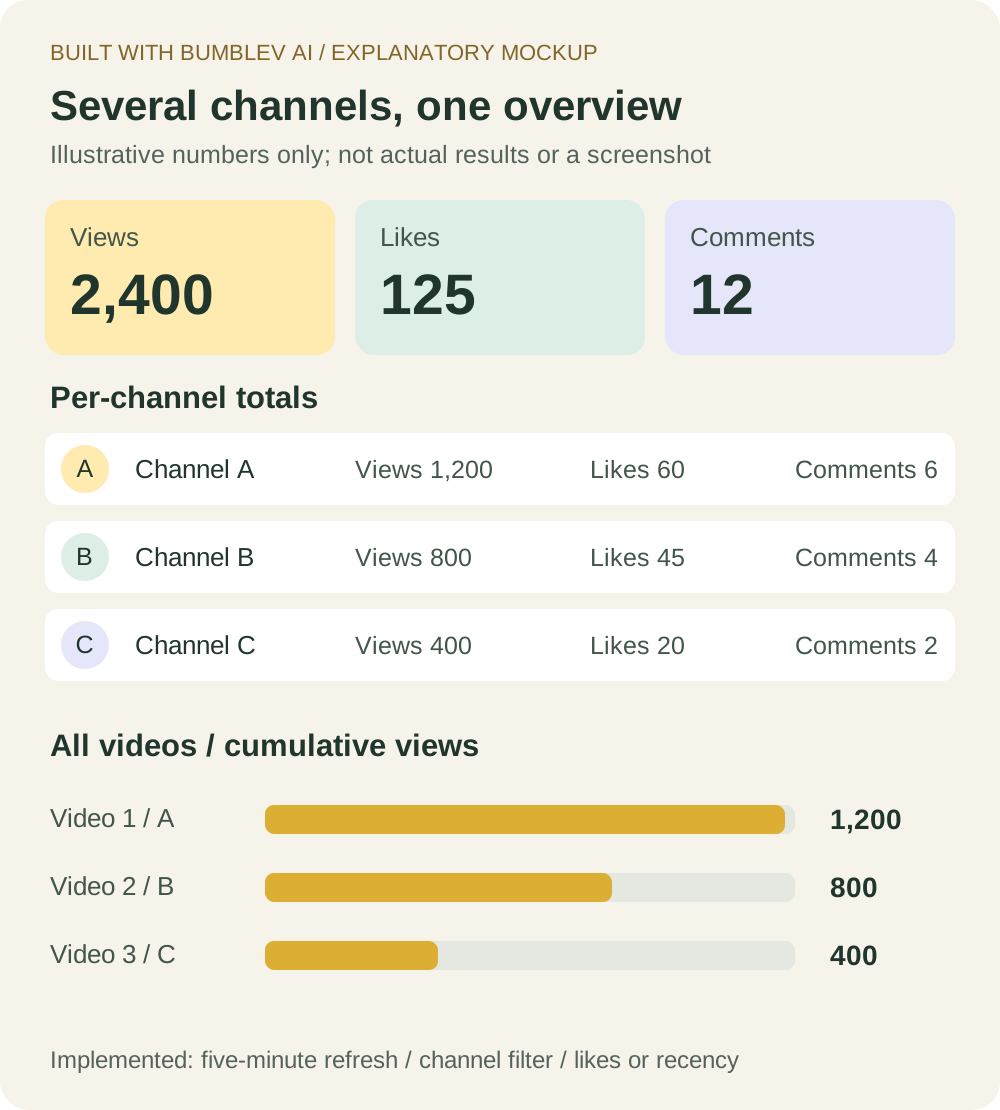
Channels A, B and C are anonymous labels. Branding and thumbnails are omitted; the numbers are illustrative examples, not actual performance.
The totals have a specific scope: public videos uploaded through this production board. They are not a complete historical report of everything ever posted to the channels. Private and unavailable videos are excluded from public totals. Missing provider counts remain unknown rather than becoming zero.
What each tool does
| Tool | Its role |
|---|---|
| ChatGPT | Helps implement features, read sources, refine scripts and carry out production and review work. |
| ChatGPT Sites | The private website for sources, scripts, speech, reviews, schedules and performance. |
| Gemini 3.8 Flash TTS | Creates narration from reviewed text, with approved voices and delivery instructions. |
| Railway speech bridge | Passes authenticated requests to the speech API, keeping its key out of the browser. |
| Python and FFmpeg | Assemble artwork, speech-aligned captions, narration, music and effects into vertical MP4 files. |
| ElevenLabs | Created reusable music and some effects; speech recognition checked caption timing in the measured example. |
| Server records and storage | Preserve source usage, generation requests, files, reviews and upload sessions; the board uses Cloudflare D1 and R2. |
| YouTube API | Uploads through authorized connections, checks scheduling/publication and reads statistics. |
| Scheduled ChatGPT tasks | Start a defined production procedure or check conditions at configured times. |
The board brings the work together; other services generate speech and assemble media. Leaving the website open is not required. Creating a website alone also does not activate recurring production. This path is separate from the SNS marketing workflow described earlier.
Following one video through production
1. Check and retain production materials
Materials are reviewed before production. The private library retains their check date, summary and usage state so previously used or duplicate items do not become new productions.
If material cannot be sufficiently verified or important information is missing, work can stop before paid generation. AI should not fill those gaps with invented details.
Reading material does not grant automatic reuse rights. Quotation, artwork and photos require their own checks. Scripts should not add unsupported dialogue or endings.
2. Review the entire script for a first-time listener
Shortening every explanation can make a story harder to follow. Viewers still need to know who spoke, why somebody acted and how events connect. I asked for familiar words, clear roles and the actual sequence of events, starting directly with the story.
An early script was confusing despite being short. That feedback became a lasting review step: read the narration in order and check who did what, when and why. Grammar and vocabulary checks alone are insufficient. Changing the source or script invalidates the old review.
3. Fix the voice and save each generated recording
After listening to samples, I saved approved voices and delivery instructions. Separate content profiles keep the delivery consistent.
The server checks script readiness before narration generation. Each request retains provider-reported tokens and its outcome, including retries. Playback and downloads read saved audio instead of generating again. Earlier text, image and sample costs were not fully recorded and remain unmeasured.
4. Align captions and assemble pictures and sound
The measured example used six illustrations and 46.64 seconds of narration. Captions follow the spoken sentences. Changes use observed word times in the saved recording, rather than distributing the duration by character count.
Output is 1080×1920. A framing bug left an illustration too small, so the scene must now fill its allocated region while retaining aspect ratio. If cropping loses an essential face or action, the artwork needs recomposition. I chose still scenes rather than constant animated zooms.
One saved background track and a sound-effects bank are reused. Sounds should match source-supported actions. Feedback that music and effects were inaudible led to stronger requirements for the next videos: review the final mix, relative levels, effect timing and mono playback. A music file existing does not prove viewers can hear it. Earlier videos do not automatically include later improvements.
5. Review the encoded file and publish that exact version
The final MP4 needs inspection of speech, music, pictures, captions and the ending. Internal speaker directions and voice labels appeared in an earlier version, so every cut and the last frame now need checking for production-only text.
Review records bind to the final file’s digest, an identifier calculated from its contents. Changing that file does not inherit the old approval. Upload records bind the actual destination, source, job and release slot. Interrupted transfers resume a saved session instead of blindly starting another upload.
Starting a task, accepting an upload, scheduling a video and making it public are different states. Scheduled means YouTube confirmed processing and the exact future release time. Published means public status was verified on the correct destination.
How the recurring work is configured
A task contains a procedure as well as a time: approved sources and voices, required reviews, how to resume saved work and when to report a blocker. Registration does not prove future executions will succeed.
| Workflow | Execution pattern | Work |
|---|---|---|
| Prepare materials | Recurring task | Review and privately retain materials needed for production. |
| Produce videos | Before release | Create and review new videos, then attempt scheduling. |
| Scheduled release | Configured publication time | YouTube releases videos that have actually been accepted into its schedule. |
| Check conditions | Periodic check | Skip generation and posting when production conditions are not met. |
This table explains the automation pattern. Individual operating schedules and material selection remain private. Task configuration and successful execution are separate states.
An earlier release slot was missed. Work starting had been too easy to confuse with an accepted public-release schedule. The revised procedure begins with preparation time before release, records each channel independently and resumes existing work. The preparation buffer is not a measured production duration.
Condition checks run periodically and retain skipped results. If nothing qualifies, the workflow does not force a video into an empty slot.
How views and likes come back into the board
YouTube’s actual video ID is saved with each upload. Statistics are read for that ID and attached to the matching card, rather than inferred from a draft title. The system does not reupload to obtain statistics.
The board totals counts by channel and across tracked public videos. The shared library ranks by cumulative views. Default refresh is five minutes, with manual refresh available. It is not second-by-second analytics. Read errors retain the last successful counts and check time, keeping old data distinguishable from fresh results.
Monetization progress bars were also added, but ordinary view totals do not automatically equal the qualified views used for eligibility. Those inputs are kept separate; missing values remain unfilled. A bar does not establish eligibility or approval.
Recorded costs, with their limits
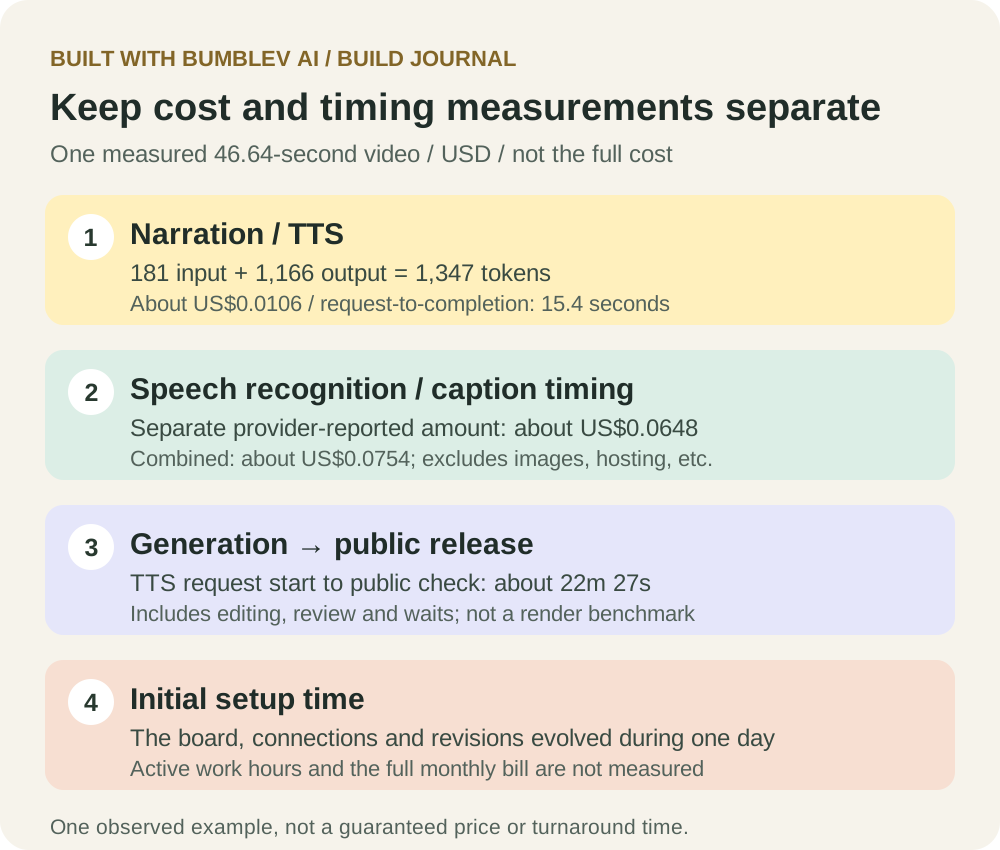
The clearest example is a 46.64-second video, six pictures, one narration request and no retry. All amounts are USD and differ from a complete paid invoice.
| Recorded item | Amount | Coverage |
|---|---|---|
| Gemini narration | About US$0.0106 | 181 input and 1,166 output tokens, estimated at the dated standard paid rate. |
| Recognition for caption timing | About US$0.0648 | Amount reported by a separate provider. |
| Those two items combined | About US$0.0754 | A partial subtotal, not the video’s total cost. |
| Initial shared music generation | US$0.0600 | One reusable saved asset. |
| Initial 12 action effects | US$0.0126 | Reusable assets; with music, US$0.0726 once. |
| Artwork, scripts, rendering, hosting, subscriptions and correction time | Unmeasured | Excluded from this accounting, rather than free. |
Narration cost is input tokens times the input rate plus output tokens times the output rate. The recorded 2026 standard rate is US$0.50 per million input tokens and US$9.00 per million audio output tokens. Date, model and tier matter; credits, allowances and tax affect the actual invoice.
For scale only, identical usage with no retries would mean about US$0.32 for 30 narrations or US$1.91 for 180. If each also incurred the same recognition amount, the two-item subtotal would be about US$2.26 or US$13.57. These are arithmetic scenarios, not complete monthly budgets. Available records cannot establish the total setup bill or monthly operating cost.
Recorded timing
The recorded speech request took about 15.4 seconds from start to completion. The same video’s public status was confirmed about 22 minutes 27 seconds after the speech request began.
The longer interval includes caption checks, assembly, review, saving/deployment and upload waits. It excludes earlier research and is neither a pure rendering benchmark nor a future average.
Roughly 17 hours elapsed between creating the board and the later dashboard update. That describes a prototype evolving throughout one day, not 17 measured hours of continuous work. Existing tools, accounts and earlier code helped. Active labor time was not precisely tracked, and a beginner should not treat this as a guaranteed setup duration.
The intended savings are in repeated assembly and finding production status. Source accuracy, understandable writing and audible sound still need attention. Future records should separate active work, generation, waiting and revisions across many videos; that long-term measurement does not exist yet.
A practical starting sequence
- Define one format: language, delivery, aspect ratio, captions and source-use rules.
- Create a private board with source, script, audio, review and publication states. Keep credentials on the server.
- Listen to a short voice sample, save the approved profile and record actual usage.
- Complete and inspect one video, including caption timing, artwork crops and final encoded sound.
- Connect and verify the actual YouTube destination; save provider results and separate read access from publishing actions.
- Add recurring tasks with preparation time, duplicate prevention, failure handling and resumption rules.
- Review statistics alongside production failures, considering comparable publication windows and content.
Bringing the work into one place was useful. Equally useful was turning a quiet soundtrack, a small picture or a missed slot into a concrete check the next run reads, instead of repeating a vague instruction to improve.
Actual production, public uploads, statistics retrieval and recurring task configuration are confirmed. Long-term unattended reliability, schedule success rates and revenue or growth effects are not. Future updates should keep those distinctions visible as the workflow improves.