I built an approval and testing dashboard for the work I give my dot
How I request features through ChatGPT dots and use a ChatGPT Sites dashboard to bring project progress, decisions and detailed manual test steps together.
Last updated
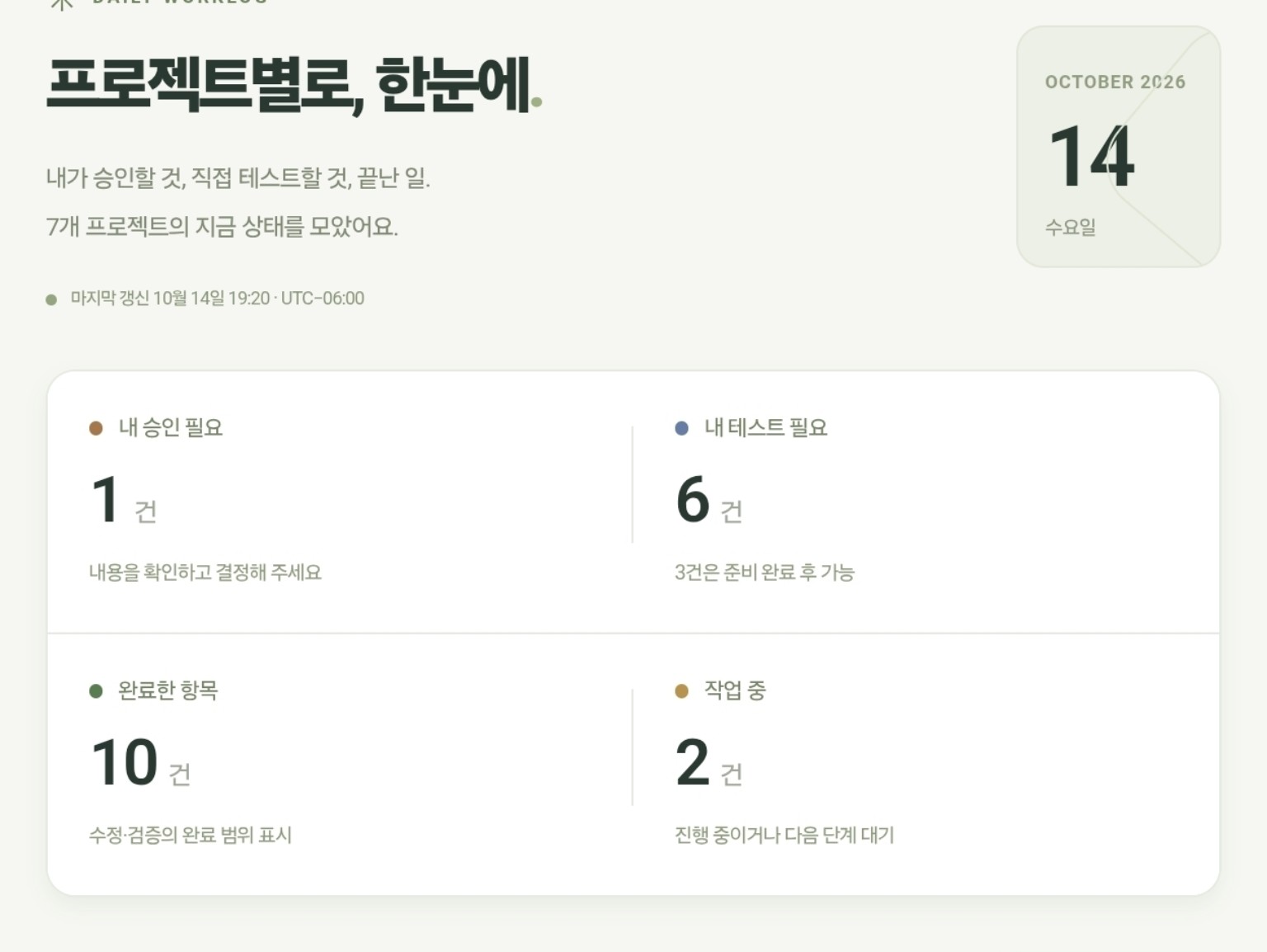
When I requested one feature, following one conversation was enough. Working on several projects changed that. One task had been updated, another needed my decision, and another needed me to open the result on my phone and try it. Finding the latest answer in each conversation became another job.
So I added a project management screen to the way I use ChatGPT dots. My dot is called Wondubu. I still explain features and give feedback through conversation, but I use Daily Worklog, built with ChatGPT Sites, to gather progress and the things that need my attention. This is the story of why I made that screen and how I use it for approvals and testing.
The image above is my actual dashboard, shown in Korean. Its last-update label is October 14, 2026 at 19:20, UTC−06:00, and it brings together seven projects. I am sharing the summary screen rather than the private project details.
I started by asking for individual features
The starting point was a feature I wanted in a website, rather than a large management system. One concrete example was comparing class damage in my published AION 2 guide. Explaining a class’s role and comparing its damage are different tasks, and I wanted the site to help with the latter too.
I asked AI to help implement the feature, inspected the output and asked follow-up questions about anything that did not make sense. When an early calculation put Cleric first, I asked for another look at what the calculation included. Changing the order alone would not explain the result. I describe that work separately in the AION 2 DPS build story.
My requests developed beyond naming a feature. I explain why I want it, what a person should do on the screen and what I need to check afterward. The following is a reconstructed example of that request style, not a verbatim quotation from an earlier conversation:
Please add a way to compare class damage in AION 2. Explain the conditions behind the results as well as showing the numbers. If a result looks wrong, check what the calculation leaves out, and tell me which screen to open and how to verify it myself.
That gives the next conversation a clearer purpose. There is a feature to build, a reason for building it and a way to inspect the result. I use my dot to help keep that work and its follow-up requests moving. OpenAI describes dots as agents that work across tools and projects and bring decisions back to the user. The dashboard in this article is something I separately built around my own needs.
More tasks made my next action harder to find
Once work was spread across conversations, I had to reread messages to distinguish an implemented change from something I had actually tested. Requests for my decisions were mixed in with progress reports. Returning later often meant first working out what I was supposed to do next.
That became a feature request of its own: bring the process together by project and separate Needs my approval, Needs my testing, Completed items and In progress. I wanted my next action to be visible without searching the conversation history.
A list of task names would not be enough. “The change is implemented” and “I tried it and it passed” describe different points in the process. A task can also need testing while its test address or required file is still being prepared. The screen therefore needs to make preparation status understandable alongside the requested action.
ChatGPT Sites gave me one place to start
Daily Worklog puts four large status summaries at the top. Before reading the detailed work, I can see the kinds of attention needed.
| Status | What I use it for |
|---|---|
| Needs my approval | Read the proposed work and leave my decision or a request for changes. |
| Needs my testing | Find what I need to try on an actual device or screen, including whether it is ready. |
| Completed items | Check the scope of the work and verification that has finished. |
| In progress | See work that is continuing or waiting for preparation before its next step. |
The supplied screenshot shows one approval, six tests, ten completed items and two items in progress. The testing summary also says that three items require preparation first. These are counts at the time of that screenshot. Seven projects can contain more than seven tasks, and one project can have several separate decisions and tests.
The last-update time matters too. Opening the dashboard now does not mean every detail was checked a moment ago. A visible timestamp tells me which summary I am reading. I am not presenting this screen as proof that every conversation and repository is synchronized continuously and completely.
Approval needs enough context to make a decision
I wanted more context than a question asking whether to continue. I need to see what changed and what decision is now required. I use the dashboard to review that work and leave my approval or explain what should change first.
For an interface proposal, that means reading the reason and looking at the proposed result. If there are choices, I ask for their practical differences too. This makes it easier to decide without rereading the full history.
I also distinguish the decision I record on my dashboard from a service’s own permission checks. The dashboard gathers my decisions and feedback; a connected service may still require its own confirmation. OpenAI’s dot controls guide explains work review, permissions and approvals. An approval card by itself does not establish that every deployment or external action executes automatically.
I ask for test steps I can follow immediately
Detailed testing instructions are a central part of this workflow. “Please check it” leaves me asking which address to open and which button to press. I therefore ask for a procedure when a change needs my own testing.
This is an example summarizing what I ask for, rather than a verbatim historical quotation:
For anything I need to test myself, give me the address or version, the menus and buttons to use, the steps in order and the expected result at each step. If it is not ready, explain what preparation is still needed. Make it detailed enough that I can follow it and report the result.
Using the published DPS screen as an example, “check whether the ranking works” can become a more useful sequence:
- Open the specified Korean DPS page and check its address and source-review date.
- Open the weekly comparison and look for the period, class values and record counts.
- Expand the completed-week section and check whether the index and DPS explanations are distinguishable.
- Switch to English and check that it opens the English version of the same feature.
- Use the page on a phone and check that the table and menus can be read and operated.
This is an illustrative test procedure, not a claim that I ran and passed all five checks while writing this article. For a real task, I use the steps and expected results that match that particular change. Knowing whether a test is ready also helps me avoid trying to start before the required page or file is available.
Specific steps make specific feedback easier
When the procedure is clear, my feedback can identify the exact point where the result differed. I can include the address or version, device, step, expected behavior and actual behavior, with a screenshot when useful.
For example, “The English version is wrong” is less informative than “I selected the language switch on the Korean article, but it took me to the article list instead of the English version of that article.” That sentence is an example of a useful report format. It tells the next task what to inspect.
The working loop is request a feature → have the dot move and organize the work → review it in the dashboard → approve or test it myself → report the result → request the necessary correction. It supports returning to an implementation after trying it, rather than treating the first generated result as the end of the job.
The feature I made helps me work with AI
The change is in where I look before deciding what to do next. Previously, I searched the latest replies across several conversations. Now I start with the dashboard to see whether a task needs my decision, an actual test or further preparation. Then I read the detailed explanation and continue the relevant conversation.
I have not measured a percentage reduction in time. What I wanted was a clearer place to find the work I had assigned and the judgment and testing still needed from me. Bringing my hands-on feedback into the same process is the useful part of this feature.
Daily Worklog is my personal management screen. This article shares its summary and the way I use it; it does not publish the internal project list or personal work links. For the features that are publicly available, the build notes collection has the development stories for the AION 2 guide and S&P 500 website.
Experience and supplied screenshot dated October 14, 2026. Official dots documentation checked on the same date.