How to Brief an AI: A Practical Prompting Workflow from Building Things
Turn an idea into a clear goal, useful context, working constraints and completion checks. Break larger projects into manageable tasks, or ask another AI to prepare the brief first.
Last updated
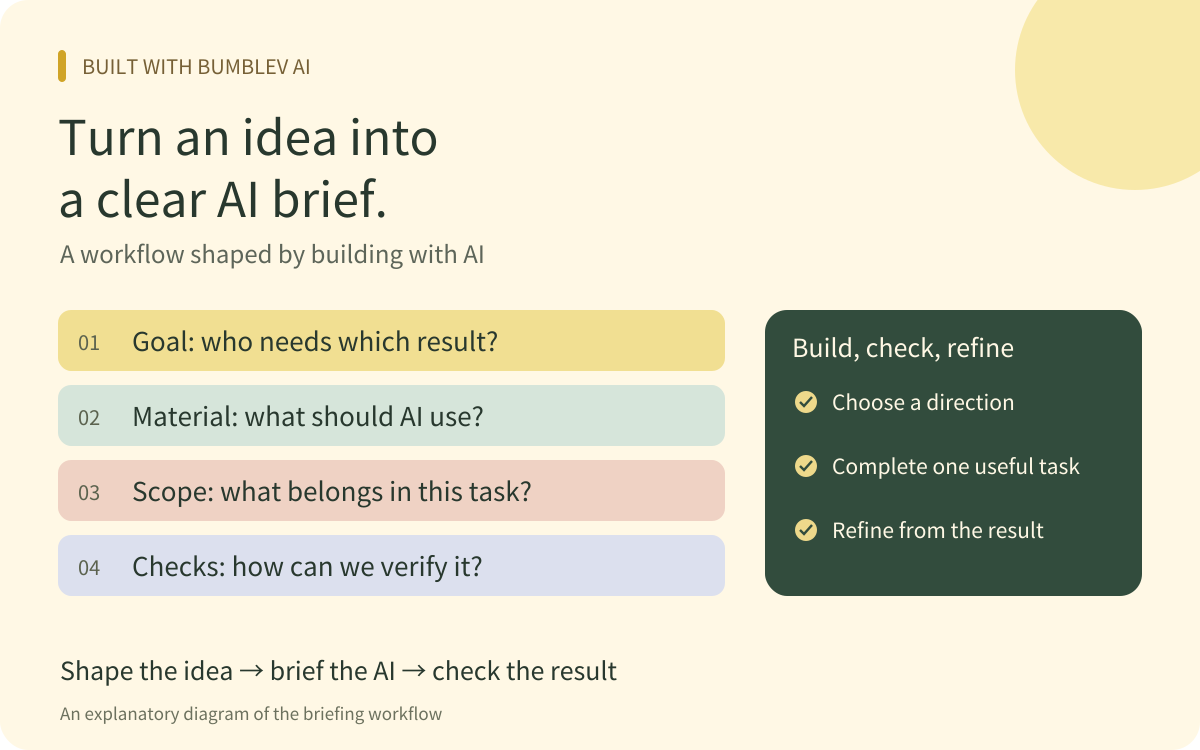
When I build something with AI, the first useful step is explaining the problem I want to solve. I do not need to begin with development terminology or a memorized prompt formula. I can start with who will use the result, what should become easier and which materials the work should use.
Working through different builds taught me that keeping the goal clear throughout a task matters as much as the opening request. Set a direction, make a manageable part, inspect it and use the result to refine the next request.
This guide explains the workflow I took from that experience. Its examples use fictional situations created for readers to adapt.
1. Organize the request into four parts
Write down the four things below before assigning a task. A small change may need only a sentence or two. A project with several connected features benefits from separate fields.
| Part | Question to answer | Fictional example |
|---|---|---|
| Goal | Who should be able to do what more easily? | Help a study group find the learning material it needs. |
| Material | What should the AI use? | Use my attached resource list and the current page. |
| Constraints | What is in scope, and what should be preserved? | Add search for now; preserve the existing resources and categories. |
| Completion check | What behavior would demonstrate completion? | Search works by title, and an empty result shows a useful message. |
If the idea is still unclear, say so. “I want to solve this problem, but I have not decided what form it should take” is a reasonable starting point. Also explain whether you want to compare plans or implement a direction already chosen.
Give reference material a purpose. Identify whether a screenshot is a color reference, a file contains names to preserve, or a document supplies facts. Providing a large pile of material is less useful if the AI has to guess which parts matter.
Copy and adapt · A basic task brief
2. Assign larger work in usable pieces
Ideas tend to accumulate during a build. A request that began with one screen can grow into data handling, search, accounts and publication. As the scope expands, deciding what to verify first becomes harder too.
For larger work, I found it useful to establish the structure and then choose a small scope that lets a user complete one meaningful action. In the fictional study-resource page, that could mean browsing and searching the resources before adding more capabilities.
A small scope does not mean changing one button at a time. Keep connected screens and behaviors together when they are needed to verify a working flow. State what this phase should complete, and receive ideas for additional scope separately.
| Phase | Work to assign | Condition for moving on |
|---|---|---|
| Choose the direction | Clarify the goal, required material, features and structural choices. | The intended result and first scope are clear. |
| Build the first useful flow | Implement enough for a user to finish one action. | There is something to open or run. |
| Inspect the result | Check normal use, empty results and error conditions. | Results and remaining issues are documented. |
| Extend the feature | Use those findings to add the next capability. | The new feature works while the existing flow is preserved. |
Copy and adapt · Plan and divide a larger task
A short wording change with an agreed direction does not need an elaborate planning phase. Ask for planning when the form or structure of the result still needs a decision.
3. Use examples to explain the standard you want
Abstract descriptions did not always communicate the tone or interface I had in mind. Providing a reference and explaining which part I liked made the request more concrete.
For writing, add the reader and purpose to a request for a friendly tone. For example: explain feature names to a first-time user, include an action they can follow and describe the expected result. For an interface, explain what the user should do first and which information matters most.
You do not have to copy an entire example. Identify what should be borrowed and what should change. A factual source and a style reference have different jobs: numbers or features in a writing sample should not silently become facts about the new task.
4. Ask another AI to prepare the prompt first
An AI can help turn an ordinary explanation into an execution brief. Describe the idea in your usual words, ask it to identify missing conditions and request a prompt you can paste into another conversation.
Keep preparation and execution clear. Use the first conversation to refine the goal and conditions. Give the second conversation the finished brief and the material it needs to perform the task. A separate conversation may not have the earlier discussion, so include the files and reference addresses it should receive.
Read the prepared prompt before using it. Remove unwanted features and correct assumptions presented as facts. The standard is whether it accurately describes your intended task, rather than how long or technical it sounds.
Paste into another AI · Prepare an execution prompt
5. Use the result to make the next request specific
Some requirements only become apparent after trying a result. Instead of predicting every situation before starting, inspect the work and use what you observe to guide the next revision.
Feedback should include where the problem occurred, what you did, what you expected and what happened. For the fictional resource page: “On my phone, entering a search term produces no results, although the attached list includes that title.” You can report that observation without deciding the cause in advance.
Ask the AI to be specific about its checks as well. Knowing what was run, in which environment, and what remains unchecked helps me decide what to try myself. When files or code change, include the previously working flow in that review.
Copy and adapt · Review the result and hand off the work
Start simply and keep the criteria with the work
The workflow I kept from building is to describe the goal, supply relevant material and divide the work into scopes that can be checked. Then use the actual result to improve the next request. Keeping the brief and the current state together also makes it easier to explain the starting point to another conversation or AI.
ChatGPT and other AI products may have different tools and file access. After handing over a brief, inspect the actual deliverable. Official OpenAI guidance on context, examples and success criteria also informed how I organized this approach.
To start, fill in the goal and material in the basic brief above. If the idea is still taking shape, use the prompt-writing request and describe it in your own words.
This workflow draws on production experience. The examples use fictional situations for illustration. Official sources were checked on October 18, 2026.