Do Threads and Instagram automation have to cost money? My solo marketing setup
How I connected AI and free-tier tools for a solo marketing workflow, with a real Threads post, Instagram requirements, costs, improvements and reasons to choose a paid service.
Last updated
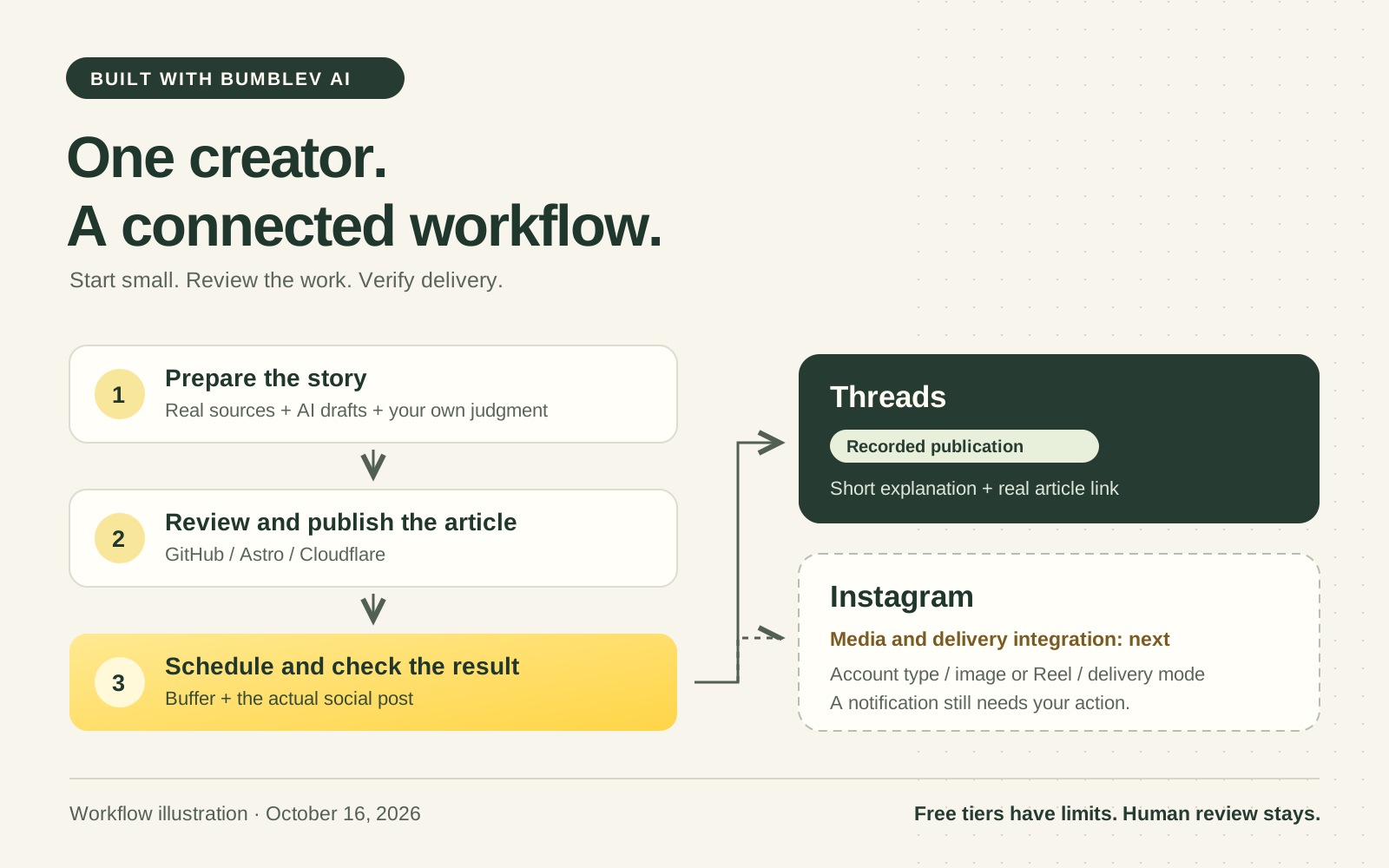
I keep seeing offers on Threads, Instagram and YouTube promising to automate content and social publishing for a fee. The convenience is appealing. But does someone promoting one small website need to buy an automation package immediately? I decided to start by connecting the AI tools I use with services that offer a free starting point.
This is a record of how I prepare articles for Built with BumbleV AI, adapt them for social channels, schedule delivery and check the result. It is not a launch announcement for automation software I sell. My aim is to make the recurring work manageable for one person, rather than to promise automatic traffic or revenue.
The scope matters: as of October 16, 2026, Threads is the channel with a verified publishing record in this workflow. Instagram needs its own media preparation and publishing checks. I explain the applicable steps and outstanding work below; I am not presenting both channels as an uninterrupted, fully unattended operation.
The cover is an explanatory workflow illustration, not a screenshot of an application or evidence of marketing performance.
What I mean by starting for free
I still use software: AI, GitHub, hosting and Buffer. What I wanted to avoid was assuming that an expensive automation package or setup service had to be the first purchase.
Writing a post yourself and putting it into a free scheduler already automates its delivery time. AI drafting and code connecting services can come later. There is no need to automate everything at once.
I cannot describe my entire working environment as having zero total cost. An AI subscription or API, a domain and time spent maintaining connections can all cost something. Free services also have limits. A publishing workflow that can start on free tiers is different from a verified total of my own spending. This article is not an invoice-based cost audit.
I divided the work into four parts
“Have AI do the marketing” is too vague to build around. I separated the recurring tasks instead.
| Task | Tools and their role | What I check |
|---|---|---|
| Find possible topics | GitHub Actions prepares private ideas from changes to my public projects. | Whether a change matters to readers or merely refreshes data. |
| Prepare the writing | AI and a Streamlit management screen help prepare articles and channel-specific copy. | Sources, actual test records, missing explanations and publication scope. |
| Publish the website | GitHub stores the writing; Astro builds the pages; Cloudflare serves them. | Whether the real article URL and both language editions open. |
| Deliver social posts | Buffer handles connected accounts and scheduled delivery. | Accepted versus actually published posts, correct links and duplicates. |
Streamlit is my private management interface. GitHub holds writing and change history and runs scheduled jobs. Astro turns the writing into webpages, while Cloudflare makes those pages available to readers. Buffer handles social connections and scheduling. Readers do not need to reproduce this whole stack to schedule a post.
AI helped with requests, code and drafts. The management application also implements a Gemini drafting path. That does not mean every article was automatically generated by one model, or that giving the drafting system a URL proves it opened and verified that source.
Threads gets a short explanation and the article link
My rule is simple: the website holds the detailed explanation; Threads explains what a tool does, where it is useful and where to read more. I do not paste the entire article into the social post. I also keep the BumbleV character’s voice consistent.
There is a concrete example from October 15. After publishing an NVIDIA PAIR article, I posted a short explanation on Threads describing its use across multiple PCs, who might find it useful and the limitation that it does not combine GPU memory. The post links to the longer website explanation. The actual Threads post is available, although viewing content may require a platform login.
The recorded submission used the Buffer interface, followed by a delivery check. Having API integration code in the repository does not make that particular post a background API publication. I distinguish what was actually used from the capabilities implemented for future repetition.
Here is a reconstructed request example, based on my editorial rules rather than a verbatim historical prompt:
Adapt this article for Threads. Explain what the tool does and whose task it helps with. Do not invent performance tests or revenue results. Keep the relevant limitations and link to the actual published article for details.
X remains a manual channel: I prepare copy, keep it in an outbox and paste it myself. I chose the scope that fits my operation instead of connecting every channel at once.
Instagram needs media and a publishing check of its own
An Instagram post is not finished just because a short Threads caption and a URL exist. It needs an image or Reel, a cover, appropriate text and a caption. A URL in an ordinary feed caption is also not a complete website navigation plan; the profile link and the instruction to use it need attention.
Buffer’s Instagram publishing guide says automatic publishing requires a Professional account, either Business or Creator, and a supported post. Personal accounts and unsupported features or media conditions may require a phone notification and manual completion in Instagram. Automatic and Notify Me are different delivery modes.
My repository currently implements text-and-link sending for Threads and Facebook. Uploading Instagram images and video through the same management interface and verifying their delivery needs further work. Connecting an account, scheduling a post and publishing without intervention each need to be checked.
My first Instagram step would be one article, one original image and one caption, scheduled in Buffer and checked on Instagram afterward. Once that works reliably, I can extend media production and upload connections. I am not claiming a completed YouTube production-and-upload pipeline or automated comments and DMs.
A practical way to start
- Choose one channel and one piece of content. Start with a published article or a tool you have actually used. Prepare the explanation and destination link.
- Write it yourself or ask AI for a draft. Check the introduction, a concrete use case, limitations and the real article address. Separate personal testing from information read in official documentation.
- Connect the necessary channel in Buffer. Complete the platform’s login and permission process, then verify the account shown. For Instagram, check account type and delivery mode too.
- Use Buffer’s own scheduler first. Check the time zone, preview, destination and publishing time. This already removes the need to return at the exact posting time.
- Open the actual post afterward. Check its text and link. On Instagram, make sure a reminder was not mistaken for a published post. If the outcome is uncertain, inspect Queue and Sent before trying again.
- Connect code only where repetition justifies it. I implemented a path from the management screen to Buffer’s API, the interface programs use to send requests to each other. That is optional for a beginner.
API keys belong in the service’s secret settings, not in public articles or committed writing. Updating an original draft also does not update a post already queued in Buffer; scheduled changes and cancellations need separate attention.
What fits within the free tier?
The Buffer pricing page, checked on October 16, 2026, lists a free plan with up to three channels, ten queued posts per channel, one user, one API key and 3,000 monthly requests. Ten refers to simultaneous scheduled posts, not a lifetime or monthly total of ten publications. Slots can be refilled after posts go out. API requests do not equal post counts: account lookups and status checks also use requests.
For example, connecting one brand’s Threads, Instagram and Facebook Page uses three channels. Preparing one post per day for a week puts seven posts in each queue, within the queue limit. That does not automatically produce Instagram media or review the writing. Check the current signup page because limits and supported features can change.
A website is not required to begin scheduling social posts. I connected mine because I already operate it. Buying a domain or an AI subscription should not be treated as the entry requirement for this first step.
Is this enough for one person to handle the marketing?
For a small brand, it is approaching a workable way to handle recurring content operations alone. Topic preparation, detailed articles, short summaries, website publishing, scheduling and delivery records fit into one process. That reduces repeated entry and makes it easier to trace which piece went to which channel.
I particularly like being able to set my own rules: do not promote unreleased projects, do not treat routine data updates as new features, maintain Korean and English editions, and use short Threads explanations that lead to the full article.
That is a content delivery process, not evidence of marketing success. Choosing useful topics, answering readers and deciding what brings meaningful visits still need attention. I do not have measured time savings, traffic growth or revenue results to report. The system is not managing paid advertising budgets or optimizing campaigns for me.
What still needs improvement
Incomplete articles: generated tool articles had missing introduction or task-specific guidance sections. I asked for both to be filled consistently. Passing a length check is insufficient; the reader needs to understand what to input and how to recognize a useful result.
Topic quality: a routine data-file update could be recommended as a story. I strengthened the distinction between that and a meaningful change to a feature. A new commit is not automatically something worth promoting.
Delivery and duplicates: a queued post can fail later. A timeout during submission can tempt a second click that creates a duplicate. The management code records per-channel results and stops retries when the result is uncertain. It does not guarantee exactly one publication under every network condition. Checking the actual destination still matters.
Instagram media and measurement: a caption copied from Threads is only a starting point. Images, Reels and a practical route to the article need preparation. The application can add UTM labels to distinguish link sources, but those labels alone are not a completed performance report. Collection settings and actual visits also need review.
Security and recovery: expired account permissions or exposed keys can interrupt publishing or permit unwanted actions. Use only necessary permissions, enable two-factor authentication and revoke and replace exposed keys. Stronger management-interface authentication, failure alerts, manual recovery and a clear pause control are further improvements. I requested daily automated reviews, but there is also a record of pausing that schedule during quality work. I am not presenting it as an uninterrupted daily service.
When a paid service may be the better choice
This approach suits a small operation I can inspect myself. Dozens of promotional websites and multiple brands change the calculation. Ten brands with three social accounts each mean thirty channels, well beyond a free three-channel allowance. Distinct audiences, editorial calendars, permissions and publication mistakes become substantial work; duplicating the same message everywhere is not the goal.
| Situation | What I would consider |
|---|---|
| One person, few channels, short queues | Start with a free scheduler and manual review to learn what is actually needed. |
| Many brands, accounts and long calendars | Compare paid channel costs, bulk scheduling and brand organization. |
| Client accounts or a team | Look for roles, approval flows, change history and client reporting. |
| Multiple websites and advertising campaigns | Decide whether scheduling is enough or advertising, analytics and CRM connections are required. |
| Maintenance interrupts the main business | Compare repair time and operational risk with the price of a supported service. |
Buffer itself has free and paid tiers with different collaboration and analytics capabilities. A social scheduler does not necessarily provide ad management or customer relationship tools. I would compare my monthly maintenance time, the cost of mistakes and the support actually needed, rather than choosing only by brand name or account count. A custom workflow also becomes more expensive to develop and maintain as it grows.
For my present goal, connecting a small process made sense. Start with one real article, schedule its introduction, verify delivery and delegate the repeatable pieces gradually. That is something worth trying before buying a separate automation package. I plan to document the changes once Instagram media and delivery checks are connected more reliably.
Related: The dashboard I built to review work with my dot · More build stories
Written against recorded work and the repository implementation. External service limits and Instagram publishing conditions were checked on October 16, 2026.