Ollama: One-task guide
Explore local model execution, VS Code integration and documentation-based comparison for Ollama v0.40.6.
Last updated
Menus and supported features can change. Compare the source-check date below with your current app version.
This guide follows one task: choose an Ollama local model in VS Code Chat, ask it to turn a small fictional fruit list into a two-column table, and check the total. The steps and interface explanations come from official documentation. They were not executed in this environment. Expected output below is a checking criterion, not a captured model response.
The selected release is Ollama v0.40.6, published on October 16, 2026 UTC. Sources were checked and the manuscript was revised on October 20, 2026. The connection sequence follows the VS Code guide pinned to that release commit. Official release · VS Code integration guide
1. Prepare the application and a model
You need VS Code 1.127 or newer, an installed and running Ollama instance, and an available local model. The guide explains that older VS Code versions may not reliably cancel requests from language model providers. Check those requirements before installing the extension. Cloud models are also documented, but the bounded task here is to select a local model. Requirements
If no model is ready, the quickstart’s local gemma4:e2b example is one documented starting point. For that specific model, the guide describes a download of about 7.2 GB and recommends 8 GB of available VRAM or Mac unified memory. Larger context windows need more memory; with less VRAM, system RAM may be used and responses may be slower. These are developer-provided conditions for that example, not requirements established for every model. Model preparation conditions
Use the following terminal commands to download the example model and inspect the available model list. If another local model is already prepared, record its exact name instead. The application installation and the model files are separate prerequisites; installing the application alone does not establish that a model is ready.
ollama pull gemma4:e2b
ollama list
The first line downloads the model in the quickstart example. The second inspects available models. Confirm that the expected model appears. On Linux, the quickstart also describes ollama serve when the server is not already running; it is not a reason to start a second server unconditionally. Local preparation · Model-list check
2. Open the official extension and model picker
The documented sequence is: install the official Ollama extension from the VS Code Marketplace, open Chat, open the model picker at the bottom of the Chat input, and select a model from the Ollama section. Choose the local model prepared in the previous step. The extension discovers models at http://127.0.0.1:11434 by default. Current installation sequence and address
The model picker determines which model receives the next question. The Chat panel is where you enter the request and read the response. Do not treat similarly named local and cloud entries as equivalent. The guide distinguishes local models, which do not require sign-in, from cloud models, which use the documented pull and signin steps. Record the selected model name so a later attempt can be compared meaningfully. Model addition and authentication
3. Send the example input unchanged
Use a fictional list rather than a real work document or personal information. The following is an example prompt proposed for this guide. It is not an input claimed to have been used by us or an observed result from the official tutorial. Confirm the selected model, paste the text into Chat, and send it.
Summarize only this list as a two-column table (item, quantity), then give the total quantity. Do not add items.
apples: 3
pears: 4
oranges: 5
The request asks the model to preserve three supplied items and add their quantities; it does not ask for external research. That small scope helps separate a connection problem from an answer-content problem. Keep the items and quantities unchanged until the first check is complete, even if you later want to adapt the prompt. Otherwise, differences between attempts become harder to interpret.
4. Check the expected result and completion criteria
The expected result has two columns corresponding to item and quantity, three rows for apples, pears, and oranges, quantities of 3, 4, and 5, and a total of 12. Wording and table formatting can vary. This guide does not promise a verbatim response. First check that an answer arrived; then separately check for missing or added items and verify the arithmetic.
There are two completion criteria. You must be able to read the answer to the request sent to the selected model in Chat, and a person must be able to confirm all three items, their quantities, and the total of 12. If an answer arrives with the wrong total, the connection check and the content check have different outcomes. A correct answer to this small example would not establish accuracy on larger calculations or other data.
5. Keep an input and output record for a repeat check
You can copy the prompt into a plain text file you create called ollama-check-input.txt. Copy the actual response into a separate ollama-check-output.txt and note the model name and date. These filenames are a proposed manual record, not an asserted automatic export feature of either Ollama or VS Code.
Later, reopen the input file, paste the same text into Chat, and compare the new response with the saved output. The input file preserves the request; the output file preserves what you observed. This offers a repeatable check without relying on undocumented session restoration or automatic conversation persistence. If you later share either file, inspect it for personal information first.
6. Investigate missing models or mismatched settings
If models do not appear, the official sequence is to check that Ollama is running, use ollama list to confirm available models, run Ollama: Refresh Models from the Command Palette, and then run Ollama: Diagnose Models and inspect the Ollama output channel. These checks do not guarantee a solution to every error. An unresolved connection should remain an unresolved result. Official troubleshooting sequence
Context length is a separate issue. The maximum length displayed by VS Code can differ from the amount allocated by Ollama at runtime. The guide describes opening Ollama Settings, setting the context length to at least 64k for local models, reloading the VS Code window, and resending the prompt. Larger context also affects resource needs; this tiny example is not a reason to increase settings blindly. Context-length instructions
What do the actual interface images show?
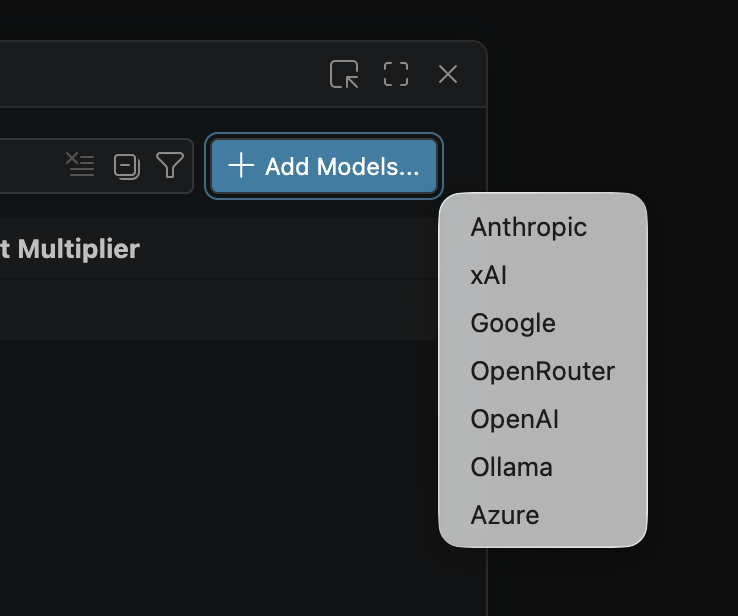
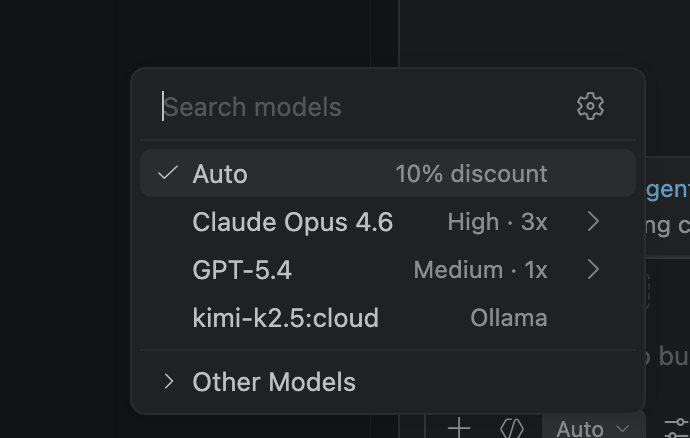
The first developer image shows selecting Ollama through Add Models… in an older VS Code setup; the second shows a model-selection list. The list helps explain where a model is chosen. The currently pinned guide instead uses the official extension and the Ollama section of the picker, so the older screenshot’s sequence should not replace the current installation steps.
These are developer-published examples, not our screenshots and not outputs from the prompt above. Each image caption links the original path, release commit, check date, and MIT reuse terms. Verification here covers documentation and image provenance. A real device connection, offline operation, privacy guarantees, and processing time were not tested.
Original BumbleV reading guide illustration; not a product screenshot or a result from our testing. Official release behind this illustration · CC BY 4.0 · 2026-10-20


Sources & further reading
- https://github.com/ollama/ollama/releases/tag/v0.40.6
- https://raw.githubusercontent.com/ollama/ollama/2476d5ead197abe04629651028f83d48dc75d2b2/README.md
- https://raw.githubusercontent.com/ollama/ollama/2476d5ead197abe04629651028f83d48dc75d2b2/docs/quickstart.mdx
- https://raw.githubusercontent.com/ollama/ollama/2476d5ead197abe04629651028f83d48dc75d2b2/docs/cli.mdx
- https://raw.githubusercontent.com/ollama/ollama/2476d5ead197abe04629651028f83d48dc75d2b2/docs/integrations/vscode.mdx
- https://raw.githubusercontent.com/ollama/ollama/2476d5ead197abe04629651028f83d48dc75d2b2/docs/faq.mdx
- https://raw.githubusercontent.com/ggml-org/llama.cpp/1ba568c5ad5c6c718984bd2bf4e7c71485b706f9/README.md
- https://api.github.com/repos/ollama/ollama