Ollama: Introduction
Explore local model execution, VS Code integration and documentation-based comparison for Ollama v0.40.6.
Last updated
Menus and supported features can change. Compare the source-check date below with your current app version.
Running a model on your own computer raises a practical question: how do you connect downloaded models to a terminal, an editor, or an application? Ollama is a platform for running open models locally or in the cloud and connecting them to other software. It helps to separate the model from the program that runs it. This introduction is based on official documentation; it is not a report of installing the product or measuring its performance. Official README
What changed in the selected release?
This series covers Ollama v0.40.6, published on October 16, 2026 UTC. Sources were checked and this article was revised on October 20, 2026. The release records changes to prevent orphaned runners on Windows and support for q2_0 tensors and file types. A runner is a process responsible for executing a model. Those changes do not establish a measured speed improvement on a particular computer, so this article does not turn them into a performance percentage. Official release
The release was selected because it falls within seven days of the source check and includes changes to model execution and model formats. Public interest was checked rather than assumed: on October 20, 2026, the official GitHub repository API reported 184,245 stars and 18,458 forks. These are observations of repository interest and copying activity, not counts of active users or scores for output quality. Numbers on a later live page can differ. Official GitHub observation source
Separate the model from the runtime
Installing Ollama does not make the application itself a single AI model. Its README shows choosing a model, running a conversation, and sending requests through a REST API or Python and JavaScript libraries. A REST API is a connection through which another program sends a message and receives a response. Choosing a model and choosing a connection method are separate decisions. Model and API examples
A terminal conversation, a model selected inside VS Code Chat, and an API request from an application are different starting points. This introduction explains those roles; the linked task guide follows the editor connection step by step. These capabilities should also be distinguished from claims about how the product was developed. The sources establish model execution and AI integration, not that AI wrote Ollama itself.
Which environments and connections are documented?
The download instructions cover macOS, Windows, Linux, and an official Docker image. The quickstart separates local model requests without an API key from cloud requests using an account and key. Deciding between a local model and a cloud service first makes the installation and authentication steps easier to understand. Download instructions · Quickstart
The VS Code guide requires VS Code 1.127 or newer, an installed and running Ollama instance, and an available model. It describes installing the official Ollama extension and choosing a model from the Ollama section of the picker below the Chat input. Documented support is different from a successful connection on a specific machine. This article supplies neither a firsthand connection result nor a compatibility score. VS Code requirements and controls
Application terms and model terms are different
The inspected repository applies the MIT license to its program source. That permission does not establish the license of every downloadable model or free access to every cloud feature. Check the model’s terms, download size, available computer resources, and connected service limits separately. A local request needing no API key also does not mean that electricity and hardware cost nothing. Local and cloud access paths
The collected documentation did not establish a complete cloud price list or commercial-use terms for every model. No fixed subscription price or unlimited usage is promised here. The README contains the developer’s privacy description, but that is not an independent security test covering every extension, connected model, or input. Establish which model is selected and where its requests go before drawing conclusions about a particular setup. Product description · Operational FAQ
What should you compare with an existing inference tool?
The comparison source is llama.cpp, a C/C++ model inference project. Its README covers prebuilt packages, source builds, Docker, and examples that download and run a model from Hugging Face. Ollama also lists llama.cpp as a supported backend. Treating the two as completely unrelated competing applications misses that relationship. It is more useful to compare the model-management and connection workflow you need. llama.cpp documentation · Ollama backends
My documentation-based assessment is that Ollama’s guides are a useful starting point when model management and editor connections are the immediate task. Readers interested in engine builds and hardware backends may prefer to begin with the llama.cpp documentation. Neither observation establishes which is faster or more accurate. That requires matching the model, settings, input, and hardware and collecting actual results. The comparison article explains what to record before making such a claim.
Start with one small input
The task guide aims to select a local model in VS Code Chat and ask it to summarize a fictional fruit-quantity list. The list is deliberately small enough for a person to check. Receiving a response and checking its arithmetic are separate steps: generating an answer does not prove that the answer is correct.
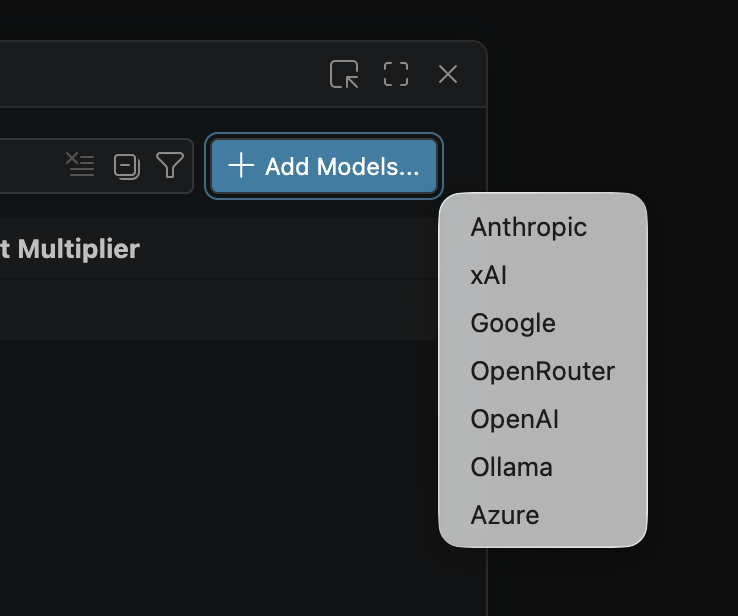
The interface images come from the developer’s public repository. They illustrate an older VS Code setup and are not screenshots of our own execution. The task guide explains how the older Add Models menu differs from the current extension instructions. Follow the linked guide for the actual sequence, example input, expected result, and repeat check, then use the documentation comparison to decide what a fair practical evaluation would require.
Original BumbleV reading guide illustration; not a product screenshot or a result from our testing. Official release behind this illustration · CC BY 4.0 · 2026-10-20

Sources & further reading
- https://github.com/ollama/ollama/releases/tag/v0.40.6
- https://raw.githubusercontent.com/ollama/ollama/2476d5ead197abe04629651028f83d48dc75d2b2/README.md
- https://raw.githubusercontent.com/ollama/ollama/2476d5ead197abe04629651028f83d48dc75d2b2/docs/quickstart.mdx
- https://raw.githubusercontent.com/ollama/ollama/2476d5ead197abe04629651028f83d48dc75d2b2/docs/cli.mdx
- https://raw.githubusercontent.com/ollama/ollama/2476d5ead197abe04629651028f83d48dc75d2b2/docs/integrations/vscode.mdx
- https://raw.githubusercontent.com/ollama/ollama/2476d5ead197abe04629651028f83d48dc75d2b2/docs/faq.mdx
- https://raw.githubusercontent.com/ggml-org/llama.cpp/1ba568c5ad5c6c718984bd2bf4e7c71485b706f9/README.md
- https://api.github.com/repos/ollama/ollama