Gemini and Apps Script: turn a Sheets summary into a Google Docs report
Generate an aggregation function in Docs Gemini, test 15 input cases, configure limited access, and save a fictional event report. Includes real captures and complete examples.
Last updated
Menus and supported features can change. Compare the source-check date below with your current app version.
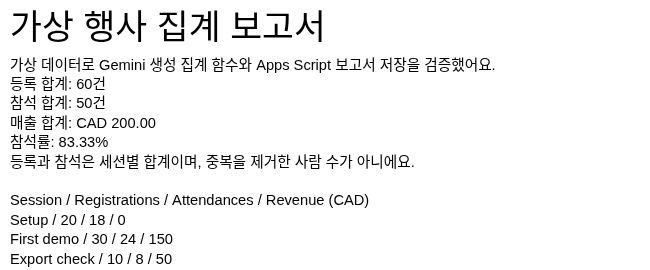
Moving totals from a spreadsheet into a report is an easy place to introduce a wrong number or percentage. Here we will summarize registrations, attendances and revenue for three fictional event sessions, then save one Google Docs report. Gemini writes a small aggregation function. We test it before connecting it to a report helper.
We performed this workflow on November 18, 2026, using desktop Chromium, Korean Google interfaces and Apps Script V8. Code generation happened in the Google Docs Gemini side panel. Execution happened in Apps Script. Our Apps Script editor did not show a Gemini button. This is therefore not a hands-on demonstration of the Apps Script native Gemini panel or an automatic agent execution feature. The exact hosted build and Gemini model name were not exposed. The downloadable report retains Korean output so both editions reproduce the same tested example; the instructions below explain the Korean labels.
1. Check access and the files you will use
In a computer browser, sign in to Google Sheets, Google Docs and Apps Script with the same Google account. No desktop application installation is involved. Work or school accounts may need administrator approval. Complete any two-step verification on your own device.
The Docs Ask Gemini feature requires an eligible Google Workspace or Google AI plan, or the applicable experimental access. If the button is missing, check Google’s availability information. You do not need to buy a new subscription just to follow this tutorial. You can study the supplied code and learn the Apps Script steps, but that would not establish that you tested Gemini generation in your own account.
We did not obtain a new API key, call Gemini API or Vertex AI, or make an additional purchase for this experiment. Gemini is used while writing code. The completed aggregation function does not ask an AI model again on each execution. Existing subscription conditions and account usage limits still apply.
2. Enter fictional data and independent check formulas
Create a spreadsheet named Event report practice and name its first tab exactly Event data. Paste the following tab-separated input into A1. It contains session labels and fictional figures, without attendee names or email addresses.
Session	Registrations	Attendances	Revenue (CAD)
Setup	20	18	0
First demo	30	24	150
Export check	10	8	50
Check that there are four columns and three data rows. Values in columns B through D must be numbers. A value stored as text, such as '20, is rejected. Registrations and attendances are session counts: the same person might attend more than one session. Do not describe the total as 50 unique people.
Put Check in F1 and Expected in G1, then enter these labels and formulas. Column F contains labels; column G contains executable spreadsheet formulas.
| Cells | Label / formula | Result |
|---|---|---|
| F2 / G2 | Registrations / =SUM(B2:B4) |
60 |
| F3 / G3 | Attendances / =SUM(C2:C4) |
50 |
| F4 / G4 | Revenue (CAD) / =SUM(D2:D4) |
200 |
| F5 / G5 | Attendance rate / =G3/G2 |
0.833333… |
Select G5 and use the toolbar’s Percent format (%) to display it as a percentage. The report displays two decimal places, giving 83.33%. G2:G5 independently check the script’s calculations. This example reads only A1:D4 and G2:G5. Adding rows does not automatically expand its input range.
3. Ask Docs Gemini for only the aggregation function
Open a new Google Doc and choose Ask Gemini at the top right. In our Korean interface this was Gemini에게 물어보기. Enter the request below in the side panel and select Submit / 제출. This reusable request combines the conditions from our generation and correction steps.
Generate Google Apps Script V8 JavaScript defining one pure function:
geminiSummarizeEventRows(rows).
Each row must have exactly [sessionName, registrations, attendances, revenueCAD].
Require a nonempty trimmed string name, finite nonnegative numbers,
integer registrations and attendances, and attendances <= registrations.
Throw Error for invalid input. Empty rows return zeros and null attendanceRate.
Return {registrations, attendances, revenueCAD, attendanceRate}.
Use null for attendanceRate when total registrations is zero.
Example: [['Setup',20,18,0],['First demo',30,24,150],['Export check',10,8,50]]
must return 60, 50, 200 and 50/60.
No Google services, network, files, email, sharing or triggers in this function.
Return one complete JavaScript code block. Do not edit this document.
Do not claim you executed the code.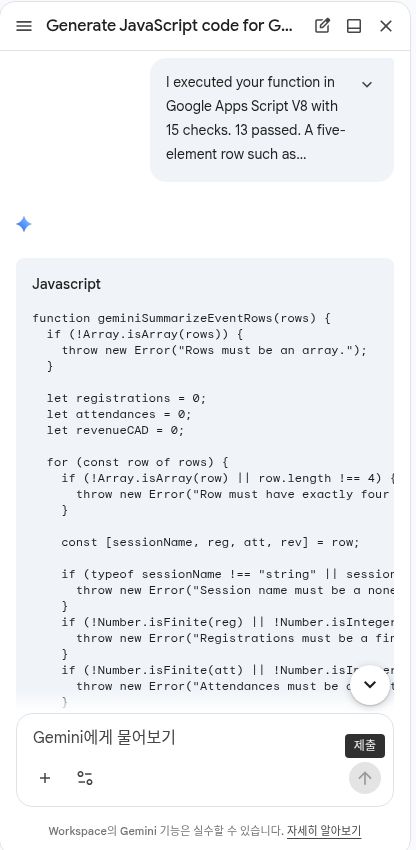
The first response produced the correct normal totals, but checked row.length < 4, allowing a five-element row. It rejected an empty name while accepting a name consisting entirely of spaces. Thirteen of our 15 checks passed. We sent the failing examples back to Gemini and requested an exact four-element check plus trimming for names. Its corrected function passed all 15 checks. This is evidence for this small fixture, not a guarantee for every dataset.
4. Move the function to Apps Script and test inputs first
From the Apps Script dashboard, select New project / 새 프로젝트 and rename it Event report practice. Use Files + → Script / 파일 + → 스크립트 to add a file named GeminiGenerated. Replace its default myFunction stub with the complete content below. geminiSummarizeEventRows is Gemini’s corrected function; testGeminiAggregation is our test helper. If you use your own generated response, keep the same function name and return fields.
Expand the complete GeminiGenerated.gs code to copy
/** Tests authored by ChatGPT; function below generated by Google Docs Gemini. */
function testGeminiAggregation() {
  const tests=[];
  function check(name,fn){try{tests.push({name,pass:!!fn()});}catch(e){tests.push({name,pass:false,error:String(e)});}}
  function rejects(value){try{geminiSummarizeEventRows(value);return false;}catch(e){return true;}}
  check('normal_fixture',()=>{const r=geminiSummarizeEventRows([['Setup',20,18,0],['First demo',30,24,150],['Export check',10,8,50]]);return r.registrations===60&&r.attendances===50&&r.revenueCAD===200&&Math.abs(r.attendanceRate-5/6)<1e-12;});
  check('empty_rows',()=>{const r=geminiSummarizeEventRows([]);return r.registrations===0&&r.attendances===0&&r.revenueCAD===0&&r.attendanceRate===null;});
  check('zero_registrations',()=>geminiSummarizeEventRows([['Zero',0,0,0]]).attendanceRate===null);
  check('decimal_revenue',()=>geminiSummarizeEventRows([['Paid',1,1,1.25]]).revenueCAD===1.25);
  check('reject_nonarray',()=>rejects(null));
  check('reject_short_row',()=>rejects([['Bad',1,1]]));
  check('reject_extra_column',()=>rejects([['Bad',1,1,0,'extra']]));
  check('reject_nonstring_name',()=>rejects([[123,1,1,0]]));
  check('reject_empty_name',()=>rejects([['',1,1,0]]));
  check('reject_whitespace_name',()=>rejects([['   ',1,1,0]]));
  check('reject_numeric_string',()=>rejects([['Bad','1',1,0]]));
  check('reject_fractional_count',()=>rejects([['Bad',1.5,1,0]]));
  check('reject_negative',()=>rejects([['Bad',1,1,-1]]));
  check('reject_attendance_over_registration',()=>rejects([['Bad',1,2,0]]));
  check('reject_infinite',()=>rejects([['Bad',1,1,Infinity]]));
  const passed=tests.filter(t=>t.pass).length;
  console.log(JSON.stringify({passed,total:tests.length,tests}));
  if(passed!==tests.length) throw new Error((tests.length-passed)+' validation checks failed');
}

function geminiSummarizeEventRows(rows) {
  if (!Array.isArray(rows)) {
    throw new Error("Rows must be an array.");
  }

  let registrations = 0;
  let attendances = 0;
  let revenueCAD = 0;

  for (const row of rows) {
    if (!Array.isArray(row) || row.length !== 4) {
      throw new Error("Row must have exactly four columns.");
    }

    const [sessionName, reg, att, rev] = row;

    if (typeof sessionName !== "string" || sessionName.trim() === "") {
      throw new Error("Session name must be a nonempty string.");
    }
    if (!Number.isFinite(reg) || !Number.isInteger(reg) || reg < 0) {
      throw new Error("Registrations must be a finite, nonnegative integer.");
    }
    if (!Number.isFinite(att) || !Number.isInteger(att) || att < 0) {
      throw new Error("Attendances must be a finite, nonnegative integer.");
    }
    if (att > reg) {
      throw new Error("Attendances cannot exceed registrations.");
    }
    if (!Number.isFinite(rev) || rev < 0) {
      throw new Error("Revenue must be a finite, nonnegative number.");
    }

    registrations += reg;
    attendances += att;
    revenueCAD += rev;
  }

  const attendanceRate = registrations === 0 ? null : attendances / registrations;

  return {
    registrations,
    attendances,
    revenueCAD,
    attendanceRate
  };
}
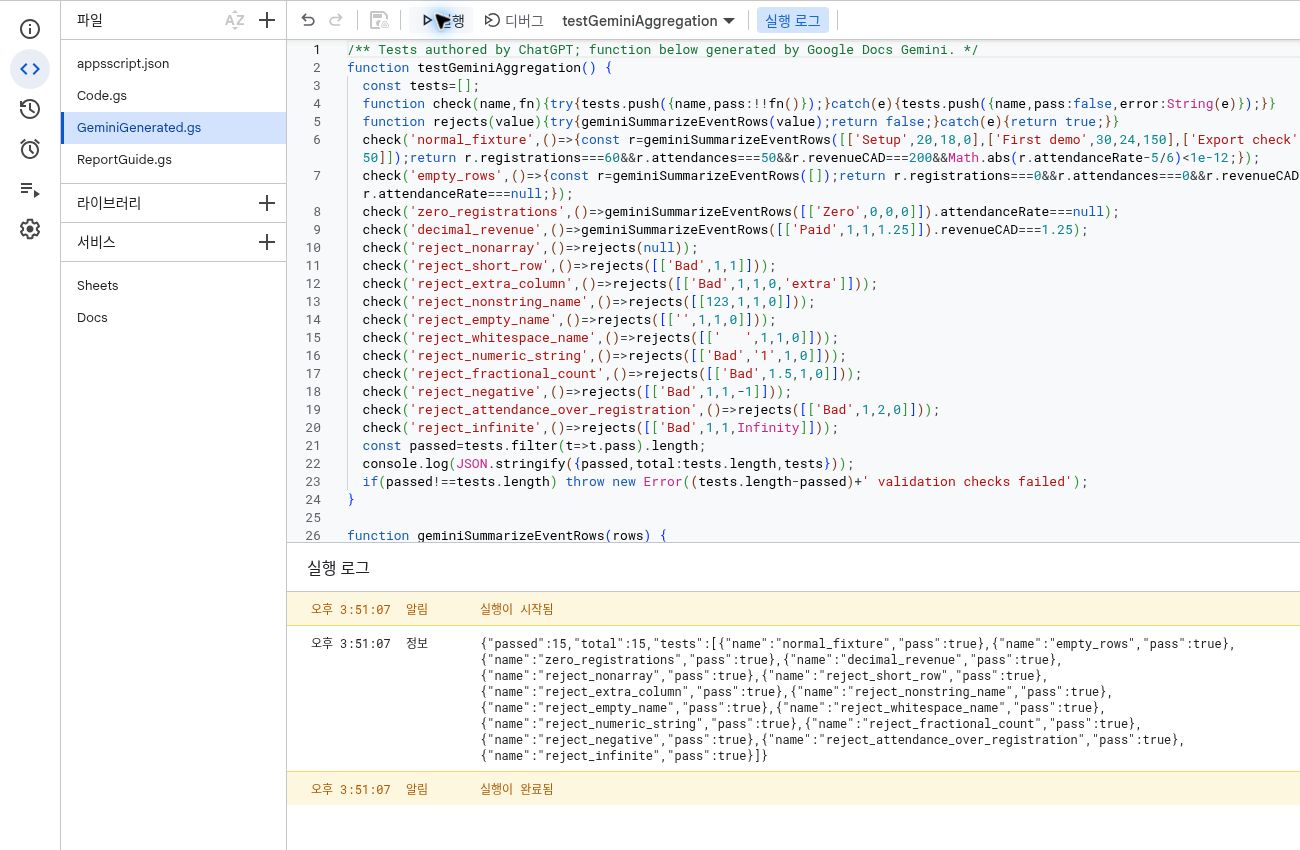
Save with Ctrl+S, select testGeminiAggregation in the function selector, and click Run / 실행. The lower Execution log / 실행 로그 should show passed:15, total:15 and execution completed. Correct an input-validation failure before continuing, even if the normal total looks right. This test does not send mail or create files.
5. Add the report helper and configure access
Use Files + → Script again to add ReportGuide and paste the complete helper below. We wrote this helper, and it calls the tested Gemini function for aggregation. In a sheet address shaped like https://docs.google.com/spreadsheets/d/FILE_ID/edit, copy only FILE_ID. Change only the quoted value on the first const sourceId = 'PASTE_YOUR_SPREADSHEET_ID'; line. Leave the matching string in the following if guard unchanged. Do not use Replace all. This field is not for a password or API key.
Expand the complete ReportGuide.gs code to copy
/** Report helper written by ChatGPT; aggregation is the tested Gemini function. */
function createGeminiEventReport() {
  const sourceId = 'PASTE_YOUR_SPREADSHEET_ID';
  if(sourceId === 'PASTE_YOUR_SPREADSHEET_ID') throw new Error('Set your source spreadsheet ID first');
  const lock=LockService.getScriptLock();
  if(!lock.tryLock(10000)) throw new Error('Another report run is active');
  try {
    const p=PropertiesService.getScriptProperties();
    const existing=p.getProperty('geminiGuideReportUrl');
    if(existing) {
      console.log(JSON.stringify({status:p.getProperty('geminiGuideReportComplete')==='true'?'EXISTING_REPORT_NO_DUPLICATE':'INCOMPLETE_REPORT_REVIEW_REQUIRED',url:existing}));
      return;
    }
    if(p.getProperty('geminiGuideAttemptStarted')) throw new Error('Previous creation outcome uncertain. Inspect Docs before retrying.');
    const data=Sheets.Spreadsheets.Values.get(sourceId,"'Event data'!A1:D4",{valueRenderOption:'UNFORMATTED_VALUE'}).values;
    if(!data || JSON.stringify(data[0])!==JSON.stringify(['Session','Registrations','Attendances','Revenue (CAD)'])) throw new Error('Unexpected source headers');
    const totals=geminiSummarizeEventRows(data.slice(1));
    const expected=Sheets.Spreadsheets.Values.get(sourceId,"'Event data'!G2:G5",{valueRenderOption:'UNFORMATTED_VALUE'}).values.flat();
    const actual=[totals.registrations,totals.attendances,totals.revenueCAD,totals.attendanceRate];
    if(expected.length!==4 || actual.some((n,i)=>typeof expected[i]!=='number'||Math.abs(n-expected[i])>1e-10)) throw new Error('Sheet formulas disagree');
    const lines=[
      '가상 행사 집계 보고서',
      '가상 데이터로 Gemini 생성 집계 함수와 Apps Script 보고서 저장을 검증했어요.',
      '등록 합계: '+totals.registrations+'건',
      '참석 합계: '+totals.attendances+'건',
      '매출 합계: CAD '+totals.revenueCAD.toFixed(2),
      '참석률: '+(totals.attendanceRate===null?'계산 대상 없음':(totals.attendanceRate*100).toFixed(2)+'%'),
      '등록과 참석은 세션별 합계이며, 중복을 제거한 사람 수가 아니에요.',
      '',...data.map(r=>r.join(' / ')),
      '', '원본 시트: https://docs.google.com/spreadsheets/d/'+sourceId+'/edit',
      '검증: 시트 G2:G5 수식 결과와 일치. Gemini 집계 함수는 별도 15개 입력 테스트를 통과했어요.'
    ];
    const text=lines.join('\n')+'\n';
    p.setProperty('geminiGuideAttemptStarted',new Date().toISOString());
    const doc=Docs.Documents.create({title:'BumbleV Gemini Apps Script — Fictional Event Report'});
    const url='https://docs.google.com/document/d/'+doc.documentId+'/edit';
    p.setProperty('geminiGuideReportUrl',url);
    Docs.Documents.batchUpdate({requests:[{insertText:{location:{index:1},text}},{updateParagraphStyle:{range:{startIndex:1,endIndex:1+lines[0].length},paragraphStyle:{namedStyleType:'TITLE'},fields:'namedStyleType'}}]},doc.documentId);
    const saved=Docs.Documents.get(doc.documentId);
    const savedText=(saved.body.content||[]).map(e=>(e.paragraph?.elements||[]).map(t=>t.textRun?.content||'').join('')).join('');
    if(!savedText.includes(text)) throw new Error('Saved document text mismatch');
    p.setProperty('geminiGuideReportComplete','true');
    console.log(JSON.stringify({status:'REPORT_CREATED_VERIFIED',...totals,url}));
  } finally {lock.releaseLock();}
}
Open the left-hand gear, Project Settings, and enable Show ‘appsscript.json’ manifest file in editor. Return to Editor, open appsscript.json, and replace its content with the following configuration in this new practice project. Do not overwrite an existing work project’s configuration to follow the example.
Expand the complete appsscript.json configuration to copy
{
  "timeZone": "America/Regina",
  "dependencies": {
    "enabledAdvancedServices": [
      {
        "userSymbol": "Sheets",
        "serviceId": "sheets",
        "version": "v4"
      },
      {
        "userSymbol": "Docs",
        "serviceId": "docs",
        "version": "v1"
      }
    ]
  },
  "exceptionLogging": "STACKDRIVER",
  "runtimeVersion": "V8",
  "oauthScopes": [
    "https://www.googleapis.com/auth/spreadsheets.readonly",
    "https://www.googleapis.com/auth/drive.file"
  ]
}
This configuration connects Sheets API v4 and Docs API v1 in the service list. For a default Cloud project automatically created by Apps Script, adding the service enables the corresponding API. If you linked a separate standard Cloud project, consult Google’s advanced services instructions for its extra setup.
Read the access scope carefully. spreadsheets.readonly permits reading all Google Sheets in the account, not just the file named in the code. Our helper reads the practice file and does not modify it. drive.file permits viewing, creating, editing and deleting specific files used with the app; it does not grant access to every Drive file. The example contains no deletion, sharing, email or scheduled-trigger operation. We replaced the initial, broader automatically detected scopes with these two explicit scopes before execution.
6. Run the helper and reopen the saved document
Select createGeminiEventReport → Run. If prompted with Authorization required → Review permissions, check that this is your own practice project and that the requested scopes match the explanation above before deciding to authorize it. An unverified-app warning is not a reason to trust an unknown project. Stop and investigate an administrator block or unexpected permission.
On success, the log shows REPORT_CREATED_VERIFIED and a document address. Open that address in a new tab. In the Korean output, 등록 합계 means registrations, 참석 합계 means attendances, 매출 합계 means revenue and 참석률 means attendance rate. Compare 60, 50, CAD 200.00 and 83.33% against the source. The helper also reads the saved document and checks that its text matches the prepared report. We reopened the document and observed the saved-to-Drive state and an only-me sharing state. Inspect the actual sharing target on your own file too. Document creation does not itself publish a website.
Run the helper once more. It should return EXISTING_REPORT_NO_DUPLICATE and the same address. This practice project stores one report. A rerun neither creates another document nor refreshes the report from changed sheet values. We checked the final connection from the Gemini function through live Sheets reads, formula reconciliation, Docs creation, saved-text verification, reopening and duplicate prevention. This final connected example was checked separately from the earlier manual-aggregation experiment.
7. Resolve the relevant error before retrying
| Message or situation | What to check |
|---|---|
| Set your source spreadsheet ID first | Replace only the sourceId placeholder with your file ID |
| Unexpected source headers | Check Event data, the exact A1:D1 labels and order, and the three rows |
| Sheets / Docs is not defined | Save the manifest and confirm Sheets and Docs appear under Services |
| Input-validation error | Check text numbers, negatives, fractional counts, attendance overflow and blank names |
| Sheet formulas disagree | Ensure G2:G5 and A1:D4 describe the same data |
| Permission error | Confirm the source belongs to the signed-in account and required scopes were granted |
| INCOMPLETE_REPORT_REVIEW_REQUIRED or outcome uncertain | Inspect the existing document and Script Properties first. Do not erase state to force a new document |
Side-panel responses can be lost when you close the conversation or refresh. Preserve the code and reasons for corrections in the Apps Script files. .gs files hold the program source; appsscript.json holds execution configuration; the Google Doc is the readable result. Finish by locating and reopening both the source sheet and output in Drive. For another dataset, preserve the existing result and use a new practice project.
To keep separate source copies, save GeminiGenerated.gs, ReportGuide.gs and appsscript.json. Copy the contents of the two text files into the corresponding Apps Script files. For a different sharing task, continue with our published Google Sheets canvas link-sharing guide. That guide is based on official documentation; its evidence scope differs from this directly executed report experiment.
Sources & further reading
- https://support.google.com/docs/answer/14206696?hl=en
- https://developers.google.com/apps-script/quickstart/automation
- https://developers.google.com/apps-script/guides/services/advanced
- https://developers.google.com/apps-script/concepts/scopes
- https://developers.google.com/workspace/sheets/api/scopes
- https://developers.google.com/workspace/docs/api/auth
- https://developers.google.com/workspace/docs/api/reference/rest/v1/documents/create