faster-whisper: Introduction
Learn how to use faster-whisper to transcribe audio files on CPU with INT8 quantization and save them with timestamps.
Last updated
Menus and supported features can change. Compare the source-check date below with your current app version.
What faster-whisper is for
This article covers the faster-whisper v1.2.1 official release, published on 2025-10-31 (UTC). The source documents were checked on 2026-10-26. This existing stable release was selected for a task explicitly requested by the reader. It is not presented as a product or update released within the last 30 days.
An audio-to-text feature often needs more than a paragraph of recognized speech. You may also want to know where each passage belongs in the original recording. faster-whisper reimplements OpenAI’s Whisper model using the CTranslate2 inference engine F1. It is a Python library to incorporate into a program, rather than a browser application with a transcription button. This series explains its documented workflow and a small timestamped-text task.
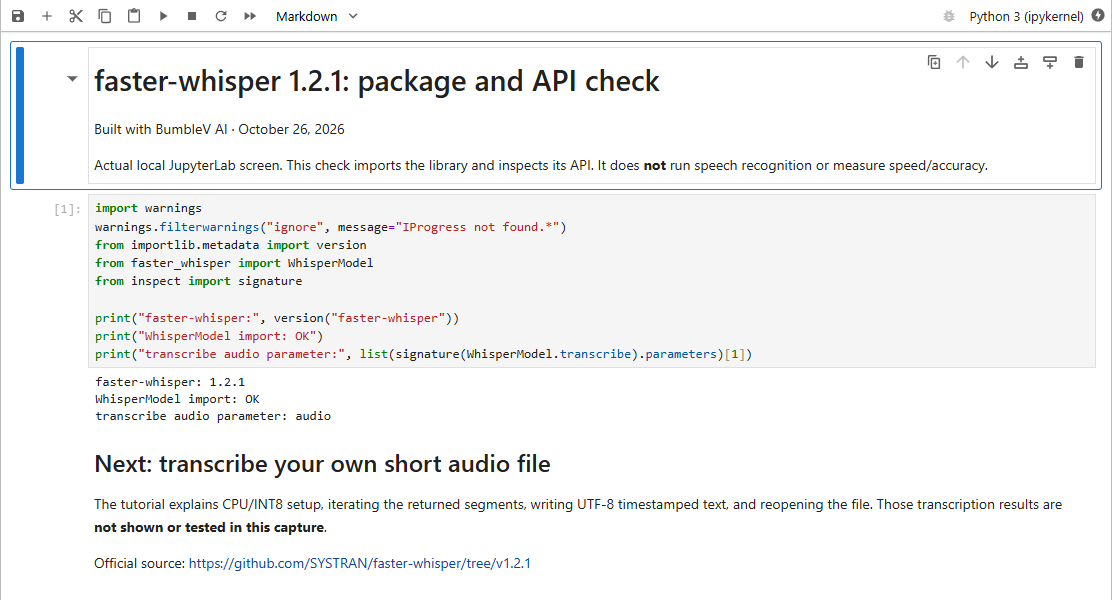
The evidence boundary matters here. The articles follow fetched official documentation, not a completed audio-transcription trial. The accompanying real JupyterLab capture verifies the installed package version and a Python API import only. It does not establish recognition quality, processing time, or successful completion of the tutorial. Read the proposed outputs below as things to check in your own environment.
The selected release and its scope
The selected v1.2.1 release notes include an upgrade to Silero-VAD V6 and changes involving clip timestamps F2. This selection is an existing stable release chosen for the reader’s requested task. Its original release date remains visible in the article; the source-check date is a separate event. Nothing in this selection establishes that it is the newest release or a recent launch.
The central workflow comes from the pinned README: import WhisperModel, initialize a model, call transcribe, and consume the returned segments F4. A segment exposes start time, end time, and recognized text, which the documented example prints together F7. The tutorial adds ordinary Python file-writing code around those values. That wrapper is an editorial example, not a claim of built-in subtitle export.
Access and environment preparation
The README describes installation from PyPI with pip install faster-whisper F3. For a guide about this selected release, pinning faster-whisper==1.2.1 makes the package choice explicit. The selected documentation requires Python 3.9 or later and describes PyAV-based audio decoding with bundled FFmpeg libraries F6. Use an isolated Python environment and check which interpreter actually receives the package before diagnosing an import error.
The documentation also describes downloading a converted model from Hugging Face Hub when a model is loaded by size D2. Prepare the network access and local storage needed for that step. A local inference library is not proof that the first run works offline, nor a blanket privacy guarantee. GPU execution has its own documented library requirements D2; the linked tutorial deliberately uses the documented CPU/INT8 initialization instead of asking the reader to configure CUDA.
How timestamped segments are produced
The CPU example initializes WhisperModel with device="cpu" and compute_type="int8", then calls model.transcribe F4. The returned segments value is a generator. The README explicitly warns that transcription starts when the generator is iterated, for example with a loop or list(segments) F5. Merely displaying the generator object is not a completion check.
For a first task, use a short recording you are entitled to process. Iterate every segment, write the timestamp and text to a UTF-8 file, then reopen the saved file and compare it with the audio. The API supports the segment fields in that sequence F7; choosing the output filename, opening a file, and deciding whether to overwrite it are responsibilities of the wrapper program. In the tutorial the overwrite behavior is stated explicitly so an earlier transcript is not accidentally treated as a new result.
What the documentation comparison can establish
The OpenAI Whisper README requires a system installation of the FFmpeg command-line tool F8. faster-whisper’s README instead describes PyAV bundling the required FFmpeg libraries F6. That is a useful distinction in setup dependencies, not a promise that one installation can never fail. Both projects provide Python examples, and the comparison article separates the examples’ output shapes from the full capabilities of either project D2, D3.
This series makes no speed or accuracy ranking. A benchmark from one documented environment is not a result for your recording or computer. If you compare implementations, record the model, hardware, numerical settings, input file and completion boundary. Keep setup and download time separate from conversion and manual correction. Consume the generator fully when checking the faster-whisper side F5.
When this workflow is a reasonable next step
The intended audience is someone comfortable running Python and checking a text file against its source audio. If the task is a single short note, consider whether a library installation is worth the preparation. That is an editorial decision about the amount of work, not a claim that the tool is unsuitable for short files. The tutorial is a route to understanding the API and its saved output, not evidence of a finished production service.
Public package access does not establish that every model, hosted service, or computing resource is free. Check the terms of the model you choose and the resources you run it on; no cloud price has been verified here. Start with a small, inspectable task and retain the original recording. A file existing on disk is insufficient evidence of a good transcript: check missing passages, incorrect words, timestamp alignment and readable UTF-8 text before using the result. The next article supplies the full wrapper and explicit completion criteria.
Original BumbleV reading guide illustration; not a product screenshot or a result from our testing. Official release behind this illustration · CC BY 4.0 · 2026-10-26
Sources & further reading
- https://github.com/SYSTRAN/faster-whisper/releases/tag/v1.2.1
- https://raw.githubusercontent.com/SYSTRAN/faster-whisper/65882eee9f5cdbeeb2d877f1131d48cf241b327d/README.md
- https://raw.githubusercontent.com/openai/whisper/86098128c0b4f24f0e2aa2994de830614b474227/README.md
- https://api.github.com/repos/SYSTRAN/faster-whisper