Karakeep tutorial: save three links and find them again
A documentation-based walkthrough of saving links, creating a manual list, checking exact queries and inspecting optional AI tags.
Last updated
Menus and supported features can change. Compare the source-check date below with your current app version.
The goal is to save three official documentation links, put them in a list named reading-test, and find the Tags page again. Public documents make the checks easy to understand. You do not need personal files or a purchase for the exercise.
This is a documentation-based walkthrough using the v0.34.1 source. Docker is unavailable in this environment, so I did not run the service. Search results and AI-tag outcomes below are expectations, not observed output. The official public demo is read-only; use an instance and account you can modify for saving and list creation.
1. Prepare a place to save the links
If you already have a Karakeep instance, sign in there and continue. For a new self-hosted setup, follow the official Docker guide. It requires Docker and Docker Compose. Create a separate karakeep-app directory and save the official docker-compose.yml there. This guide targets v0.34.1, released October 22, 2026.
In the same directory, .env needs KARAKEEP_VERSION=0.34.1, NEXTAUTH_URL=http://localhost:3000 and distinct locally generated values for NEXTAUTH_SECRET and MEILI_MASTER_KEY. Use the official instructions to generate your own values. Do not reuse example strings or publish the file. No real credential belongs in this article.
| File or location | Its role |
|---|---|
| docker-compose.yml | Describes the web service, fetching browser and search service |
| .env | Supplies the version, service address, secrets and optional AI settings |
| data volume | Persists application data |
| meilisearch volume | Persists search-service data |
The official Compose file wires up persistent volumes. Starting the application and preserving its data are different responsibilities. From the configured directory, run docker compose up -d and open the service address. The expected entry point is Sign In; use the account-creation route offered by your own instance to prepare an account. Publishing a new server to the internet is outside this exercise.
2. Save the three links one at a time
In the English interface, use Home → NEW ITEM, paste one address and choose Save. Finish one item before adding the next so the multiple-URL import dialogue does not complicate the first attempt. The labels are checked against the release-pinned English UI strings.
https://docs.karakeep.app/using-karakeep/bookmarking/
https://docs.karakeep.app/using-karakeep/lists/
https://docs.karakeep.app/using-karakeep/tags/
Expect three distinct saved items. Open each and check the final URL path: bookmarking/, lists/ and tags/. Fetched titles and preview images may change with the source page, so a visually identical card is not the completion requirement. Saved item types
If Save is unavailable in the public demo, that is consistent with the documented read-only restriction. It does not establish a failure of saving on a normal instance. Continue only in your own editable account. Demo restriction
3. Create one manual list
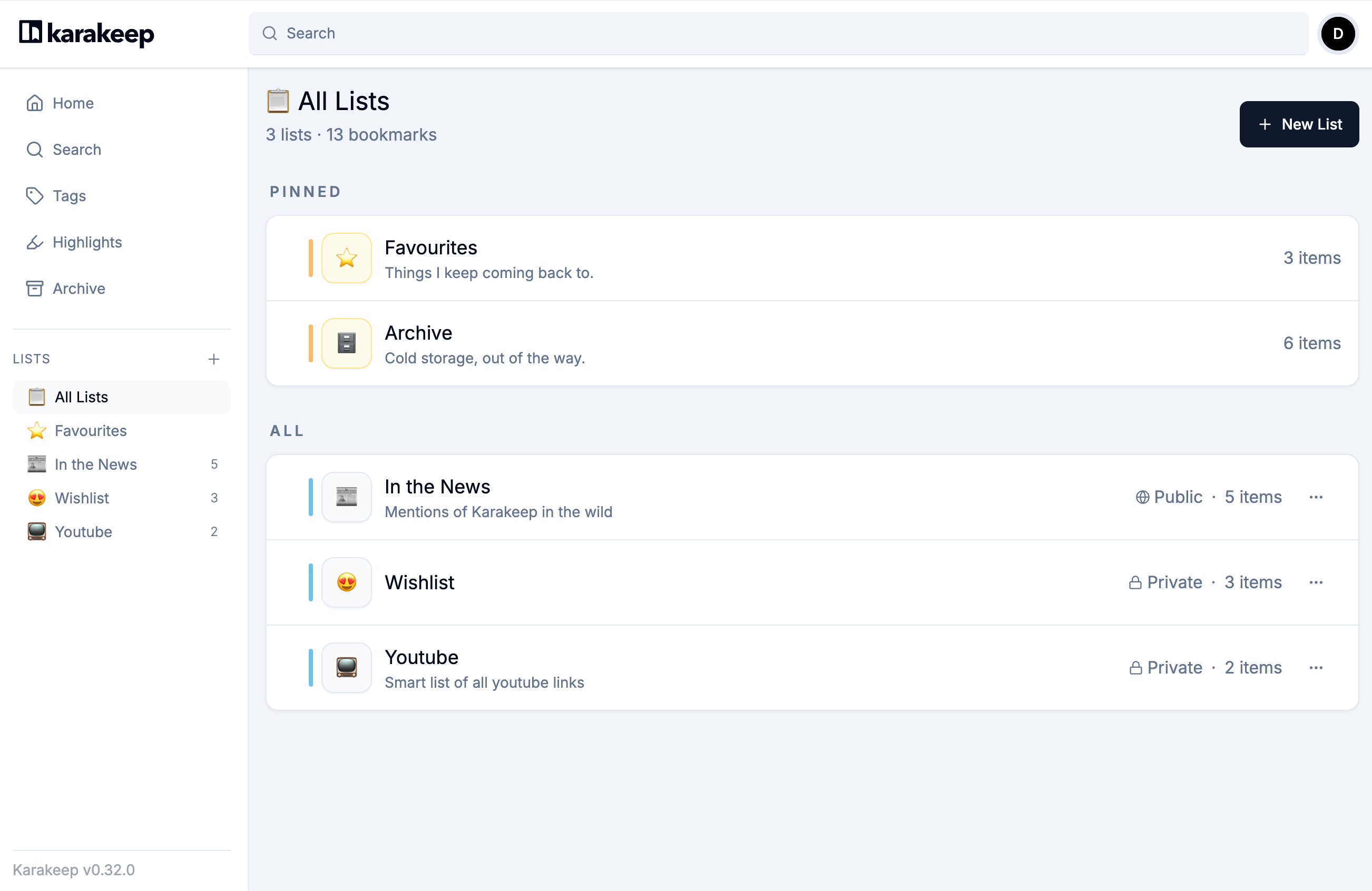
Open All Lists → New List, enter reading-test as the name, set List Type to Manual List, then choose Create. A manual list contains items you deliberately add. A Smart List is based on a saved search condition; leave that for a later task. List guide · Creation dialogue source

For each saved card, open … → Manage Lists, select reading-test, then choose Close. Open the list from the sidebar and verify that all three URLs are present. This associates the saved items with a list; it does not create three extra standalone files. Manage Lists implementation
Keep this practice list private. The developer screenshot also shows a Public list, but publishing a collection or inviting collaborators is unnecessary for this task.
4. Retrieve one document with explicit conditions
Use the top Search field with Keyword mode as the baseline. Start with the list name:
list:reading-testThe three documents you added should be included. On an existing account, do not assume that every test produces exactly three results without checking what belongs to that list. Then narrow the search:
list:reading-test url:using-karakeep/tagsThe intended match is the Tags document. Open its original URL and confirm that it reaches the Tags explanation. The query language defines list: for a list name and url: for an address substring; conditions separated by spaces are combined. This is an exact retrieval check, not a benchmark of natural-language semantic search. Search syntax
5. Check AI tagging separately, if you need it
Once saving and retrieval work, you can inspect an optional AI connection. Self-hosted Karakeep supports OpenAI-compatible providers and Ollama. Without a configured provider, the documentation says automatic tagging is skipped. A visible bookmark card alone is not evidence that AI is operating. Provider setup · Configuration conditions
If Ollama is already running, choose one documented route: its OpenAI-compatible /v1 endpoint or the native endpoint. The model service must be reachable from inside the Karakeep container; localhost commonly points back to the container itself. This guide does not buy or install a model, or promise a particular model’s Korean-language quality.
The documented defaults are INFERENCE_ENABLE_AUTO_TAGGING=true and INFERENCE_LANG=english. Check the language setting if you need Korean tags, while allowing for variation in the selected model’s labels. Reapply the service after changing .env, as the installation guide instructs. Automatic summarization uses a separate flag, INFERENCE_ENABLE_AUTO_SUMMARIZATION, which defaults to false.
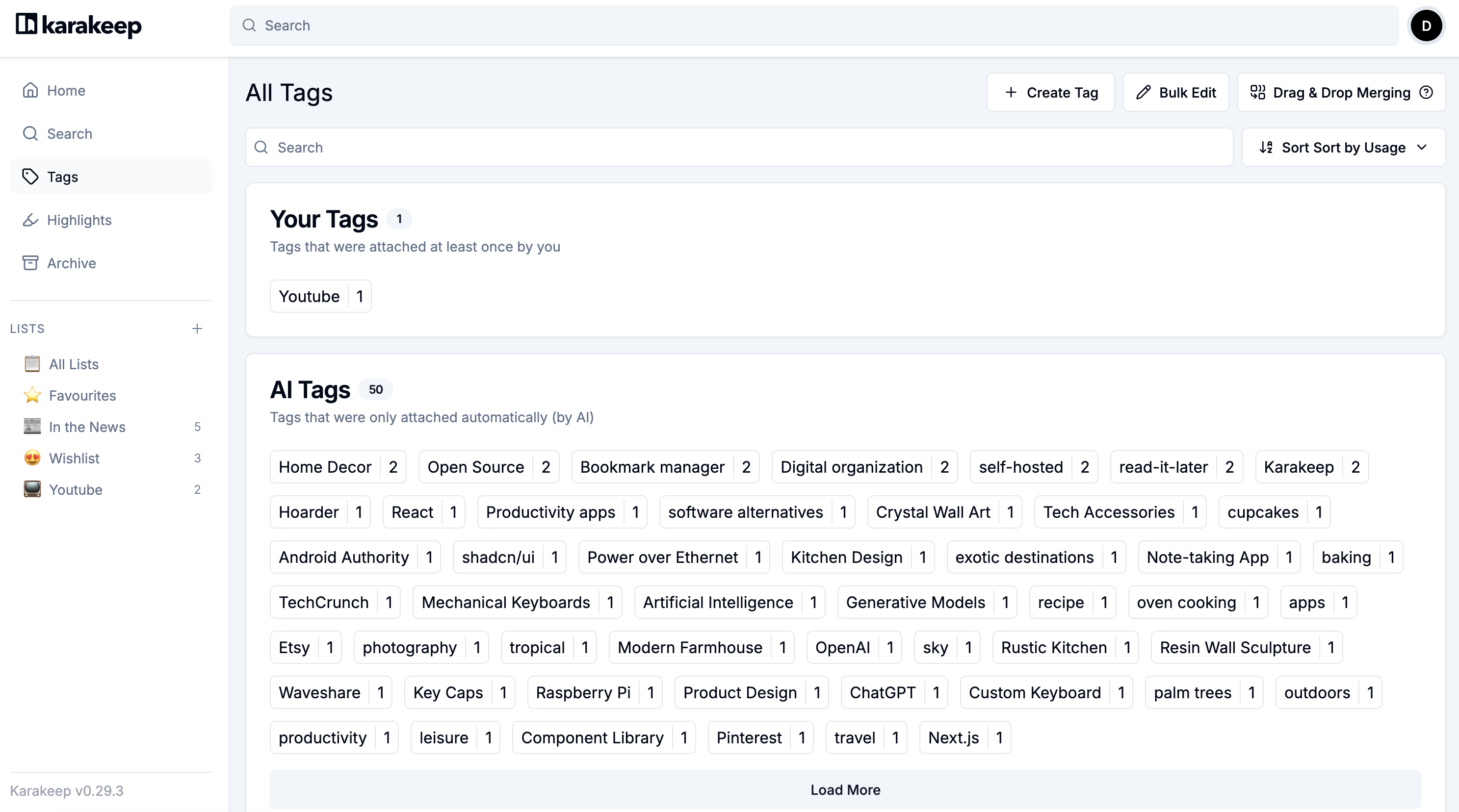
After configuring the provider, add one more public link and inspect its processing result. In Tags, distinguish Your Tags from AI Tags and inspect the labels attached to the saved item. Do not expect a fixed set of labels such as AI, documentation or installation. No model output for this exercise has been verified.

6. Close the browser and check again
Return to the same server and account, open reading-test, then repeat the URL query. This checks that the material remains available through the same setup; it is not a backup-restoration or server-failure test.
Keep a separate reading-test-check.txt with the three URLs, list name, queries attempted and what you actually found. This is your human-written record, not a Karakeep-generated backup. Original page links, saved items and server backups have different roles.
| Problem | First thing to check |
|---|---|
| Save is unavailable | Read-only demo versus your own editable account |
| URL exists but content is missing | Fetch status, source availability and authentication requirements |
| An item is absent from the list search | Manage Lists membership and exact list name |
| No AI tags appear | Provider settings, connectivity, processing errors and auto-tagging setting |
| Tags are in English | INFERENCE_LANG and the connected model’s language handling |
| Items disappear after restarting | Same server/account and the original persistent volumes |
The completion criteria are three saved URLs, confirmed membership in one list, retrieval of the Tags page and successful retrieval after returning. Record AI-tag success separately. Keeping storage, search and classification distinct makes a failed step easier to identify.
More in this series
Sources & further reading
- https://github.com/karakeep-app/karakeep/blob/ebd122bb45b38d9dd45f7c6db55b5587bf6b1265/README.md
- https://github.com/karakeep-app/karakeep/blob/ebd122bb45b38d9dd45f7c6db55b5587bf6b1265/LICENSE
- https://github.com/karakeep-app/karakeep/releases/tag/v0.34.1
- https://github.com/karakeep-app/karakeep/releases/tag/v0.34.0
- https://karakeep.app/pricing/
- https://github.com/karakeep-app/karakeep/blob/ebd122bb45b38d9dd45f7c6db55b5587bf6b1265/docs/docs/02-installation/01-docker.md
- https://github.com/karakeep-app/karakeep/blob/ebd122bb45b38d9dd45f7c6db55b5587bf6b1265/docker/docker-compose.yml
- https://github.com/karakeep-app/karakeep/blob/ebd122bb45b38d9dd45f7c6db55b5587bf6b1265/docs/docs/03-configuration/02-different-ai-providers.md
- https://github.com/karakeep-app/karakeep/blob/ebd122bb45b38d9dd45f7c6db55b5587bf6b1265/docs/docs/03-configuration/01-environment-variables.md
- https://github.com/karakeep-app/karakeep/blob/ebd122bb45b38d9dd45f7c6db55b5587bf6b1265/docs/docs/04-using-karakeep/bookmarking.md
- https://github.com/karakeep-app/karakeep/blob/ebd122bb45b38d9dd45f7c6db55b5587bf6b1265/docs/docs/04-using-karakeep/lists.md
- https://github.com/karakeep-app/karakeep/blob/ebd122bb45b38d9dd45f7c6db55b5587bf6b1265/docs/docs/04-using-karakeep/tags.md
- https://github.com/karakeep-app/karakeep/blob/ebd122bb45b38d9dd45f7c6db55b5587bf6b1265/docs/docs/04-using-karakeep/search-query-language.md
- https://github.com/karakeep-app/karakeep/blob/ebd122bb45b38d9dd45f7c6db55b5587bf6b1265/docs/docs/05-integrations/03-mcp.md
- https://github.com/karakeep-app/karakeep/blob/ebd122bb45b38d9dd45f7c6db55b5587bf6b1265/apps/web/lib/i18n/locales/en/translation.json
- https://github.com/karakeep-app/karakeep/blob/ebd122bb45b38d9dd45f7c6db55b5587bf6b1265/apps/web/components/dashboard/lists/EditListModal.tsx
- https://github.com/karakeep-app/karakeep/blob/ebd122bb45b38d9dd45f7c6db55b5587bf6b1265/apps/web/components/dashboard/bookmarks/ManageListsModal.tsx
- https://github.com/karakeep-app/karakeep/blob/ebd122bb45b38d9dd45f7c6db55b5587bf6b1265/apps/web/components/dashboard/bookmarks/BookmarkOptions.tsx
- https://support.mozilla.org/en-US/kb/bookmarks-firefox
- https://api.github.com/repos/karakeep-app/karakeep