Gemini Notebook: turn your sources into something you can explain
Understand Gemini Notebook, formerly NotebookLM, through a small source-based task, account checks, and practical review criteria.
Last updated
Menus and supported features can change. Compare the source-check date below with your current app version.
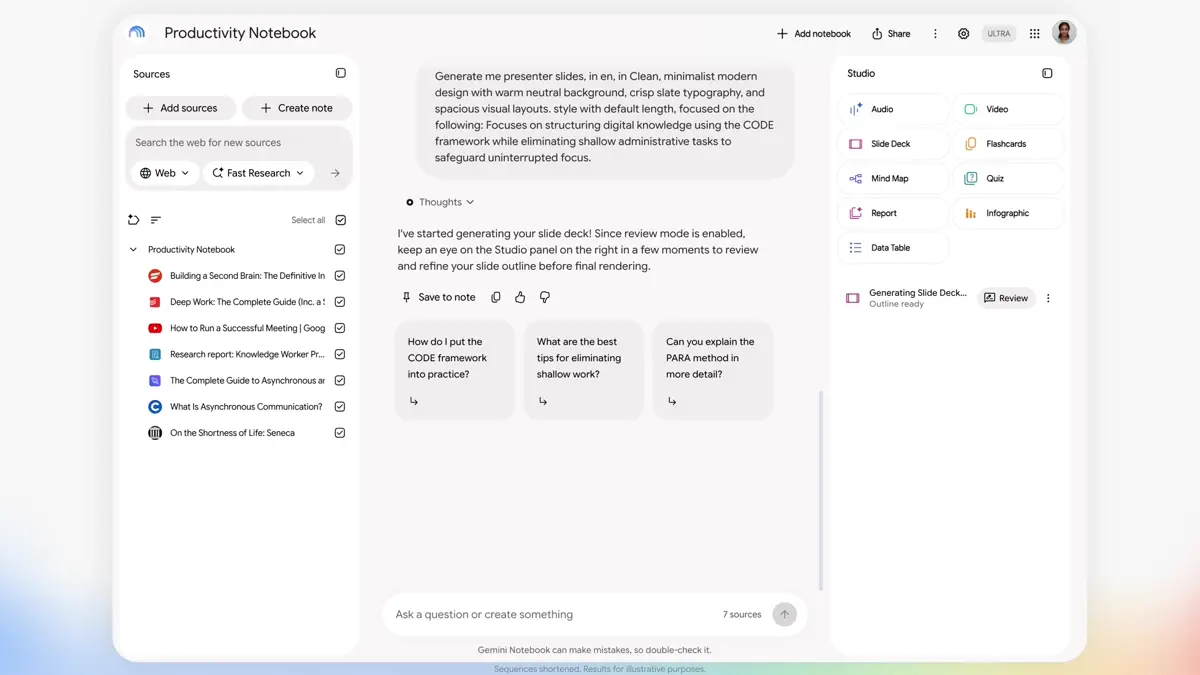
Reading a document and turning it into something another person can understand are different tasks. You may know the material yet still hesitate over the first slide, the order of ideas, or the details a newcomer needs. Gemini Notebook is worth examining for this kind of source-based preparation. This series uses a short event brief as a concrete starting point.
This introduction follows official material checked on October 26, 2026. It is a documentation review, not a report of measured performance or a hands-on trial.
NotebookLM and Gemini Notebook refer to the same product
Google announced the rename from NotebookLM to Gemini Notebook on July 16, 2026, describing it as the same standalone product with broader connections across its ecosystem. Older tutorials may use the previous name, so check current help alongside an older guide. Rename announcement
The service covered here is Gemini Notebook. A shared Gemini name does not mean every Google AI app has the same controls or behavior.
Start with a task whose facts you can check
Choose a small assignment with an identifiable source and a clear reader. These are suggested first exercises, not a ranking of product capabilities:
| Your material | First useful output | What you should verify |
|---|---|---|
| An event brief | A participant presentation outline | Date, time, and meeting point |
| Reading notes | Discussion questions | The author’s claim versus your interpretation |
| A project description | A newcomer glossary | Whether each term belongs to the actual project |
| Study notes | Review questions | Missing topics and inaccurate definitions |
A participant needs to know what to bring. An organizer needs to know who prepares what before arrival. Choosing the reader changes both your prompt and the standard for accepting the result. One page of familiar material is enough to practice that distinction.
Separate sources, conversation, and outputs
The official introduction organizes work around a notebook containing a project’s sources, a Chat area, and a Studio area for outputs. Separate notebooks do not act as one combined source collection. Notebook structure
Treat the source as evidence, the conversation as the place to request and inspect work, and the output as the form you intend to deliver. This helps you locate a problem. An incorrect date in the source requires a source correction. A correct date that is difficult to read requires a presentation correction.
Keep an original copy of the information you intend to communicate. You can then distinguish a change to the facts from a change to the wording or layout, even when both happen during the same editing session.
Why review the outline before the finished slides?
Google’s October announcement introduces an opportunity to give feedback on a slide plan before rendering. Availability should be checked in your account and current help rather than assumed from a launch headline. Co-creation announcement · Rollout notice
The editorial benefit is straightforward: a plan makes questions visible earlier. Is the introduction too long? Are supplies explained too late? Has an undecided item become a definite promise? Even without a dedicated review control, preparing and checking an outline in chat can be a useful habit.
Citations are a route back to the evidence
Chat citations can take you to the relevant source passage. Use them to check the material rather than treating a citation badge as the end of the review. Citation controls
For example, changing “fee undecided” to “free admission” changes what a reader expects. Highlight names, numbers, dates, and conditions in your final draft, then compare those items with the original. Ask:
- Did the result add information that the source does not contain?
- Did it lose qualifiers such as planned, undecided, or conditional?
- Can the intended reader identify their next action?
These questions are useful even when the result looks polished.
Check current access and usage before committing
Usage limits depend on requests and features. Check your account’s Usage screen and reset information. Usage guidance
Before changing a subscription, try a small exercise and note whether the needed controls are available. Track your own source preparation, review, and correction effort alongside generation. No timing or cost comparison was measured for this series.
Continue with the part you need
The step-by-step slide guide includes an original practice brief, copyable prompts, and a downloaded-file checklist. It takes the task from first access to a result you can reopen.
The workflow comparison helps you decide between generated slides and a presentation you assemble in an editor. Your first useful milestone is a small presentation whose facts you can verify and whose next revision you know how to make.
Sources & further reading
- https://blog.google/innovation-and-ai/products/gemini-notebook/notebooklm-gemini-notebook/
- https://notebook.google.com/
- https://support.google.com/gemininotebook/answer/16206563
- https://blog.google/innovation-and-ai/products/gemini-notebook/co-create-slides-videos/
- https://workspaceupdates.googleblog.com/2026/10/gain-more-creative-control-over-slide-Decks-and-Video-Overviews-in-Gemini-Notebook.html
- https://support.google.com/gemininotebook/answer/16179559
- https://support.google.com/gemininotebook/answer/17670842