Gemini Notebook slide workflows: generate, review, or assemble yourself
Compare direct generation, outline review, and manual slide assembly using the same task and explicit, unmeasured review criteria.
Last updated
Menus and supported features can change. Compare the source-check date below with your current app version.
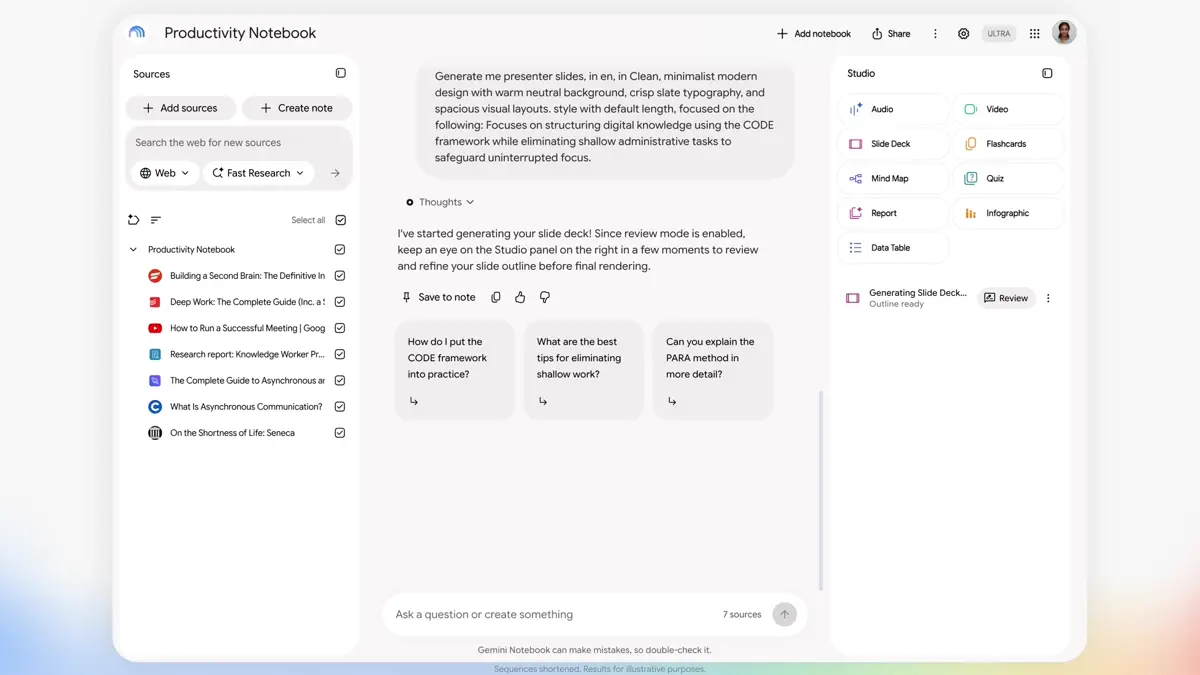
Should you ask an AI tool for finished slides, review an outline before generation, or organize the information and build the deck yourself? This comparison holds the assignment constant: turn one participant brief into a short presentation. It uses official documentation checked on October 26, 2026. No generation speed, output quality, or editing time was measured.
Keep the input and acceptance criteria the same
Imagine a one-page brief for a fictional reading meetup. It contains a name, date, time, location, supplies, and unresolved details. Apply the same requirements to every workflow:
- Do not add an unsupported fee or contact detail.
- Separate the introduction, schedule, supplies, and practical reminders.
- Open the final file and inspect the text and sequence.
- Be able to explain how you would change next week’s date.
Comparing different source material makes it difficult to distinguish a workflow difference from a preparation difference. Use one source, one audience, and one follow-up change for the first experiment.
Compare where decisions happen
A: Generate directly. Create a deck in Notebook and inspect the result. B: Review the plan first. Where available, give feedback on an outline before generation. Google’s announcement describes both routes. Creation announcement · Workspace notice
C: Organize the content, then assemble it in an editor. Use the source-based preparation, but lay out the presentation yourself in a tool such as Google Slides, which supports editable text, images, shapes, and collaboration. Slides basics
| Question | A: Direct generation | B: Outline review | C: Manual assembly after preparation |
|---|---|---|---|
| First decision | Is the generated result correct? | Is the proposed sequence right? | What belongs on each slide? |
| Suggested first use | Explore a small brief’s structure | Preserve an intentional sequence | Control recurring wording and layout |
| Correction plan | Inspect and prepare a correction | Give outline feedback, then inspect output | Change selected content and elements |
| Access to check | Generation availability and allowance | Whether review is actually offered | Editor permissions and needed tools |
| Keep for reuse | Source and final prompt | Source, outline, and feedback | Source and editable original |
| Final check | Output versus source | Feedback versus actual result | Copied information versus source |
The suggested uses are editorial judgments based on the workflows. They are not measured claims that one route is faster or produces better slides.
Direct generation still needs an editorial pass
A small brief can make direct generation a useful first experiment. Include the review in your definition of the task, however. A rendered deck is not automatically ready for participants.
Suppose the source asks people to bring a phone and water, but the result says a professional camera is required. That needs correction regardless of how attractive the illustration looks. Fix the changed condition before spending time on colors. The important result is what a participant believes they must do.
Use a short acceptance list before generating. It gives you a reason to stop refining decoration once the presentation communicates the required facts clearly.
Outline review works best with specific feedback
Before using a review step, decide what feedback would change the result. This original example names the desired sequence and a factual boundary:
Reduce the opening background to one sentence.
Put supplies before the schedule.
Do not turn the undecided fee into a definite amount.
End with three things participants should check before leaving home.
That feedback can help clarify your intentions before a finished deck exists. A review control cannot decide the audience or purpose for you. If the option is unavailable in your account, drafting and checking an outline in chat remains a possible preparation method.
Manual assembly gives you a separate editing path
Consider an editable presentation when dates, prices, or names will change repeatedly. This is a recommendation for a particular preference: being able to select and alter the recurring detail directly.
Google’s introductory Slides documentation explains creating a presentation, editing its elements, and collaborating. This comparison does not assume an AI export converts perfectly into an editable source file. Manual assembly is a separate path: check the information first, then place it in the presentation editor. Create a Slides presentation
Ask whether the deck is a one-time handout or a recurring report. For recurring work, decide which original you will retain and how you will identify the current version. A useful workflow should make next week’s correction understandable, not just produce this week’s first draft.
Measure preparation, correction, and the next change
Check Notebook’s actual usage information for generation and revision. A subscription name does not establish identical consumption for every task. Usage guidance
Use this unfilled experiment log if you compare the routes yourself:
| Record | A | B | C |
|---|---|---|---|
| Source preparation time | Not measured | Not measured | Not measured |
| Generation or assembly time | Not measured | Not measured | Not measured |
| Factual corrections | Not measured | Not measured | Not measured |
| Final-file inspection time | Not measured | Not measured | Not measured |
| Time to change the next date | Not measured | Not measured | Not measured |
A fast first result can still need substantial correction. A slower initial layout may be convenient to update. Those are possibilities to test, not outcomes observed here.
Choose with the next revision in mind
Try the small-source slide walkthrough, then change one date and one supply item. Check whether the final file is correct again and whether you know which original to keep. That modest follow-up gives you more useful evidence than counting buttons or assuming the newest feature is the best fit.
Sources & further reading
- https://blog.google/innovation-and-ai/products/gemini-notebook/co-create-slides-videos/
- https://workspaceupdates.googleblog.com/2026/10/gain-more-creative-control-over-slide-Decks-and-Video-Overviews-in-Gemini-Notebook.html
- https://support.google.com/docs/answer/2763168?hl=en
- https://support.google.com/a/users/answer/10665800?hl=en
- https://support.google.com/gemininotebook/answer/17670842