Gemini CLI: Introduction
Gemini CLI v0.65.0 is an open-source AI agent that brings Gemini models directly into your terminal for code manipulation, file operations, and MCP extension.
Last updated
Menus and supported features can change. Compare the source-check date below with your current app version.
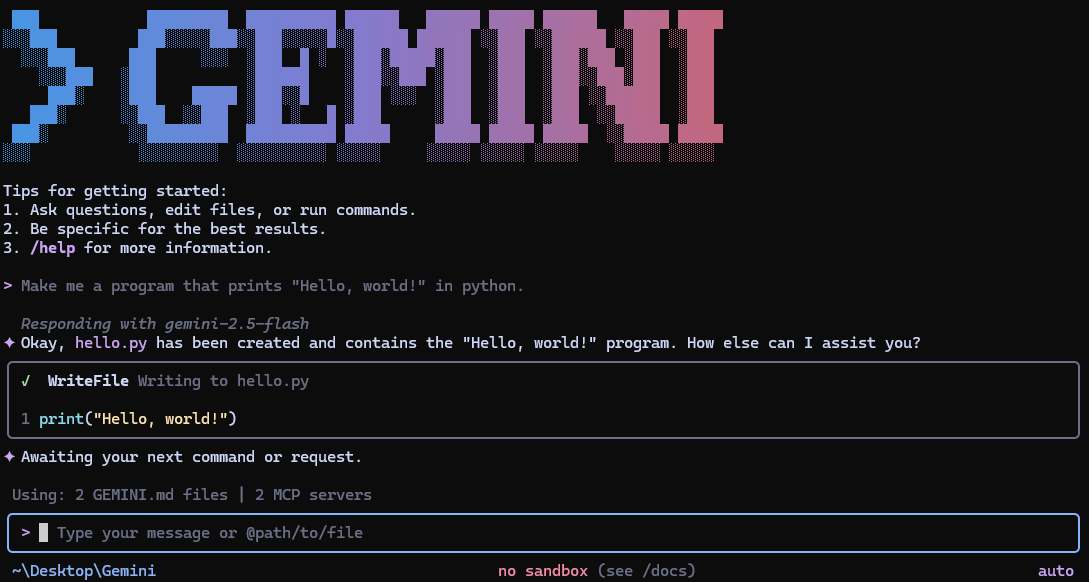
This introduction is based on the official README and release notes, rather than a firsthand test. Gemini CLI v0.65.0 was published on October 20, 2026 (UTC), and the source documents were checked on October 21, 2026 D1.
What can you do from the terminal?
Gemini CLI is an open-source AI agent that connects a terminal session to Gemini models F1. The developer’s README lists code understanding and generation, file operations, shell commands, web fetching and Google Search grounding D2. If your work already happens in a terminal, the point to consider is whether asking the model from that workspace fits the task you have in mind. We have not measured whether this is quicker than using another interface.
This is an application with AI features and agent capabilities, including CLI operation and MCP connections. Those features do not establish how much of the application itself was developed using AI. The sources checked for this series do not settle that separate question. The introduction explains its role; the companion guide takes one code-structure question through a documented output workflow.
How do the free tier and model costs differ?
The pinned README describes a personal Google account tier of 60 requests per minute and 1,000 requests per day F3. It also describes Gemini 3 models and a 1M-token context window D2. These are the developer’s documented access details at the check date, not measurements or a promise of unlimited use. Account type, authentication method and model service conditions still matter.
The application is published under Apache 2.0 D2. That source-code license is separate from cloud inference billing. The README offers Google sign-in, a Gemini API key and Vertex AI as different authentication routes. Before using the tool for repeated requests, check the route that applies to your account rather than assuming that open-source software makes every request free.
Look at connected tools and repository context separately
The README documents built-in file and shell tools and extensions through MCP, the Model Context Protocol D2. MCP is a way to connect additional tools; a particular server connection still needs its own setup and verification. The presence of MCP support is not a test of every available server.
Aider’s README, used here as the comparison source, describes a map of the codebase and Git integration F8, D3. When choosing a terminal assistant, those documented workflows are useful things to inspect alongside Gemini CLI’s file tools and model access. We have not established a performance winner, replacement claim or uniform output format between the products.
Check the execution mode and release channel
Documented execution options include starting with gemini in the current directory, including additional directories and selecting a model F4, D2. The -p flag supplies a prompt for non-interactive use, while --output-format json requests JSON output F7. This gives readers a concrete workflow to investigate for scripts, without implying that a particular request succeeded here.
The README separates stable, preview and nightly channels. Preview releases are published weekly on Tuesdays and may contain regressions or outstanding issues because they have not been fully vetted F5. The selected product release for this series is v0.65.0, rather than a claim that every moving installation tag always points to that version. Inspect the version and channel you actually install.
One useful first task is to save a code-structure explanation
For the companion task, prepare a Node.js/npm or npx environment and the authentication route described in the README D2. Its installation examples also include Homebrew for macOS/Linux and MacPorts for macOS. We have not performed an installation or checked every operating system in this series. The detailed installation guide remains the place to verify requirements for a particular machine.
The question used throughout the guides and comparisons is an example request, not a prompt that we executed:
Explain the architecture of this codebase.The README documents the prompt flag and JSON output option F7. An example that combines those options with ordinary shell output redirection is:
gemini -p "Explain the architecture of this codebase." --output-format json > architecture.jsonThe expected result is JSON-formatted output with a model-generated explanation. architecture.json is the shell-created response file, not a native project export. Reopen it in a text editor or terminal reader, check that it parses as JSON, and compare the named paths and modules with the real project. Asking for an explanation is not a guarantee that every working file stayed unchanged; check those files separately.
What should you inspect when something fails?
The v0.65.0 release notes include a fix enforcing read-only workspace settings in untrusted folders F2. The scope stated in that note is workspace settings; it is not evidence that a particular run cannot write any file. Authentication, account quotas and folder trust are separate checks when troubleshooting.
Keep the selected release notes and the pinned README beside the task you are attempting D1, D2. The guide explains the inputs, saved file and completion checks in more detail, while the comparison article separates documented differences from items that still need equal-input testing. None of these articles contains an observed installation result, response time or benchmark.
Original BumbleV reading guide illustration; not a product screenshot or a result from our testing. Official release behind this illustration · CC BY 4.0 · 2026-10-21

Sources & further reading
- https://github.com/google-gemini/gemini-cli/releases/tag/v0.65.0
- https://raw.githubusercontent.com/google-gemini/gemini-cli/6006c14a4decfe4b891c6263ad6ad5992e404b5b/README.md
- https://raw.githubusercontent.com/Aider-AI/aider/5dc9490bb35f9729ef2c95d00a19ccd30c26339c/README.md
- https://api.github.com/repos/google-gemini/gemini-cli