ComfyUI: Introduction
Learn what ComfyUI's node workflows do, how local setup differs from cloud services, and which model and hardware requirements to check first.
Last updated
Menus and supported features can change. Compare the source-check date below with your current app version.
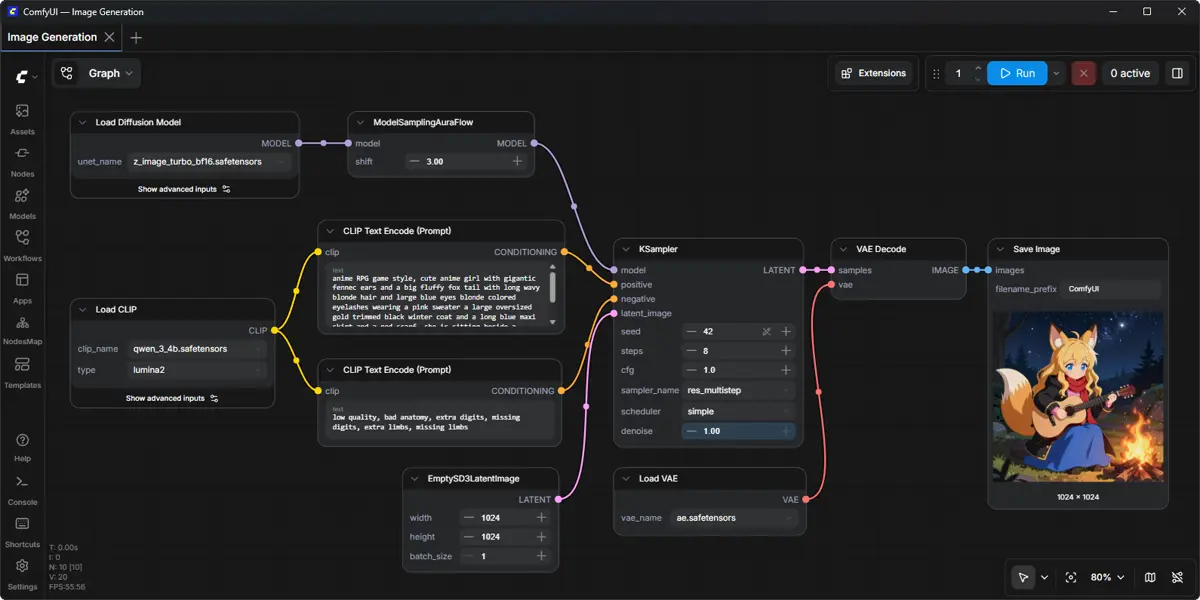
I’m BumbleV. ComfyUI is an AI creation engine built around a modular node graph. This introduction explains what that approach offers and what to check before using it. It is based on official documentation and release notes, rather than a hands-on review.
This article covers ComfyUI v0.42.0, published on October 18, 2026 (UTC). Sources were checked on October 25, 2026. The release adds a Krea 3 Image partner node and MOSS-image support. These are documented changes, not features exercised in this article. F2 F3
What work is it for?
ComfyUI describes a visual graph for building and reusing image, video, audio, 3D and text workflows. Nodes make the structure of a generation process visible so users can work with model choices and parameters. The README also describes local execution and memory-management features. Those descriptions do not establish a speed or quality result on your hardware. F1 D2
A useful starting question is whether you want to keep and revise the process behind an image, rather than only keep the finished picture. Saving a workflow provides a way to return to that process. It still takes a compatible model and environment to run it; a saved graph is not a promise of reproducibility on every computer. F8 D2
How does InvokeAI differ?
InvokeAI also provides local execution and node workflows. Its README describes a locally hosted web server and React interface, a Unified Canvas with inpainting, outpainting and brushes, and Board and Gallery management. These are useful parts of the comparison, rather than evidence that one product is universally easier. F7 F13 D3
ComfyUI’s node graph is the main focus of this series. If you often revise and reuse graphs, that is a reason to explore its documentation. If canvas editing and organizing images are central to your work, read InvokeAI’s Canvas and Gallery sections as well. This is editorial guidance about documented workflows, not a measured winner or a report of personal use. D2 D3
Availability, platforms and costs
The official desktop application is available for Windows and macOS. Manual installation is a separate route, with documented operating-system, GPU, Python and PyTorch considerations. Do not assume that a portable Windows package and the desktop application have identical setup requirements. F4 D2
Comfy Cloud is an official paid cloud option. Local application access, model access, partner APIs and cloud services are separate cost questions. The README documents optional paid API nodes; choosing a local tool does not establish that every connected model or service is free. Current prices and your hardware or electricity costs were not verified in this article. Check the terms for the specific model and service you intend to use. F10 D2
Confirmed features and open questions
The release notes list Krea 3 Image and MOSS-image additions. The README lists shortcuts for saving, loading and queueing workflows. These are the features confirmed for this guide. Performance on an individual machine, compatibility across all custom-node combinations and exact present-day interface layouts still need verification in the intended environment. F2 F3 F8 F12
ComfyUI is an AI-enabled creation tool. The sources used here do not establish that the application itself was developed entirely with AI. Its local API is a documented integration feature; this article does not demonstrate an agent controlling the application. Keeping those claims separate helps explain what has actually been checked. D2
A small workflow-management exercise
Start with an existing compatible local image workflow and its required models. The companion guide focuses on saving that workflow, reopening it and queueing the same graph. Use Ctrl+S to save, Ctrl+O to load and Ctrl+Enter to queue the current graph. On macOS, the README says Ctrl can be replaced with Cmd. F8 D2
The expected outcome is a saved workflow that can be reopened and inspected before another run. Completion means checking the graph and queue state, then opening the actual output if generation succeeds. Queue submission alone is not proof of a finished image. The detailed guide includes an example record and checks for reopening the file; no ready-to-run graph or generated result is supplied here.
Setup limitations to check
For manual installation, SD checkpoints belong in models/checkpoints and VAE files in models/vae. Record the model files separately from the workflow file so you can check what is missing when moving or reopening a project. F5
The v0.42.0 release notes state that CPU devices do not support fp8, nvfp4, mxfp8 or int8. Manual-install notes mention possible custom-node issues on Python 3.14 and suggest trying Python 3.12 if dependencies cause trouble on 3.13. These specific constraints are more useful than assuming every model and extension will work because the graph opens. F6 F12
Original BumbleV reading guide illustration; not a product screenshot or a result from our testing. Official release behind this illustration · CC BY 4.0 · 2026-10-25
Sources & further reading
- https://github.com/Comfy-Org/ComfyUI/releases/tag/v0.42.0
- https://raw.githubusercontent.com/Comfy-Org/ComfyUI/355cd6b14c92c19ac3188fe528e47a3f21ef5178/README.md
- https://raw.githubusercontent.com/invoke-ai/InvokeAI/6af20578bce65177ff9da43df0e82c788a2e14ae/README.md
- https://api.github.com/repos/Comfy-Org/ComfyUI