faster-whisper: Documentation comparison
Learn how to use faster-whisper to transcribe audio files on CPU with INT8 quantization and save them with timestamps.
Last updated
Menus and supported features can change. Compare the source-check date below with your current app version.
What this comparison does and does not cover
This article covers the faster-whisper v1.2.1 official release, published on 2025-10-31 (UTC). The source documents were checked on 2026-10-26. This existing stable release was selected for a task explicitly requested by the reader. It is not presented as a product or update released within the last 30 days.
For a timestamped text-file task, the useful question is which documented interface and setup fit your Python work. faster-whisper reimplements OpenAI’s Whisper model with CTranslate2 F1. The relationship between the projects does not mean their engines, dependencies or returned examples are identical. This is a documentation comparison, not a completed head-to-head transcription test.
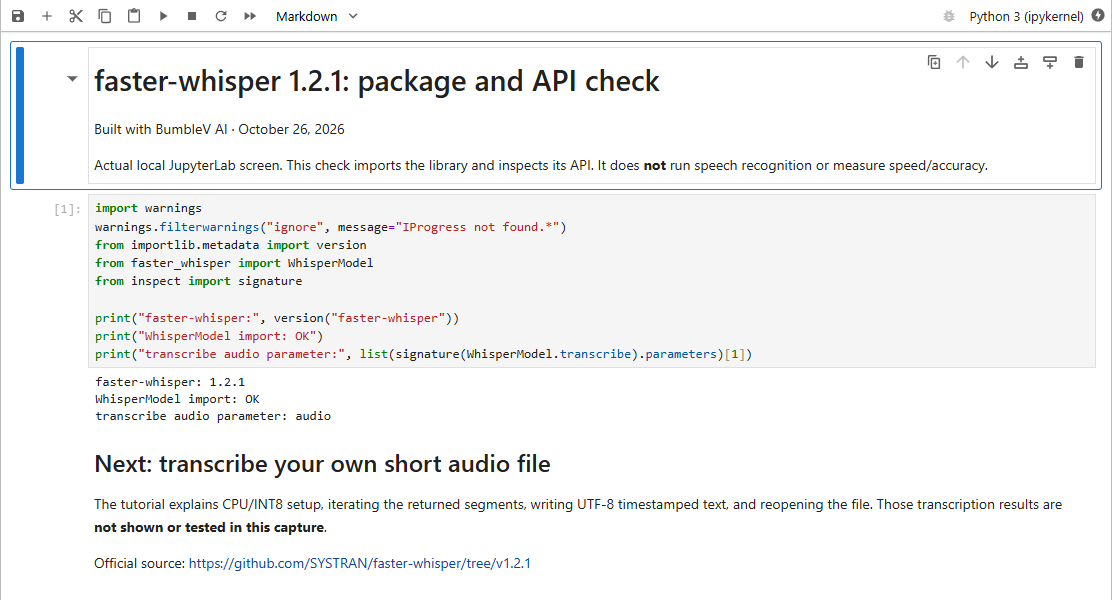
The faster-whisper source is pinned to the selected v1.2.1 release; the OpenAI Whisper README is pinned to a separately checked commit D2, D3. They are not matched release dates, and this is not a survey of every current feature. The real screenshot verifies a local faster-whisper package/API check only. No audio result, timing or accuracy score can be inferred from that capture.
Output: identify the values you need to save
The faster-whisper example consumes segments and prints segment.start, segment.end and segment.text F4, F7. That makes a timestamped-line wrapper a concrete next step. Writing those lines to a UTF-8 file remains additional Python code: the tutorial explains its chosen filename and overwrite mode rather than calling it native subtitle export.
OpenAI Whisper’s basic Python example loads a model, calls model.transcribe, and prints result["text"] D3. This describes the shape of the documented basic example. It does not establish that OpenAI Whisper lacks timestamp features elsewhere. Compare the specific outputs your program needs with the relevant API documentation rather than treating a short example as a complete feature inventory.
Time and compatibility: keep the conditions visible
There is no measured winner here. A performance claim from one documented benchmark is not a result for an arbitrary recording or device. Model size, numerical settings, hardware, input and the boundary used to define completion can change what a comparison means. In particular, faster-whisper’s returned segments are a generator; the README says recognition runs when the segments are iterated F5. A function returning a generator must not be timed as if the complete transcript had already been produced.
Compatibility also includes setup dependencies. The faster-whisper README describes PyAV bundling FFmpeg libraries and says a separate system FFmpeg installation is unnecessary F6. The OpenAI Whisper README explicitly requires the FFmpeg command-line tool on the system F8. This is a difference in documented preparation, not a claim that either installation is universally trouble-free. Satisfy each project’s Python and compute-library requirements in its own environment.
Friction, automation and audience
For this task, the audience is someone comfortable running Python and checking a file against the original audio. Installing a library and managing paths may be more friction than a one-off short note warrants. Consider the complete amount of preparation, not just a theoretical recognition speed. That is editorial advice about your workflow, not a ranking of the projects.
For automation, faster-whisper’s segment iteration can be connected to file writing and later processing F5, F7. OpenAI Whisper also supplies a Python usage example D3. In either case, input validation, failure handling, naming the output and reviewing the recognized text belong to the surrounding application. Public source availability alone does not establish that all models, hosted services or compute resources are free. No cloud-price comparison is offered here.
A same input trial you can perform
Use the same input specification as the tutorial below. It describes a recording to prepare; it is not an attached audio file or a report of a completed test.
Recording to prepare, not a supplied audio file:
sample.wav — a short recording you own, containing:
Today we are checking whether a saved transcript matches the original audio.
Output to create with the tutorial script: transcript.txt (UTF-8).
Make a recording you are entitled to use and give both tools copies of the same file. Prepare separate environments that meet their requirements. Record the package version, chosen model, device and decoding settings before starting. Align the conditions that can be aligned and record the ones that cannot: two different inference engines do not automatically offer identical numerical configurations.
For faster-whisper, consume the full generator before marking the conversion complete F5. For OpenAI Whisper, inspect the result returned by the documented Python call D3. Keep installation and download time separate from conversion waiting and the human time spent correcting the text. Reopen the saved output, check its encoding and compare the beginning and end with the recording. If your wrapper saves timestamps, listen at those positions and check their alignment.
How to turn the observations into a choice
Write down missing words, manual corrections, dependency issues and any output-format work the wrapper needed. Do not infer recognition quality simply from a successful exit or from the presence of a text file. A fair trial states the conditions and the limits of the observations; this article supplies the procedure without inventing its results.
The current documentation-based choice is therefore about fitting an API and its dependencies to your program. If segment-wise values suit your processing code, inspect faster-whisper’s example first F7. If you already maintain an OpenAI Whisper integration, assess its documented interface before replacing it D3. Decide after the small controlled trial, not from an unqualified speed promise.
Original BumbleV reading guide illustration; not a product screenshot or a result from our testing. Official release behind this illustration · CC BY 4.0 · 2026-10-26
Sources & further reading
- https://github.com/SYSTRAN/faster-whisper/releases/tag/v1.2.1
- https://raw.githubusercontent.com/SYSTRAN/faster-whisper/65882eee9f5cdbeeb2d877f1131d48cf241b327d/README.md
- https://raw.githubusercontent.com/openai/whisper/86098128c0b4f24f0e2aa2994de830614b474227/README.md
- https://api.github.com/repos/SYSTRAN/faster-whisper