ComfyUI: Documentation comparison
Compare ComfyUI's node workflows with InvokeAI's Canvas, Boards and Gallery using official documentation, plus a same-input test plan. No benchmark claims.
Last updated
Menus and supported features can change. Compare the source-check date below with your current app version.
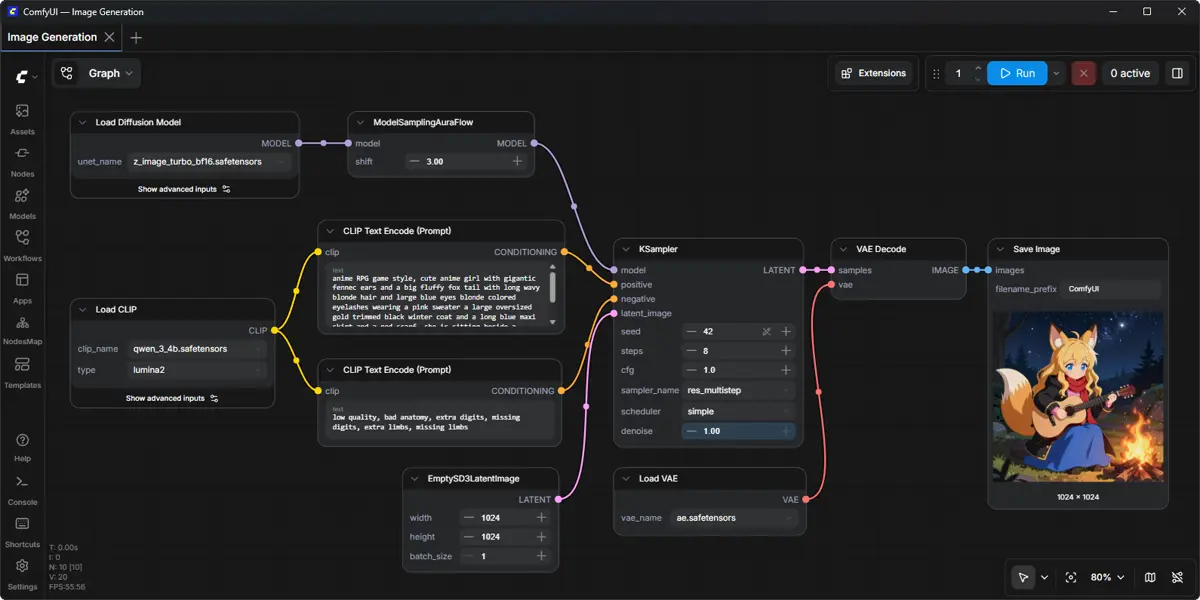
Which should you explore first: ComfyUI or InvokeAI? The applications were not executed and generation speed was not measured for this article. This is a comparison of official documentation and a proposed way to keep records for your own equal-input test. It does not name a quality or speed winner.
This article covers ComfyUI v0.42.0, published on October 18, 2026 (UTC). Sources were checked on October 25, 2026. D1
Narrow the baseline task
The task is to save one compatible local image workflow, reopen it and queue the same graph. ComfyUI uses a node graph for generation workflows. InvokeAI also provides node workflows and a canvas. Instead of dividing them into a simple tool and an expert tool, start with where your repeated work is saved and how you bring it back. D2 D3
ComfyUI’s shortcut table lists Ctrl+S to save, Ctrl+O to load and Ctrl+Enter to queue the current graph. InvokeAI’s README describes Unified Canvas inpainting, outpainting and brushes, alongside Board and Gallery management. Consider whether editing a canvas or managing a graph is closer to the work you want to repeat. F8 F7 F13
Record the same input
The following is a proposed record for a future comparison. It is not an execution result or a supplied complete workflow. The prompt is an example for the reader, and each application needs its own compatible workflow and models.
Workflow file: local-image-workflow.json
Prompt: a yellow ceramic cup on a plain wooden table
Record the exact model, VAE, seed and software versions.
Keep the roles of the files separate. ComfyUI documents saving and loading workflows as JSON. Saving a graph does not establish that model weights or every extension have been packaged with it. Manual-install instructions place SD checkpoints in models/checkpoints and VAE files in models/vae. Record those files separately so missing components are easier to identify when reopening a project. D2 F5
What to check in ComfyUI
Begin with a local image graph whose execution requirements are already met. Save with Ctrl+S; local-image-workflow.json is a suggested filename. Reopen it with Ctrl+O and compare the nodes and connections with the intended graph. These are proposed checks based on documented actions. They do not promise an identical file dialog or storage location in every environment. F8
Queue the graph after checking its restored structure. Ctrl+Enter queues it; Q toggles queue visibility and H toggles history visibility. Successfully loading a graph and finishing an image are separate checkpoints. If execution stops because a model or node is incompatible, record the reason rather than treating queue submission as success. F8 F9
Output and time are separate comparisons
For output, a reader could open the actual saved image and check whether it depicts the example cup and table and whether the file can be reopened. These are future evaluation criteria, not observations from this article. An identical prompt alone does not establish an identical image. Align model, settings and resolution where both products support them, and record any differences before judging results.
Time has not been measured. Separate installation and model downloads, first execution and prepared repeat executions. Including model loading for only one product would make the comparison harder to interpret. Define the start and finish in advance, such as queue submission to an output file that can actually be opened. Keep failed runs separate from successful runs. Documentation about optimizations is not a speed measurement.
Compatibility and friction
Compatibility does not mean the same graph file can be shared unchanged across both products. Use a workflow suited to each application’s structure and verify shared model support separately. ComfyUI’s release notes state that CPU devices do not support fp8, nvfp4, mxfp8 or int8. Manual-install notes mention possible Python 3.14 custom-node issues and suggest trying Python 3.12 when some dependencies have trouble on 3.13. F6 F12
Assess friction by asking whether you can find missing files and explain a failure after reopening, not only by counting setup clicks. If you move a saved graph to another computer, check whether model and extension details were recorded too. InvokeAI describes image metadata that can recall key prompts or settings in its Gallery; that does not establish conversion of all settings between the two applications. D3
Automation and target audience
For automation, ComfyUI’s README describes a local API, reusable subgraphs, templates and App Mode. InvokeAI also describes developing and sharing node-based workflows. Both offer documented ways to organize repeatable work, but no API call or scheduled execution was tested here. Before adopting either, verify the inputs and outputs of one small task in the environment you intend to use. D2 D3
For the target audience, consider what you change most often. If you repeatedly save and revise model and graph configurations, explore ComfyUI’s node workflow. If canvas editing and organizing pictures are central, start with InvokeAI’s Unified Canvas and Gallery documentation. This is editorial guidance based on documentation, not a hands-on judgment that either product is easy for everyone. F1 F7 F13
Costs and comparison completion criteria
ComfyUI’s paid cloud and local installation are separate choices. The README also describes optional paid API nodes, so a local tool does not establish free access to every connected model or service. Current price lists and individual hardware or electricity costs were not verified for this article. InvokeAI’s README describes free use, but that does not settle terms for separate models or commercial services. Check the model and service conditions individually. D2 D3
A completed comparison would use the same input record, describe the prepared environment and file roles, and record all six dimensions: output, time, compatibility, friction, automation and audience. Mark unexecuted checks as unexecuted and unsupported steps as limitations of the tested setup. The completed work in this article is the official-document comparison. It supplies no generated image, benchmark time or performance score.
Original BumbleV reading guide illustration; not a product screenshot or a result from our testing. Official release behind this illustration · CC BY 4.0 · 2026-10-25
Sources & further reading
- https://github.com/Comfy-Org/ComfyUI/releases/tag/v0.42.0
- https://raw.githubusercontent.com/Comfy-Org/ComfyUI/355cd6b14c92c19ac3188fe528e47a3f21ef5178/README.md
- https://raw.githubusercontent.com/invoke-ai/InvokeAI/6af20578bce65177ff9da43df0e82c788a2e14ae/README.md
- https://api.github.com/repos/Comfy-Org/ComfyUI