Docling: Introduction
A documentation-based guide to converting a PDF to Markdown with Docling and checking the converted result.
Last updated
Menus and supported features can change. Compare the source-check date below with your current app version.
Sometimes you want to prepare a PDF paper for an AI application while keeping its headings and tables readable. Docling is a Python tool that analyzes documents and exports Markdown or structured data. This introduction follows official documentation; no document conversion was executed while preparing it. Here is what the tool is intended for and what to check before adopting it. F1, D2
This article covers the Docling v2.142.0 official release, published on 2026-10-22 (UTC). The source documents were checked on 2026-10-22.
What work is Docling intended for?
Docling documents support for parsing multiple formats and integrating with the generative AI ecosystem. Its README lists PDF layout analysis, reading order, table structure, code and formulas among its features. F1, D2 A developer preparing a paper or report can therefore consider it as a conversion component. Those features do not establish how accurately a particular file will be converted.
The listed inputs extend beyond PDF to DOCX, PPTX, XLSX, HTML, EPUB, images, audio and video. The README also describes local execution capabilities and air-gapped use. D2 Check the selected models, downloads and remote-service settings before deciding how data will move in your own setup. A local-execution option alone does not establish the security properties of every configuration.
The README also lists integrations with frameworks such as LangChain and LlamaIndex. They are options to examine when building an agent-based AI application. D2 D2, D3
How does it relate to MarkItDown?
MarkItDown describes itself as a lightweight Python utility that converts files to Markdown for LLMs and related text analysis. Docling lists layout, formula and table analysis as features. F6, D2 These descriptions help identify what to investigate, but they do not demonstrate that either tool produces a better conversion.
Docling documents a common DoclingDocument representation, Markdown and other exports, including lossless JSON. MarkItDown emphasizes preparing Markdown. D2, D7 As an editorial choice, start by asking whether the next step needs readable Markdown alone or a structured document object as well. Which tool preserves your tables better, and how much correction each needs, require a same-file trial. That trial was not performed for this introduction.
Access, costs and prerequisites
The Docling codebase uses the MIT license. Individual models have their own licenses, which the README tells readers to check in the original packages. D2 Code licensing and model or service access are separate questions. This article does not establish a particular hosting service’s free allowance or a paid model’s current price.
Installation is documented through Python package managers. Python 3.9 support ended in Docling 2.70.0, so prepare Python 3.10 or newer. The installation guide lists macOS, Linux and Windows and both x86_64 and arm64 architectures. F3, F5 Check the environment-specific instructions rather than treating platform support as proof that every optional component will install successfully.
Confirmed features and limitations
The documentation covers conversion through the Python API and CLI, supported document formats and confidence information. The selected v2.142.0 release notes include a CLI fix to return exit code 1 when a document fails to convert. F2, F4, D6 That is useful information for handling a failed task; it is not a content-accuracy check.
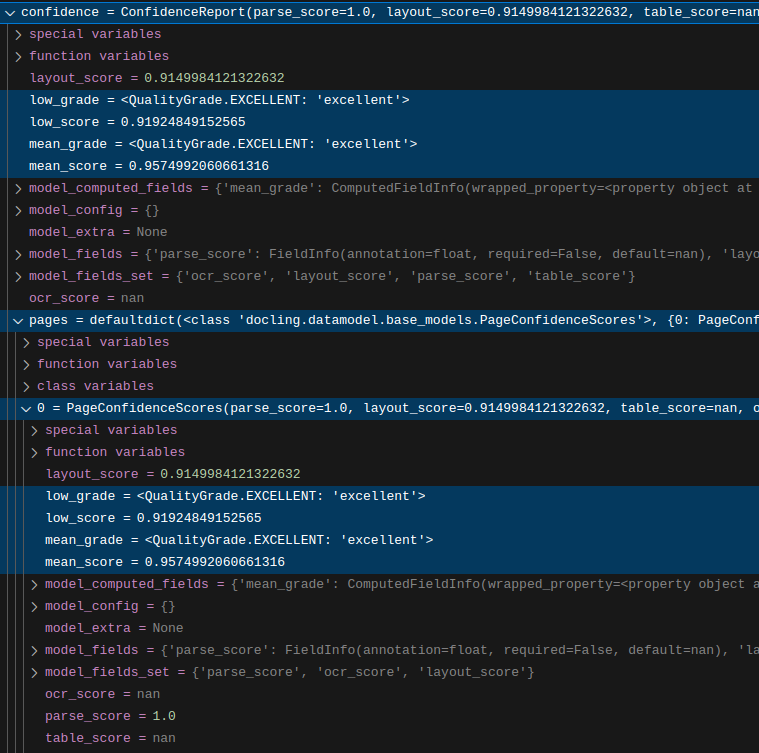
The confidence guide explicitly marks table_score as not yet implemented. The README also lists some metadata extraction and complex chemistry understanding under Coming soon. F9, D2 Check those boundaries before designing a workflow around a feature that the project has not documented as available.
A small documented conversion example
The Python example converts a source URL with DocumentConverter and prints the returned Markdown. This is a documentation-based example rather than an observed result from this article’s preparation. F4
from docling.document_converter import DocumentConverter

source = "https://arxiv.org/pdf/2408.09869"
converter = DocumentConverter()
result = converter.convert(source)
print(result.document.export_to_markdown())
The expected outcome is a Markdown string representing the document. The README’s shortened Docling Technical Report output is an illustration, not a guarantee of identical heading punctuation or a complete output supplied here. F4 After running it, compare the main headings, body and a representative table with the PDF. Reaching the end without an error is only part of the completion check.
Checking output and resolving problems
Look for changes in heading order, table alignment and missing content when comparing an output with its source. If you use the CLI separately, its —output option selects an output directory. The Python print example above does not automatically save a file. F4, F10 Keeping those two routes distinct makes it easier to find the result you intended to create.
For installation problems, confirm Python 3.10 or newer and read the relevant PyTorch distribution and architecture notes. F5, D3 For CLI automation, the release’s failure exit-code behavior can help distinguish a failed conversion. F2 Retain a separate check of the resulting content before handing that file to another application.
Original BumbleV reading guide illustration; not a product screenshot or a result from our testing. Official release behind this illustration · CC BY 4.0 · 2026-10-22

Sources & further reading
- https://github.com/docling-project/docling/releases/tag/v2.142.0
- https://raw.githubusercontent.com/docling-project/docling/6aaf87ebd99b8c7d3699d90f7aba372555d0140e/README.md
- https://raw.githubusercontent.com/docling-project/docling/6aaf87ebd99b8c7d3699d90f7aba372555d0140e/docs/getting_started/installation.md
- https://raw.githubusercontent.com/docling-project/docling/6aaf87ebd99b8c7d3699d90f7aba372555d0140e/docs/getting_started/quickstart.md
- https://raw.githubusercontent.com/docling-project/docling/6aaf87ebd99b8c7d3699d90f7aba372555d0140e/docs/reference/cli.md
- https://raw.githubusercontent.com/docling-project/docling/6aaf87ebd99b8c7d3699d90f7aba372555d0140e/docs/concepts/confidence_scores.md
- https://raw.githubusercontent.com/microsoft/markitdown/21d9c1d01ecc12538dab19811fd247ef2f96ef60/README.md
- https://api.github.com/repos/docling-project/docling