Docling: One-task guide
A documentation-based guide to converting a PDF to Markdown with Docling and checking the converted result.
Last updated
Menus and supported features can change. Compare the source-check date below with your current app version.
This guide follows one task: convert the Docling Technical Report PDF to Markdown, save the returned string and reopen it to check headings and a table. It is based on official documentation. No conversion of this input was executed while preparing the guide. Docling lists PDF layout, reading-order and table analysis, but those features do not guarantee that a particular document will convert accurately. F1, D2
This article covers the Docling v2.142.0 official release, published on 2026-10-22 (UTC). The source documents were checked on 2026-10-22.
One outcome to complete
The goal is a report.md file whose contents you can compare with the original PDF. The documented Python flow creates a DocumentConverter, converts a source and obtains a Markdown string from the returned document. F4 The file-writing step below is ordinary Python code added to that flow; it is not a separate export menu promised by Docling.
Use the same PDF and output name as the comparison article. After running the example, reopen the saved file and check its main headings and a representative table. This verification procedure is an editorial addition to help readers assess their own output, not a claim that this task has already succeeded.
Prepare the environment and version
Prepare Python 3.10 or newer: Python 3.9 support ended with Docling 2.70.0. The installation guide lists macOS, Linux, Windows, x86_64 and arm64 support. F3, F5 The version-pinned commands below request the release covered by this series. They are instructions to try, not an installation result observed here.
python -m pip install "docling==2.142.0"For a project managed with uv, the corresponding version-pinned form is:
uv add "docling==2.142.0"The README describes local-execution and air-gapped capabilities. D2 This particular example uses an external PDF URL and therefore needs network access. Also check model and dependency downloads and any remote services enabled in your configuration. The installation and CLI references describe the relevant options; local execution does not make every configuration offline. D3, D5
Enter the input and run the script
Save the following script as convert_report.py. Open a terminal in that folder and run python convert_report.py. Use a working folder without an existing report.md that you want to keep: the standard Python open/write example writes to that name. The conversion and Markdown extraction calls follow the official API example. F4
Example input:
Source PDF: https://arxiv.org/pdf/2408.09869
Output file: report.md
The Python example for that input is:
from docling.document_converter import DocumentConverter

source = "https://arxiv.org/pdf/2408.09869"
converter = DocumentConverter()
result = converter.convert(source)
markdown_content = result.document.export_to_markdown()

with open("report.md", "w", encoding="utf-8") as f:
    f.write(markdown_content)
The source URL is passed to the converter, and the returned document supplies the Markdown string. F4 The standard Python file-writing code then places that string in report.md in the script’s working directory. These are distinct steps: obtaining the string does not itself write this example file.
Reopen and compare the saved file
Expected result: report.md contains converted Markdown text. The README shows a shortened Docling Technical Report output example; it does not supply a complete output for this guide or guarantee identical heading markers. F4 Open the saved file in a text editor or Markdown viewer and compare the relevant sections with the original PDF.
The completion criteria go beyond seeing a file appear. The conversion should finish without a reported error, the returned string should be written to the intended file, and the main headings and a representative table should be checked. Inspect rows, columns, values and notes. If content is missing or reordered, record the location and leave the content-verification step incomplete rather than treating a successful process exit as sufficient.
Resolve errors and inspect quality information
The selected v2.142.0 release includes a fix for the CLI to exit with code 1 when a document fails to convert. F2 This lets a script distinguish a failure by exit code. It does not establish that the resulting Markdown is complete, and it does not describe the behavior of an arbitrary older version.
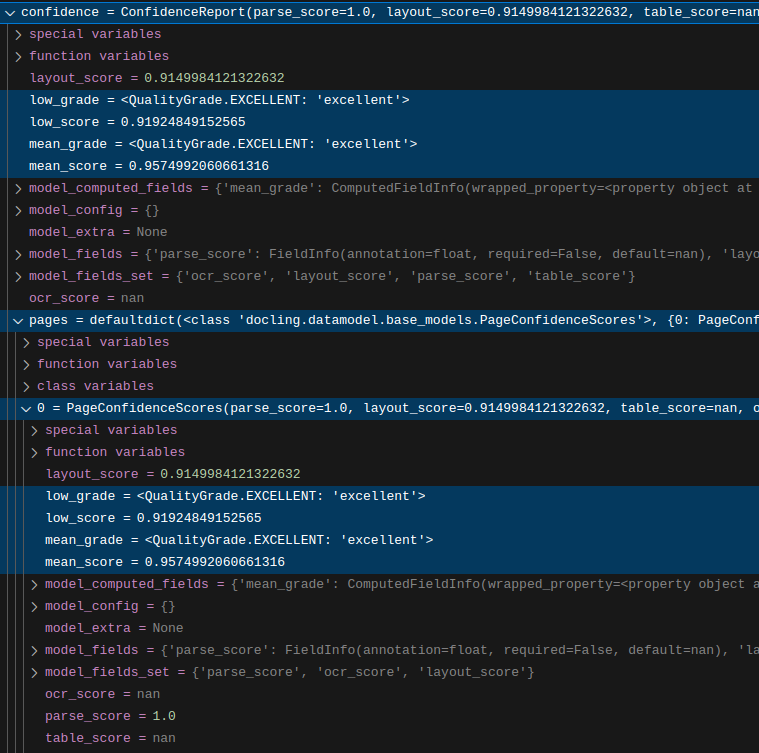
Docling’s confidence information offers reference grades for review. The guide recommends the document-level mean_grade and low_grade fields; internal numerical calculations and weighting can change. F8 They are not an independently measured accuracy result. The guide also states that table_score is not yet implemented. F9 For environment errors, check the Python requirement and the installation guide’s PyTorch and platform-specific notes. F5, D3
Check the handoff to the next task
report.md is a Markdown file for reading and checking structure. It does not preserve the PDF original or the complete Docling document object in the same format. The README separately lists other export choices, including lossless JSON. D2 This task stops at one checked Markdown file; choose another format when a subsequent task actually requires it.
The developer-published example image shows an expanded ConfidenceReport in a debugger, including document-level grades and the pages fields. Its displayed values belong to that upstream example, not to this guide’s input. D6 It is not a screenshot locating a CLI conversion button. Follow the script and terminal sequence above for this task.
Neither conversion time nor output quality was measured for this article. When repeating the task, record the installed version, source URL or file, selected model and output filename. A comparison with another tool should preserve the same PDF and the same heading, table and completion checks.
Original BumbleV reading guide illustration; not a product screenshot or a result from our testing. Official release behind this illustration · CC BY 4.0 · 2026-10-22

Sources & further reading
- https://github.com/docling-project/docling/releases/tag/v2.142.0
- https://raw.githubusercontent.com/docling-project/docling/6aaf87ebd99b8c7d3699d90f7aba372555d0140e/README.md
- https://raw.githubusercontent.com/docling-project/docling/6aaf87ebd99b8c7d3699d90f7aba372555d0140e/docs/getting_started/installation.md
- https://raw.githubusercontent.com/docling-project/docling/6aaf87ebd99b8c7d3699d90f7aba372555d0140e/docs/getting_started/quickstart.md
- https://raw.githubusercontent.com/docling-project/docling/6aaf87ebd99b8c7d3699d90f7aba372555d0140e/docs/reference/cli.md
- https://raw.githubusercontent.com/docling-project/docling/6aaf87ebd99b8c7d3699d90f7aba372555d0140e/docs/concepts/confidence_scores.md
- https://raw.githubusercontent.com/microsoft/markitdown/21d9c1d01ecc12538dab19811fd247ef2f96ef60/README.md
- https://api.github.com/repos/docling-project/docling