Docling: Documentation comparison
A documentation-based guide to converting a PDF to Markdown with Docling and checking the converted result.
Last updated
Menus and supported features can change. Compare the source-check date below with your current app version.
Choosing a PDF-to-Markdown tool takes more than checking whether it creates a file. Heading order, table rows and columns, and the way you reopen the output all matter. This article compares Docling and MarkItDown using official documentation and proposes a same input check. It is not a hands-on review or a conversion-speed measurement. D2, D7
This article covers the Docling v2.142.0 official release, published on 2026-10-22 (UTC). The source documents were checked on 2026-10-22.
Scope and the same input
Docling describes document parsing and integrations with the generative AI ecosystem. MarkItDown also describes preparing Markdown for LLMs and text-analysis pipelines. F1, F6 Dividing them into an AI tool and an ordinary text tool would therefore misrepresent their documented purposes. The concrete question here is what to check when preparing one readable Markdown version of a paper.
Use exactly the same example input as the guide. Keep separate working folders for the two tools even though the output name is the same, so one does not overwrite the other’s file. No output from running this input was obtained for this article.
Source PDF: https://arxiv.org/pdf/2408.09869
Output file: report.md
The Docling side follows the selected v2.142.0 release and its documentation. The comparison source is the MarkItDown README pinned at the source-check date, not an installation test of a specified MarkItDown package version. Record the actual installed versions and options before conducting your own trial. D1, D7
Output and compatibility
For output, Docling documents a common DoclingDocument representation, Markdown and other exports including lossless JSON. Its README lists layout, reading order, table structure and formula analysis. D2 These are features to examine if a later program needs a structured document object; their presence does not prove that every element of this PDF will be preserved.
MarkItDown describes preserving important structure and content such as headings, lists, tables and links in Markdown. It also says that high-fidelity conversion for human consumption may not be its best use case. D7 It would be inaccurate to say that MarkItDown cannot handle tables or that Docling always produces better ones. Check the same table in both actual outputs.
For compatibility, Docling lists Python 3.10 or newer, macOS, Linux, Windows, x86_64 and arm64 support. MarkItDown requires Python 3.10 through 3.14. F3, F5, F7 Choosing the same Python version does not make all selected model or optional-package requirements identical. Check the dependencies needed by the actual configuration.
Running the task and keeping the files
The documented Docling Python flow uses DocumentConverter and result.document.export_to_markdown() to obtain a string. The MarkItDown Python example reads the markdown property of the result returned by convert(). F4, D7 In either workflow, producing a string and saving it are different operations. The guide adds ordinary Python file-writing code to create report.md.
For a CLI comparison, the current Docling reference documents docling convert, output-format selection and an —output directory. MarkItDown’s README shows markitdown input-file -o output-file. D5, D7 A directory option and a filename option are not interchangeable. Keep each tool’s input, output and configuration record in its own folder so you can identify the file that was actually produced.
The expected outcome is a readable report.md in each working folder. Set completion criteria that include the original heading order and a representative table’s rows, columns, values and notes. Reopen both files in an editor and record missing content, merged cells or reordered text against the same selected pages. This is a proposed procedure, not an observation that either tool has passed it.
Time and friction remain unmeasured
Time is unmeasured for both tools here. The word lightweight in a README is not a processing-time measurement. D7 If you time a trial, record installation, model downloads, document conversion and manual correction separately. Mixing a first run that downloads models with a prepared-environment rerun makes it difficult to tell what the elapsed times represent.
Friction is also a comparison of documented setup choices rather than a personal usability score. Docling’s installation guide discusses PyTorch distributions, CPU-only installation and Intel Mac compatibility. MarkItDown documents format-specific optional dependencies and plugins that are disabled by default. D3, D7 Identify the features your PDF needs before enabling extensions; distinguishing basic conversion from optional processing makes the setup easier to reason about.
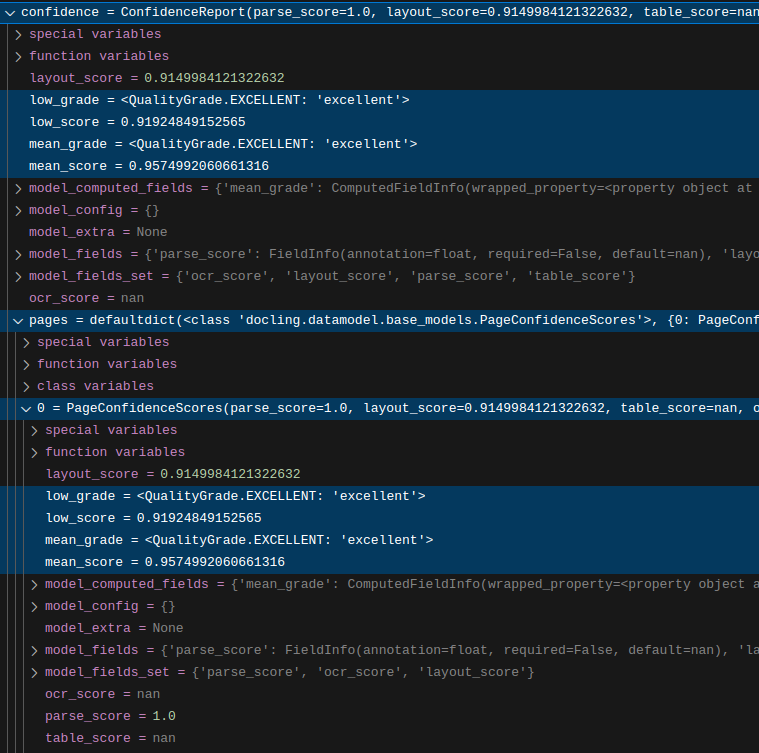
Docling’s confidence information is not a finished accuracy report for this test. The guide recommends mean_grade and low_grade and says internal numerical calculations may change. It explicitly marks table_score as not yet implemented. F8, F9 The EXCELLENT label in the developer’s debugger image belongs to that example and cannot be reported as this input’s result.
Automation and costs
For automation, both projects document Python and CLI integration. The Docling v2.142.0 notes include a fix for returning CLI exit code 1 when a document fails to convert. F2, D7 That behavior helps distinguish a failed task; it does not verify the content of the resulting file. Retain both file creation and content review as separate completion conditions.
The MIT license for Docling code and the licenses for individual models must be checked separately. MarkItDown’s documentation distinguishes built-in conversion from Azure Document Intelligence and Content Understanding integrations and identifies those Azure routes as billable API calls. D2, D7 This article does not establish current service prices or free allowances. Record code access, selected model or service charges and local computing conditions separately when evaluating an actual deployment.
Audience and a completed comparison
Choose an audience by the output the next task requires. If you need a document object and several export forms for further processing, Docling’s representation is worth examining. If a workflow already consumes Markdown and you want to examine conversion routes for different file types, MarkItDown’s documentation can be a useful starting point. D2, D7 These are editorial task-to-feature judgments, not a quality ranking.
To finish a same input comparison, retain the PDF original, installed versions, enabled options and both outputs. Record missing headings or table content, the locations needing correction and how failures were reported. Across output, time, compatibility, friction, automation and audience, leave unobserved values unmeasured. A claim that one tool is faster or more accurate requires actually performing and documenting the comparison.
Original BumbleV reading guide illustration; not a product screenshot or a result from our testing. Official release behind this illustration · CC BY 4.0 · 2026-10-22

Sources & further reading
- https://github.com/docling-project/docling/releases/tag/v2.142.0
- https://raw.githubusercontent.com/docling-project/docling/6aaf87ebd99b8c7d3699d90f7aba372555d0140e/README.md
- https://raw.githubusercontent.com/docling-project/docling/6aaf87ebd99b8c7d3699d90f7aba372555d0140e/docs/getting_started/installation.md
- https://raw.githubusercontent.com/docling-project/docling/6aaf87ebd99b8c7d3699d90f7aba372555d0140e/docs/getting_started/quickstart.md
- https://raw.githubusercontent.com/docling-project/docling/6aaf87ebd99b8c7d3699d90f7aba372555d0140e/docs/reference/cli.md
- https://raw.githubusercontent.com/docling-project/docling/6aaf87ebd99b8c7d3699d90f7aba372555d0140e/docs/concepts/confidence_scores.md
- https://raw.githubusercontent.com/microsoft/markitdown/21d9c1d01ecc12538dab19811fd247ef2f96ef60/README.md
- https://api.github.com/repos/docling-project/docling