ArtCraft Launcher: one place to manage the Craft apps
Explore the official launcher’s catalog, installation and update workflow, separate from image generation and editing.
Last updated
Menus and supported features can change. Compare the source-check date below with your current app version.
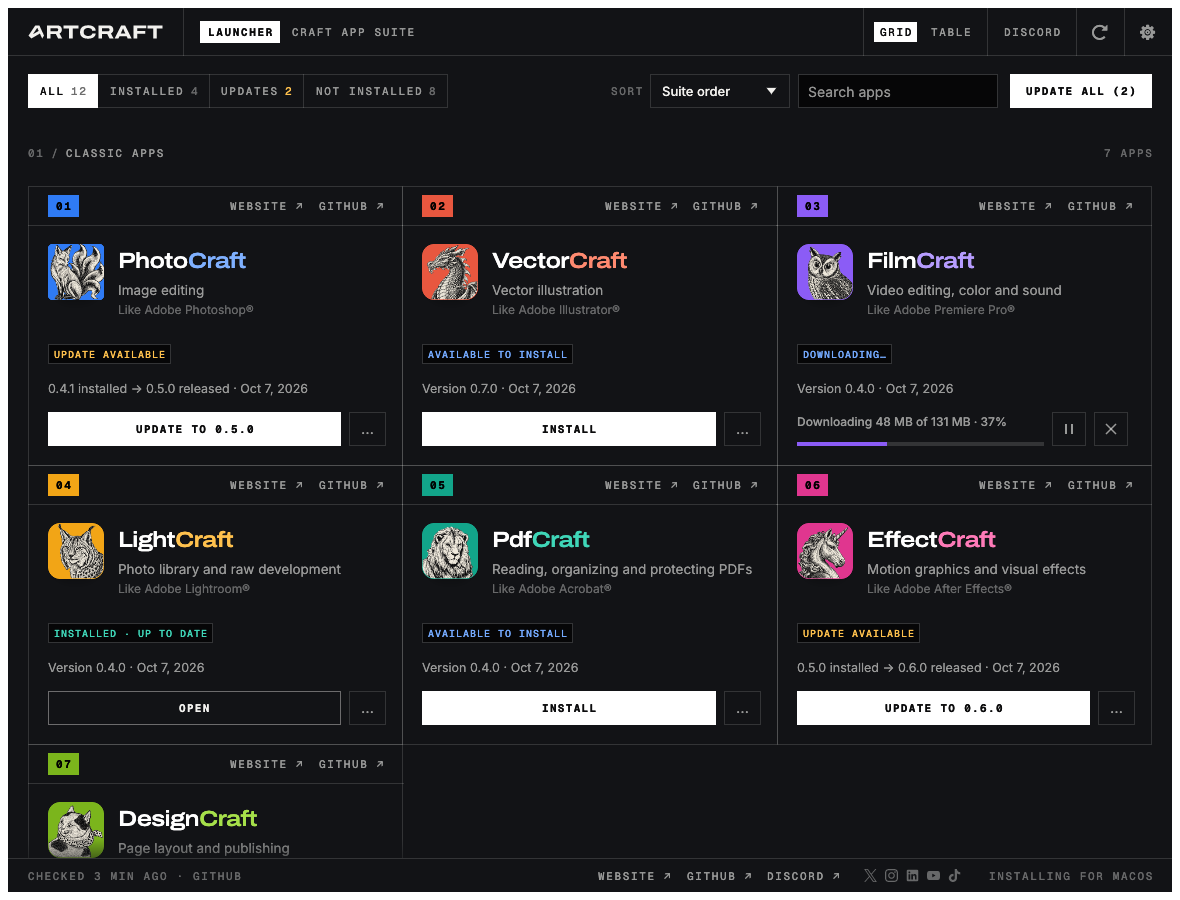
Finding one release page is easy. Keeping track of several photo, video and PDF applications can become a different task. ArtCraft Launcher provides one official place to install, open and update the Craft apps.
It is an installation manager, not an image generator or video editor. Its relevance to an AI creation workflow is managing the applications used in that workflow.
Start with the interface
What it manages
The README describes installed state, installed and latest versions, release dates and platform-appropriate packages. Downloads are checked against published SHA-256 values before installation. A checksum checks file integrity; it does not demonstrate the editor’s suitability for a project.
This series covers storytold/craft-launcher. Community projects use similar names, so inspect the repository behind a download. The official thirteen-app catalog should not be treated as a promise to install every independently developed Craft-named project, including SolidCraft.
Access and installation
The documentation lists Windows, macOS, Linux and FreeBSD packages and a browser catalog. Match CPU architecture as well as operating system. The application uses the platform’s normal package or application locations and describes recognizing manually installed apps.
The browser catalog and a browser-running editor are different things. A separate community Web Launcher hosts web builds on a server; it is not this native installation manager.
Cost and updates
The launcher code is MIT or Apache-2.0 licensed. Target-app terms and external AI service charges remain separate. Installing an editor for free does not make a connected cloud model free.
The documented updater retains the installation format and avoids replacing a running app. The launcher also documents self-update and restart. We have not executed these operations or tested operating-system-specific behavior.
Keep a working-file copy before checking a new editor release. Updating an application and resaving a project in a new format are separate actions. Record the version that last opened the source successfully.
A useful first check
I would install just PhotoCraft, record its installed version, launch it, save a small image copy and reopen that file. Then return to the launcher and check whether the installation is identified consistently.
If something fails, distinguish download, checksum, package installation, editor launch and document saving. A successful installation badge does not establish every editing function. Those separate milestones make a later problem much easier to diagnose.
Sources and scope
Checked 19 October 2026. This introduction, tutorial and comparison use the primary sources below. They contain no claim of our own app execution or measured performance. Development builds may differ from the pinned source.
Sources & further reading
- https://github.com/storytold/craft-launcher/blob/7c7271e5f62975326d0add2dcf31f03096be4189/README.md
- https://github.com/storytold/craft-launcher/blob/7c7271e5f62975326d0add2dcf31f03096be4189/LICENSE-MIT
- https://github.com/storytold/craft-launcher/blob/7c7271e5f62975326d0add2dcf31f03096be4189/NOTICE
- https://github.com/storytold/craft-launcher/blob/7c7271e5f62975326d0add2dcf31f03096be4189/docs/brand/LICENSE-brand.txt
- https://getartcraft.com/apps
- https://github.com/storytold/craft-launcher/releases