EffectCraft: what it does and what to check first
A short title does not need a complicated animation to make its timing clear.
Last updated
Menus and supported features can change. Compare the source-check date below with your current app version.
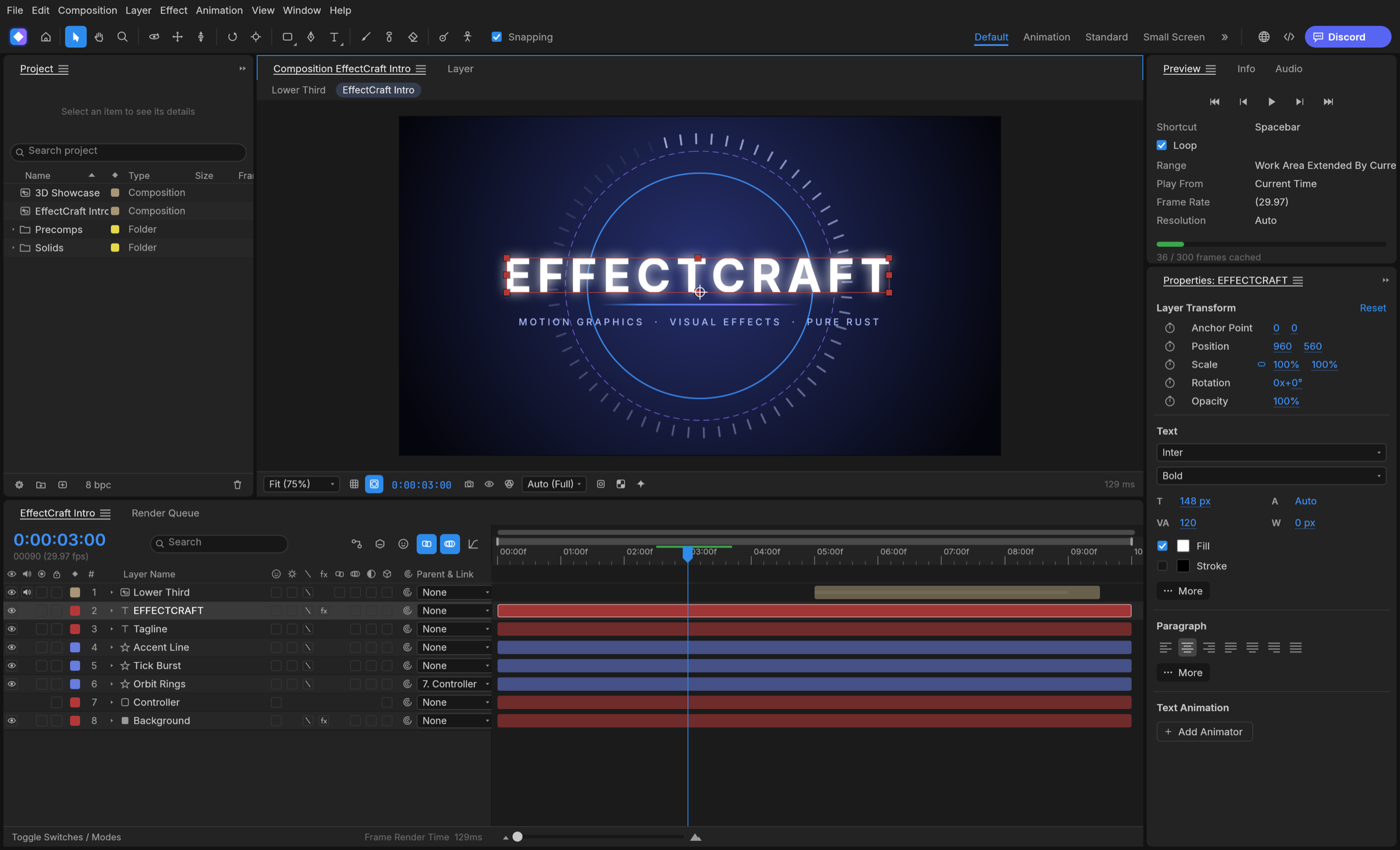
A short title does not need a complicated animation to make its timing clear. EffectCraft places layers in a composition and changes their properties over time. I would begin with a title that fades in for one second and stays readable for two more. That gives us a small result to inspect without pretending an existing After Effects project can simply be moved over.
The checked material describes alpha / in development. I have read the public documentation; I have not installed and run this app for a hands-on review.
A look at the screen
| Where to look | What it does |
|---|---|
| Composition | See the actual title frame. |
| Timeline | Manage layers and keyframe positions. |
| Properties and Render Queue | Inspect text, transforms and the composition to render. |
What the documentation describes
- Arrange layers in a composition and control motion with keyframes and a graph editor.
- The documentation describes a native JSON project format and Lottie import/export.
- Effects, 3D work, video output and CLI/MCP control paths are described in the public documentation.
What interests me beside After Effects
A composition is the scene with a defined size, duration and frame rate. EffectCraft is better approached as a place to build a new composition than as a continuation of an After Effects project. Lottie is an animation interchange format used on the web and in apps; supporting it does not mean every effect transfers unchanged.
The developer describes free, open-source, local work. Open source means the code is available to inspect. I have not measured a speed or total-cost advantage. For After Effects, check the official product and plan information for the terms that apply in your region.
The limitation I would check first
The README says .aep/.aepx files cannot be opened and After Effects plug-ins do not run. It also notes the absence of automated render comparisons with After Effects. If a particular plug-in or an existing project is essential, that limitation comes before the convenience of the new interface.
A small first task
For the first exercise, let’s animate a three-second title entrance. Prepare: A short title such as Built with BumbleV AI and a plain background. Start with opacity alone so the timing is easy to inspect.
Check the official app page and release downloads for a build matching your operating system and CPU. If there is no suitable installer or the app does not start, read Get started/Quick start and known issues in the official README. Record the app version and OS when you try the task.
The separate tutorial gives the menu sequence and an expected result. It is a documentation-based exercise, not a claim that I completed it. AI-assisted development, an app’s built-in AI features and an agent operating existing functions need to be distinguished when judging an automation claim.
Keep the working file and the delivery file
Keep the .ecproj for changing text and keyframes, and the rendered file for playback. A render is not an editable composition. After reopening, adjust the title or one keyframe and confirm the other layers remain intact. If delivering Lottie, also play it in the actual destination player and inspect which effects survive.
If the result differs
If the title is visible from the start or disappears abruptly at the end, check property values at the first and last times. Compare the playback range with the render range. A font or alignment problem needs separate attention from timing. Check layer selection and the playhead if text editing behaves unexpectedly.
What I would verify before a bigger job
- Compare keyframe times, interpolation and text placement in the same three-second title.
- Play the same Lottie in the actual player and inspect missing effects.
- Evaluate .aep files and plug-in-dependent work as a separate compatibility question.
A simple new title animation can show how layers, keyframes and output fit together. It cannot establish migration of .aep/.aepx projects or third-party plug-ins. Matching a preview is also different from matching an After Effects render under controlled settings.
Start with readable timing before adding effects. Compare keyframe times and interpolation in equal-length animations, and keep the text/font inputs identical. For a web delivery, record the player used; success in a desktop preview is not proof that every Lottie property is supported there.
Introduction · Task tutorial · Comparison: documented differences
Sources & further reading
- https://getartcraft.com/apps/effectcraft
- https://github.com/storytold/effectcraft/blob/main/README.md
- https://www.adobe.com/products/aftereffects.html
- https://github.com/storytold/effectcraft/blob/549e9d825132986d6167c1432cd3328efcbb0278/README.md
- https://github.com/storytold/effectcraft/blob/549e9d825132986d6167c1432cd3328efcbb0278/crates/engine/src/menus.rs